 NexMask-官方博客
Let's start with the conclusion: if you'll need to log into the account again later, or still receive its password reset or order notifications, use a long-lived alias—what many people call an "anonymous email." If you only need to receive a one-time verification code, grab a single resource, or submit a test form once and won't care afterward, use a temporary email.
Neither exposes your real email address. The difference lies in how long the address lasts, where the mail goes, and whether you can fix things if a problem arises.
First, clarify what "anonymous email" means
The term "anonymous email" is used loosely. Some people mean a no-registration one-time inbox; others mean an email alias that sits in front of a real inbox. Strictly speaking, temporary email itself is also anonymous. This article compares the following two types of tools:
- Temporary email: No registration required; open it and get an address, read mail on the web page. When it expires, the address and its emails are destroyed together.
- Long-lived alias (email alias, forwarding email): Generates a separate address for each website. Mail sent to that address is forwarded to your regular inbox. You can reply using the alias, and deactivate it when you no longer want it.
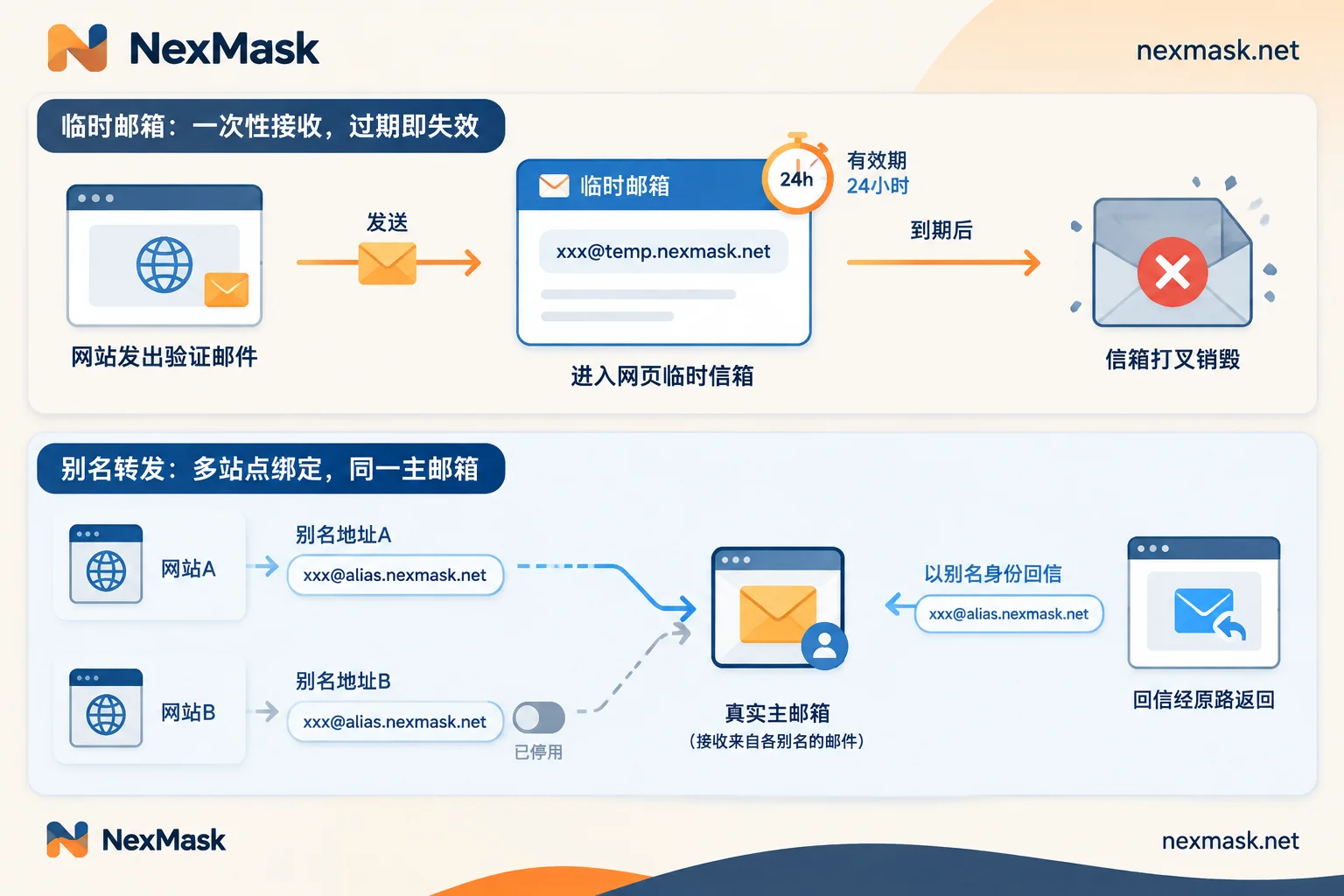
Five differences that determine which to use
1. How long it lasts
Temporary email has a short validity period, ranging from minutes to hours to a few days depending on the provider; after expiry, the entire mailbox is destroyed. A long-lived alias remains valid as long as you don't deactivate or delete it.
2. Where you read mail and whether you can reply
Temporary email is usually a standalone web inbox, primarily for receiving; most don't support sending or replying.
Long-lived aliases work through relay forwarding: mail is forwarded as-is to your primary inbox. When you reply, the recipient still sees the alias; your real address is not exposed. If you need back-and-forth communication with support, sellers, or partners, only an alias can do that.
3. Whether you can recover the account later (the most critical point)
Once a temporary email expires, you can no longer receive any mail. If you'll need the registered account later, you won't receive emails for password resets, email verification triggered by logging in on a new device, or security alerts from the platform. The account—along with any balance, orders, and data—may become unrecoverable.
A long-lived alias will continue to receive such emails. For remedies when a temporary email has already expired, see What to do when a temporary email expires.
4. Whether spam can be traced to its source and cut off individually
A long-lived alias is typically one address per website. When an alias suddenly starts receiving a flood of marketing or phishing emails, you can basically determine which website leaked the address—provided you haven't used that address elsewhere. Whether it's a data breach, resale, or the website itself spamming, the handling is the same: deactivate that alias, and your primary inbox and other aliases remain unaffected.
Temporary email will expire anyway, so you don't really need to deal with spam. But it also lacks the usefulness of "finding out who leaked it."
5. Whether registration will be rejected
Many websites and anti-fraud services use public blacklists of disposable email domains. Common temporary email domains are easily rejected outright during registration.
Alias service domains are usually not on such public lists, and aliases on your own domain are even harder to identify in bulk. However, risk control rules vary by platform, and switching to an alias doesn't guarantee approval. For specific remedies after rejection, see What to do when a temporary email is rejected.
Choose by scenario
When temporary email is suitable:
- Downloading a one-time whitepaper or resource, claiming a one-time trial
- When connecting to public Wi-Fi and asked to enter an email for verification
- Forums or websites that force registration to view content, where you'll leave right after
- Development and QA testing of registration flows, form submissions, or whether verification emails are sent
When a long-lived alias is suitable:
- Daily website and app accounts
- Online shopping: orders, logistics, and after-sales all rely on email
- Subscribing to newsletters or membership services you might want to unsubscribe from or cut off later
- Needing ongoing email correspondence but not wanting to give your real email
When unsure, ask yourself: Will I still need this website to email me three months from now? If the answer is "yes" or "not sure," use an alias.
For accounts involving payments, assets, work, or real-name verification, do not use temporary email. When using an alias for such accounts, also consider that the forwarding service will be online long-term and you must be able to manage it continuously. If you're not comfortable with that, using your regular email directly is also a reasonable choice.
A few common pitfalls
- Registering with a temporary email, then realizing you need it long-term. Before the address expires, log into the account and change the bound email to a long-lived alias or your regular email. Changing it after expiry is difficult. See Is temporary email suitable for registration.
- Deactivating an alias without changing the bound email first. After deactivation, password reset emails from that website will also be unreachable. Confirm the account is no longer needed, or that you've rebound another email, before deactivating.
- Thinking an alias makes you completely anonymous. An alias only hides your email address. The name, phone number, and shipping address you enter on the website are still available to the other party.
Get one on NexMask
After deciding which type to use:
- One-time use: Open NexMask Temporary Email and get an address directly. No registration, no phone number, and the entire inbox is destroyed on expiry. If you need to generate addresses in bulk for testing, that's a member feature.
- Long-term accounts: Create a separate alias for this website at NexMask Long-Lived Alias. Mail is forwarded as-is to your regular inbox, you can send and reply as the alias, and you can deactivate it when you no longer want to receive mail. The free plan includes one alias. Multiple-target forwarding and binding a custom domain (any prefix can receive) are member features.
NexMask does not log or record IPs. For specific validity periods and membership details, refer to the official website pages.




Comments(0)