 NexMask-官方博客
Both prevent exposure of your real email; the real difference is whether you'll still need this address later.
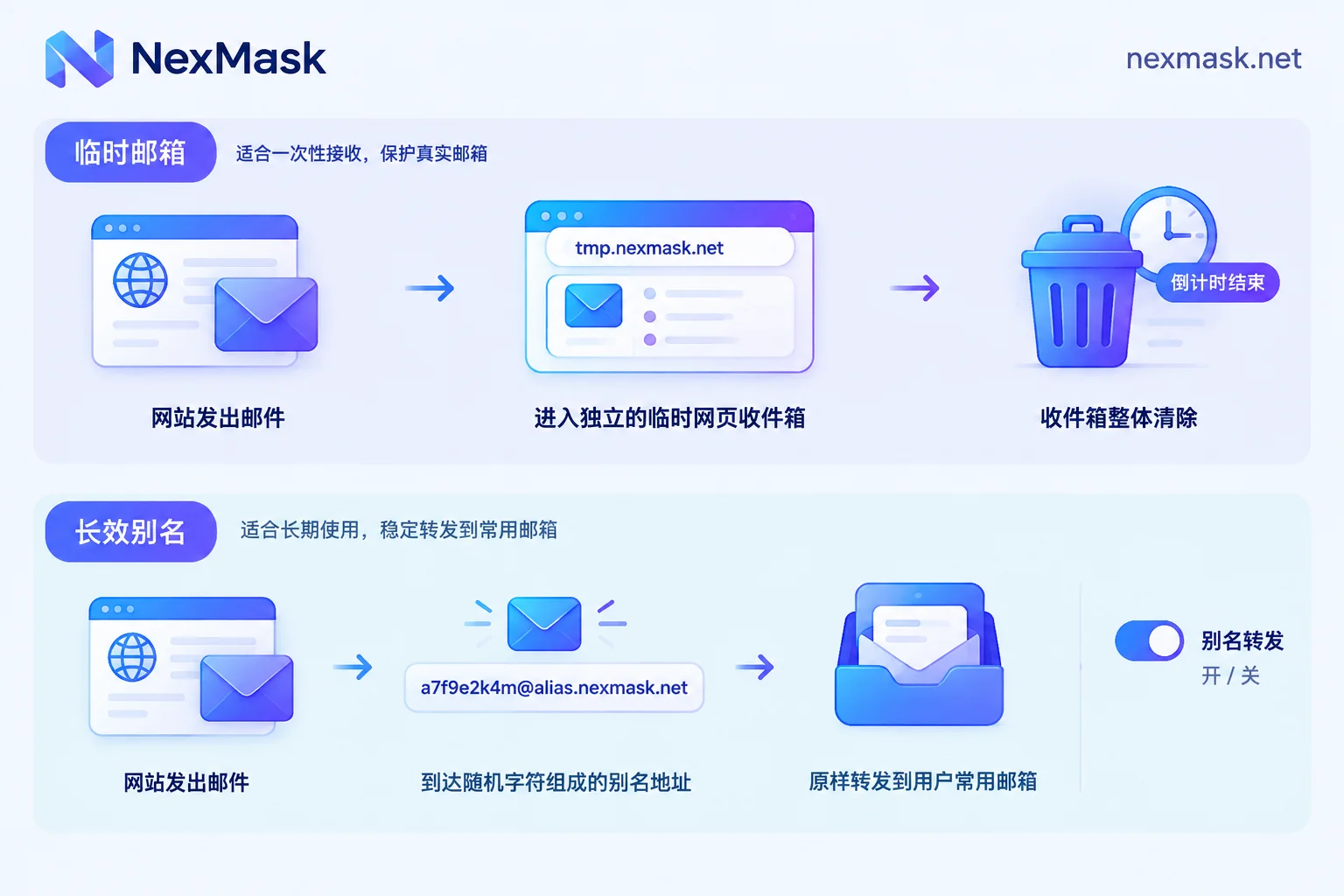
- Temporary email is a standalone disposable web inbox that requires no registration. When it expires, the entire inbox is cleared and cannot be recovered. It suits scenarios where you won't return after receiving a verification code.
- Long-lived email alias is a "mask address" attached to your regular email. Messages sent to the alias are forwarded to your main inbox, remain usable for its lifetime, and you can disable it at any time. It suits accounts you'll log into later, recover passwords for, or receive bills from.
Ask yourself one question: Will you need to recover the password for this account later?
- One-time use only, such as downloading a resource, taking a quick look, or trying a service you don't plan to keep → use a temporary email.
- You'll log in again later, or will receive orders, bills, renewal reminders, or security verification → use a long-lived alias.
- The signup page says it won't accept this email → switch to a long-lived alias on a regular domain or an alias bound to your own domain.
When unsure, treating it as long-lived is safer. You can disable an alias you no longer want, but a destroyed temporary inbox cannot be recovered.
Five differences that affect your choice
1. Where emails are stored
Temporary email stores messages in the provider's disposable inbox; you must open that webpage to see them, and it has no connection to your real email.
An email alias itself generally doesn't store messages separately. Its role is to act as an intermediary layer, forwarding received mail as-is to your regular email. So messages from sites you registered with using an alias appear alongside your other mail in your main inbox, with no separate URL to check.
2. How long it lasts and whether you can still recover the account
This is the most common pitfall. Once the temporary email countdown ends or it's manually destroyed, all data is cleared. If you used it to register an important platform and later need verification for a new device login or a password reset, there's nowhere to receive the email, and the account may become permanently inaccessible.
A long-lived alias can receive mail throughout its validity, and you control whether it's active, enabling long-term receipt of password recovery and security verification emails.
3. Can you reply?
Most temporary emails are receive-only and cannot send outbound messages.
More capable alias services support two-way communication: you reply directly in your main inbox to forwarded messages, and the recipient still sees the alias as the sender without exposing your real email. This matters if you need back-and-forth with sellers, support, or unknown contacts.
4. How spam is handled
Temporary email's approach is "discard the whole thing": once the inbox is destroyed, the harassment stops.
Long-lived aliases take a "one per site" approach: use a separate alias for each website. If the alias dedicated to a site starts receiving promotional or scam emails, it's likely that site leaked or sold your email. You then only need to disable that one alias, leaving your main inbox and notifications from other sites unaffected.
5. Will signup pages reject it?
Many websites, especially financial and commercial SaaS platforms, maintain blacklists of disposable email domains and outright reject registrations from them. Temporary email domains are public and widely used, making them more likely to be listed. Long-lived aliases on regular domains, or aliases bound to your own domain, usually pass more easily on such platforms. What each platform blacklists and how often it updates can't be predicted externally; you can only see the result when you actually register.
For specific steps after being rejected, see What to Do When a Temporary Email Is Rejected.
| Temporary Email | Long-Lived Email Alias | |
|---|---|---|
| Where to view mail | Disposable web inbox | Forwarded to your regular email |
| Lifespan | Entire inbox destroyed on expiry, unrecoverable | Usable throughout validity, can be disabled |
| Sending/replying | Usually receive-only | Can reply as the alias |
| Spam handling | Discard entire inbox | Disable individual alias and trace leak source |
| Best for | One-time verification, short-term testing | Accounts needing long-term login, password recovery |
An alias is not the same as adding "+" after your email
Some email providers support the [email protected] format, often also called an "alias." It does help categorize mail, but its privacy benefit is limited: many scraping scripts automatically strip the "+" and everything after it, directly recovering your real email. Independently generated masked aliases use random characters and a separate address structure, so outsiders cannot derive your main email from them. If the goal is to isolate your real email, the plus trick is no substitute for an alias.
How to use each by scenario
Website signups: First decide if you'll use it long-term. For a forum you'll glance at or a coupon you'll claim, a temporary email is enough. For shopping, subscriptions, cloud services, and accounts tied to payments, use a long-lived alias, preferably one per site. For more guidance, see Is Temporary Email Suitable for Signups.
Form testing and QA: If you only need to verify a registration flow once, confirm a verification email sends, or check template rendering, a temporary email works immediately without preparing a real account. If the test account must log in repeatedly in regression tests and go through password reset flows, a temporary email will expire and interrupt testing; a long-lived alias is better. If you need many test addresses, enable catch-all on your own domain so any prefix is received, making it easy to manage test accounts by number.
Spam prevention: To permanently block a source, use a temporary email and discard it after receiving. To keep receiving mail from a site normally while retaining the ability to cut it off anytime, use aliases, one per site, and disable whichever starts receiving spam.
What to do if you already registered an important account with a temporary email
While the temporary email hasn't expired, log into that account, go to account settings, change the bound email to a long-lived alias, and confirm the new address can receive verification emails. If the temporary email has already expired, the mail inside is basically unrecoverable, and the remedy depends on whether you can still log into the account; for details, see What to Do When a Temporary Email Expires.
Also note: aliases work via forwarding, and a few senders have strict authentication policies, so forwarded mail may land in your regular email's spam folder. After changing the bound email, if a site's messages don't arrive, first check your main inbox's spam folder.
Once you've decided which to use, where to get it
If you just need a one-time verification code or to run a test flow, you can get a temporary email directly from NexMask, no registration or phone number required, destroyed on expiry; bulk address generation is a member feature.
For accounts you'll use long-term, set up a long-lived alias: one per website, mail forwarded as-is to your regular email, can send and reply as the alias, and disabled when you no longer want to receive. For specifics on how many aliases the free plan allows, multi-target forwarding, custom domains, and other member features, refer to the official website.




Comments(0)