 NexMask-官方博客
When registering accounts online, subscribing to newsletters, or doing development testing, many people search for a long-circulated trick to avoid exposing their primary email to marketing systems and potential data breaches: using Gmail's "+" or dot to generate unlimited email aliases (e.g., [email protected]).
But by 2026, if you still rely on this method for privacy, you're likely to hit two pitfalls: either the website directly rejects your registration with an "invalid email format" error, or one day you discover that spam has bypassed your filters and is bombarding your primary email [email protected] directly.
Why has the once-useful "plus trick" failed? What should a real email alias look like? This article clarifies the underlying logic and provides a practical solution that truly hides your primary email and lets you cut off harassment at any time.
1. Why Gmail's "+" and Dot Are Not True Privacy Aliases
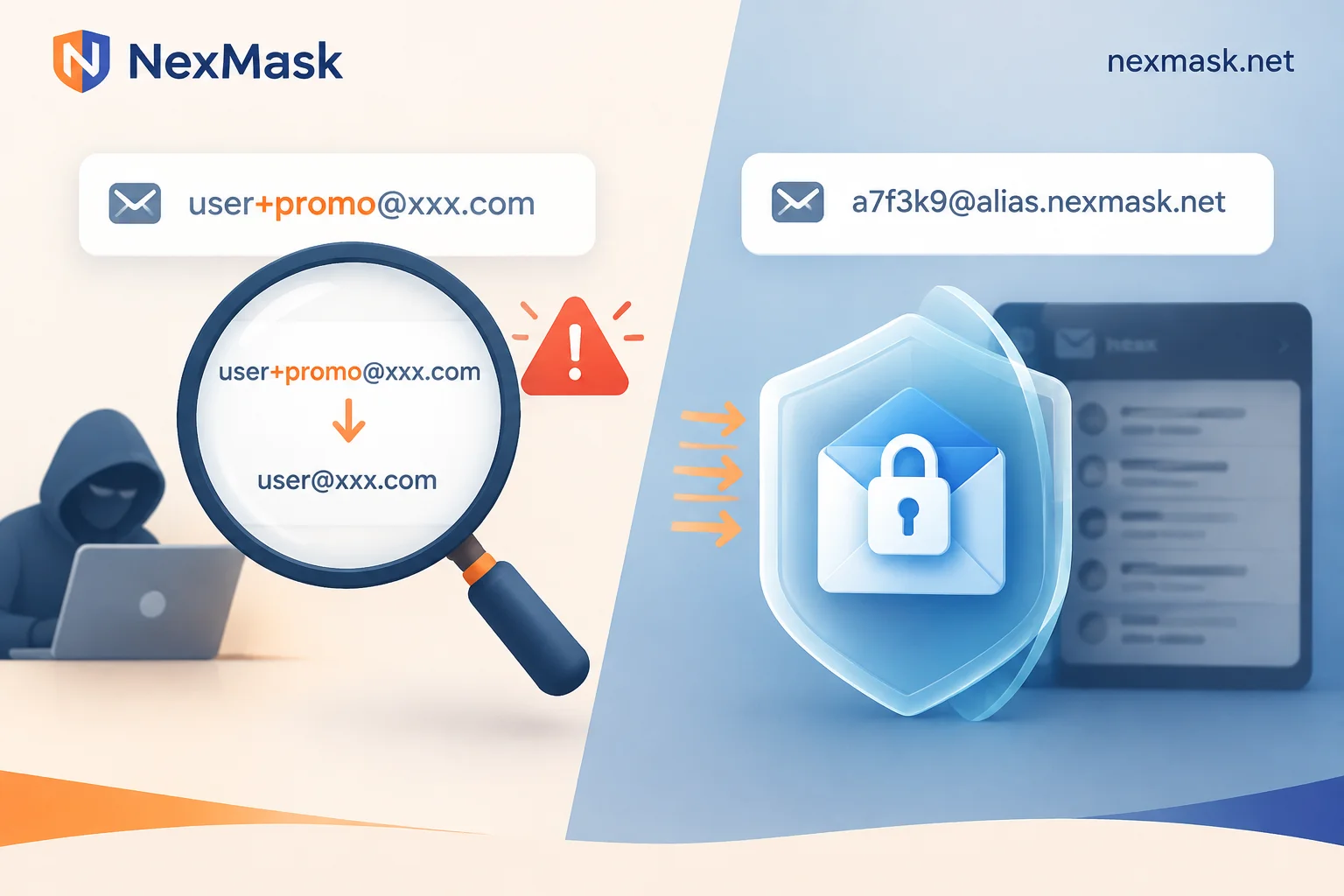
In email protocols, an address like 你的名字+标签@gmail.com is called "subaddressing" or Plus Addressing. Its original purpose is to help you categorize and auto-label emails in your inbox, not to hide your identity.
In practice, it has three unavoidable flaws:
- Your primary email is exposed: The part before the plus sign is your real username. Any data broker, marketing agency, or hacker who obtains a list can simply use a one-line regex to strip the
+and everything after it, directly recovering your real primary email. Once your primary email is exposed, cross-platform credential stuffing and targeted phishing become hard to prevent. - More and more websites block or strip the "+": Today, many e-commerce sites, SaaS tools, and AI platforms directly prohibit entering emails with
+in their front-end forms to prevent users from abusing free credits. Even more covertly, some websites automatically ignore dots or truncate content after+when storing data, so you think you used an alias, but the database still stores your original address. - You cannot truly "disable" it: When a subaddress is sold or starts receiving spam, you cannot cancel that address; you can only create a filter rule to "skip inbox" or "delete directly." But if the sender removes
+标签when sending, the filter rule becomes completely ineffective.
2. Email Provider Built-in Aliases vs. Independent Forwarding Email Aliases
Since the "+" doesn't prevent leaks, can you use the "add alias" feature built into Outlook, iCloud, or enterprise email backends?
Built-in aliases from major clients can indeed hide your primary username, but they have two obvious limitations:
- Strict quantity limits: Traditional email services usually allow only a few to a dozen aliases, and many limit the number of changes per year—far from enough to handle registrations on dozens or hundreds of websites.
- High cost of switching email providers: These aliases are deeply tied to your email provider. If you later want to stop using a certain email service, you have to change the binding for every website account one by one.
This is why in 2026 privacy practices, independent forwarding email aliases (Email Masking) have become the mainstream choice. Its core logic is to set up an independent "buffer isolation layer" between your real inbox and external websites—giving out independent addresses that reveal no personal characteristics, while forwarding emails as-is to your usual email.
If you're still unsure when to use a disposable inbox versus a long-term alias, you can first read this comparison: What's the difference between a temporary email and an email alias? See whether you'll need to recover your password later.
3. What Four Capabilities Should a Truly Useful Email Alias Have?
Take NexMask's long-term anonymous email (alias) as an example. A email alias solution that can provide long-term support must solve four things: "hide well, receive reliably, reply back, and cut off when needed":
1. One Site, One Address: Pinpoint Who Sold Your Data
With independent aliases, you can assign an unrelated address to each website. For example, use alias A for a cross-border shopping site and alias B for an industry newsletter. Because the address prefix has nothing to do with your real name or common ID, cross-platform ad tracking graphs cannot link your identity through email.
More importantly, if alias A suddenly receives gambling ads or phishing emails, you can immediately see which website suffered a data breach or secretly sold user lists. For specific operational details, refer to How anonymous email protects privacy: one address per site, trace leaks and disable individually.
2. Seamless Forwarding: No Change to Your Existing Email Habits
Using email aliases doesn't require you to check an extra inbox every day. Through NexMask email forwarding, emails sent to the alias (including body, attachments, and sender information) are forwarded as-is to your usual Gmail, Outlook, QQ Mail, or 163 Mail, and you can clearly see which alias the email was originally sent to.
During setup, you only need to fill in a receiving address; you don't need to give up your primary email password or high-risk authorization. After delivery, NexMask servers do not retain copies of the body. For users with team collaboration or multi-device needs, members can also forward emails to multiple target inboxes simultaneously or specify different forwarding targets for different aliases.
3. Two-Way Anonymity: Reply and Send Directly with the Alias
Many people encounter an awkward scenario with long-term accounts: website customer service asks you to "send an email from your registered email to verify your identity." If you reply with your real email, all previous hiding is wasted.
Under NexMask's long-term alias mechanism, you can not only proactively send emails as the alias directly from the console, but also click reply directly after receiving a forwarded email in your usual inbox—the reply will still be sent as that alias, and the recipient never sees your real email address (for details, see How anonymous email forwarding works: receive and reply with an alias without revealing your real email).
4. Independent Switch: Cut Off a Single Leak Source Anytime
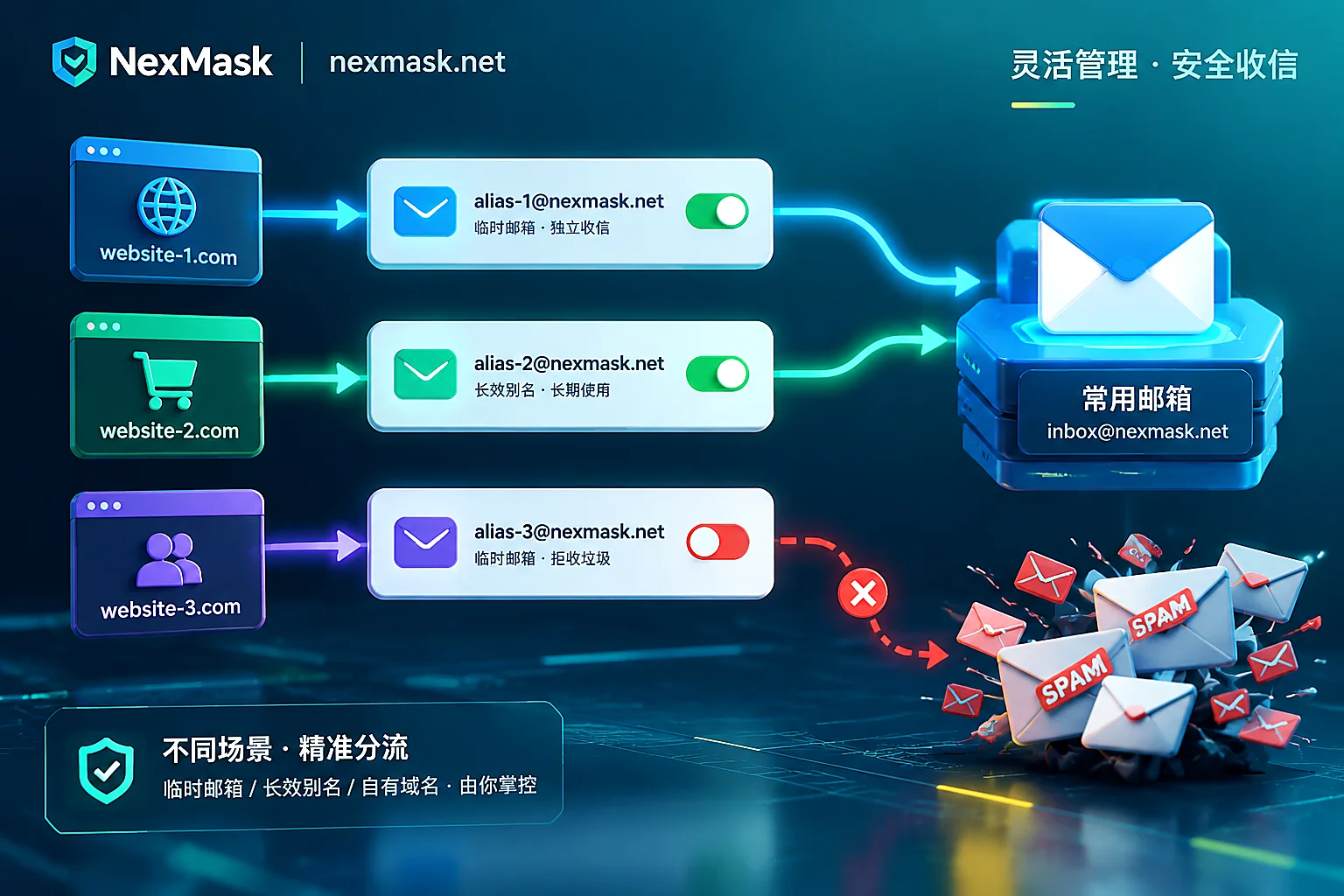
Once an alias starts receiving spam bombs or you completely stop using a trial platform, you only need to turn off the forwarding switch for that alias in the console or disable it separately. Harassment stops immediately, while your aliases on other websites and your primary email remain completely unaffected.
4. Advanced Playbook: Mix and Match Your Email Alias Arsenal by Scenario
Different registration and business scenarios have completely different requirements for email suffix trust and lifespan. Rather than forcing one solution onto all websites, it's better to combine tools by scenario (you can also refer to the How to choose by scenario page anytime):
Scenario 1: Daily Important Accounts, Long-Term Subscriptions, and SaaS Services
Recommended solution: Long-term anonymous email (alias)
Any website you'll need to log into later, possibly receive bills from, or reset passwords on should use a long-term alias that remains available throughout its validity and supports renewal. NexMask registration requires only an email address, no phone number binding; the free plan includes one long-term alias, and upgrading to a member allows you to create and manage multiple aliases, truly achieving one-site-one-address.
Scenario 2: Strict Risk Control, Blocking Public Alias Suffixes, or Multi-Account Business Operations
Recommended solution: Custom domain alias
Some platforms with extremely strict risk control maintain a list of public email provider suffixes and reject registration with shared public suffixes. Or you're a developer or operations person who needs to generate test accounts in bulk.
In this case, binding your own independent domain in NexMask (a member feature) is the most reliable solution:
- Exclusive suffix not affected by others: Your own domain doesn't share a suffix with others, making the website look like a legitimate corporate or personal independent site email, extremely difficult to be indiscriminately blocked by forms.
- Catch-all receives any prefix: After configuring MX, SPF, and DKIM records as guided in the console (the backend displays the detection status of each record in real time) and enabling Catch-all, you don't need to manually create aliases in the backend in advance—just fill in
任意前缀@你的域名.comin the website registration form, and the email will be automatically received and forwarded. After verification, you can also send emails from your own domain address. - Freedom to come and go: Domain ownership is entirely yours. If you want to migrate someday, just change the MX records back in your domain registrar backend.
Scenario 3: Just Want a Verification Code or Whitepaper, Use Once and Discard
Recommended solution: Temporary anonymous email or major provider suffix temporary email
If you only plan to visit a website once and never use it again, you don't even need to create a long-term alias. Simply open and get a temporary anonymous email without registration. After receiving the verification code, the inbox and emails are automatically destroyed upon expiration, with no copies left on the server.
If you encounter rigid forms that only accept mainstream provider suffixes, you can also directly obtain ready-made Gmail temporary email, Outlook temporary email, or Hotmail temporary email without registration to receive emails and pass. But note the boundary: these temporary emails and major provider temporary emails only receive, not send, and are destroyed upon expiration. Never use them to bind important accounts that require long-term password recovery. Additionally, when doing cross-border e-commerce form testing or QA validation, if you need test names and addresses that conform to local postal code rules in addition to anonymous emails, you can conveniently pair them with a registration-free real-format address and identity generator.
5. Get Started: Three Steps to Protect Your Primary Email
To get rid of spam and privacy leaks, you don't need to change all the old accounts you registered over the past decade overnight. The easiest way to implement is starting with the next website you register today:
- Put away your primary email: Reserve your real personal email only for banks, government, acquaintances, and as the underlying terminal for receiving forwarded emails.
- Start with a long-term alias: Go to the NexMask app console, no phone number required, just one receiving email to activate your first long-term alias (or migrate from other services, see Replacement and migration guide).
- Route by importance: Throw one-time verifications to temporary emails; give long-term services to long-term aliases or custom domain aliases. If you encounter sending/receiving issues during use, you can consult the FAQ and troubleshooting guide anytime.
Stop fooling yourself with the "+" sign and put a removable independent mask on every website. Only then can your primary inbox truly return to a clean and secure state.




Comments(0)