 NexMask-官方博客
To hide your real email behind an alias when receiving mail, you rely on forwarding. You enter an alias address on a website, the email first goes to the forwarding service, and then it is delivered as-is to your regular inbox. The website and sender only see the alias. When you reply, you also send as the alias, and the other party still cannot see your real address.
If you will need to log in later, recover passwords, receive long-term notifications, or communicate back and forth with the other party, use a long-term forwarding alias. If you just need to receive a one-time verification code or download something once, a temporary email that self-destructs after expiry is more convenient. The following sections explain the forwarding path, where your real email can leak, why forwarded mail sometimes goes to spam, and how to choose for signups and testing.
How an Email Gets Forwarded
Incoming path:
- When you sign up on a website, you enter an alias, for example
[email protected]. - The website sends email to that address, and the email first reaches the forwarding service’s server.
- The forwarding service finds that the alias maps to your regular inbox and delivers the email as-is. The website’s database only ever stores the alias.
Reply path: A common approach is a “reverse alias.” When forwarding, the service rewrites the sender to a corresponding relay address. You click “Reply” directly in your regular inbox, and the reply first goes back to the forwarding service. The service removes your real address and then sends it as the alias to the original sender. Implementations vary: some let you just click reply, while others require you to select a sending identity in the service. The first time you use it, send a test email back and forth with another email account you own.
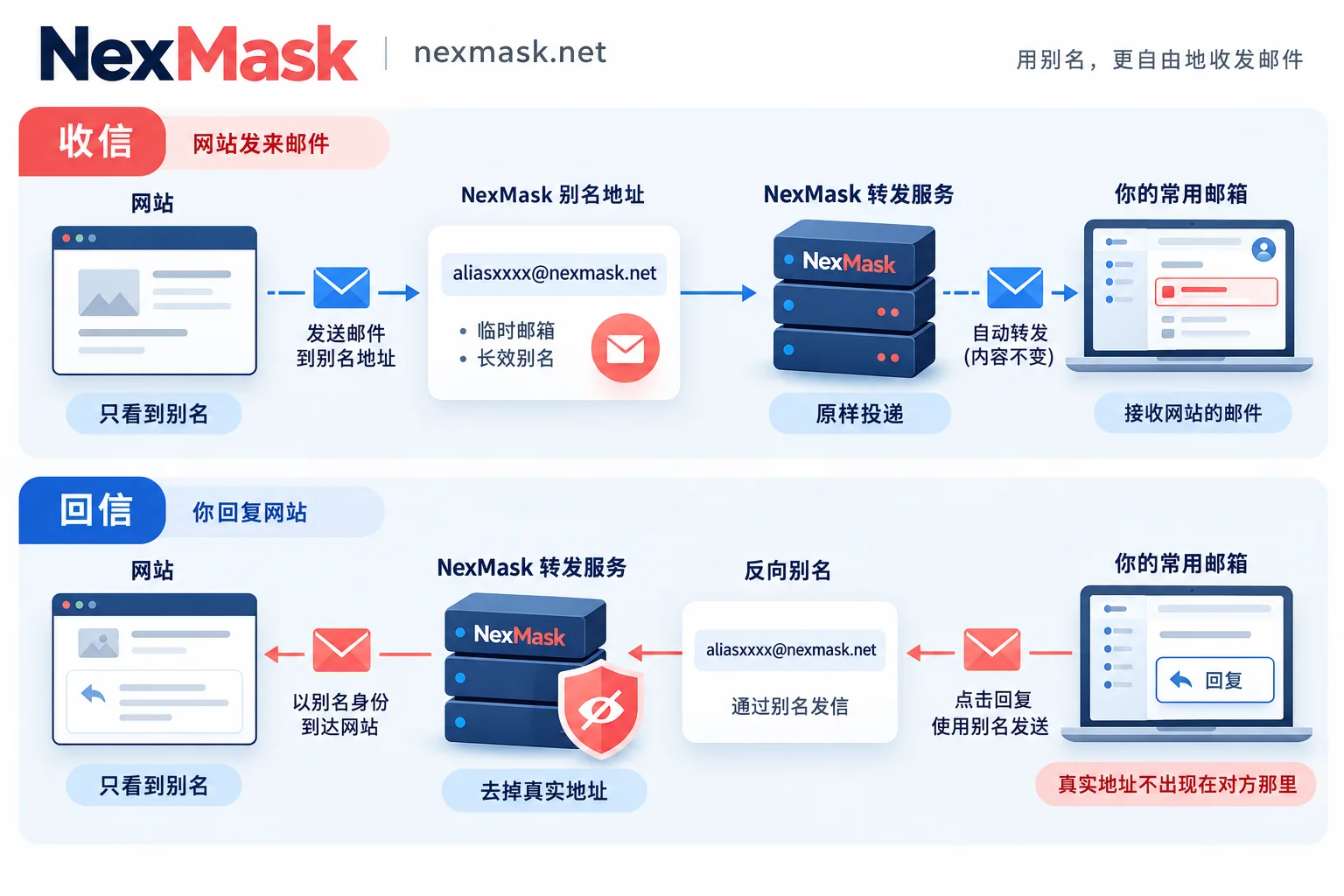
Using a separate alias for each website has two benefits. First, if an alias starts receiving spam, you can roughly tell which company leaked or sold the address. Second, after you disable that alias, spam no longer enters your main inbox, while aliases for other websites continue to work.
Where Your Real Email Can Leak
Forwarding itself does not tell the other party your real address. Most real-address exposure comes from usage habits:
- Using “New Message” in your regular inbox to contact the other party. What you send is then your real address. The correct approach is to reply to the forwarded email from the other party, or to send as the alias from within the forwarding service.
- Leaving your real name, phone number, or another email in your signature or message body. Forwarding only replaces the address; it does not change what you wrote.
- Forwarding an alias to another forwarding service’s alias. This nesting can disrupt headers and reply routing, causing replies to go to the wrong place or be lost. The forwarding destination should be the regular inbox you actually use.
- The forwarding service itself holds the mapping between aliases and your real email. So when choosing a service, look at what records it retains.
Why Forwarded Mail Sometimes Goes to Spam or Is Rejected
This is a known side effect of forwarding mechanisms, and it does not necessarily mean you or the website configured something wrong.
Receiving inboxes such as Gmail and Outlook verify the email’s origin, mainly looking at three things:
- SPF: Checks whether “the server delivering this email is authorized by the sending domain.” After forwarding, the server delivering the email to your inbox is the forwarding server, not the original sender’s server, so the original sending domain’s SPF check usually fails.
- DKIM: A signature the sender applies to the email content and some headers. As long as forwarding does not alter the body or the signed headers, the signature remains valid.
- DMARC: If either SPF or DKIM passes and aligns with the sending domain, DMARC can pass.
Since SPF generally breaks after forwarding, whether an email reaches the inbox depends heavily on whether DKIM is preserved intact—this is why “forwarding as-is” matters. Proper forwarding services also use SRS to rewrite the envelope sender so bounces go back to the right place and the forwarding server itself can pass SPF checks.
What you can do:
- First check your regular inbox’s spam folder. If you find it, mark it “Not spam,” or add the forwarded sender address to your contacts.
- If only one website’s emails consistently fail to arrive or go to spam, the cause may be on the sender’s side: if it does not sign with DKIM and sets a strict DMARC policy, emails are more likely to be blocked after forwarding. In that case, see whether the website offers another notification method, such as in-site messages.
- If you receive nothing at all, troubleshoot step by step across the sender, alias, forwarding, and receiving inbox. See What to do when anonymous email doesn’t receive messages. If forwarded mail repeatedly goes to spam, see Troubleshooting the forwarding chain when temporary email goes to spam.
There is currently no publicly clear explanation of how domestic Chinese email providers such as QQ Mail and 163 judge mail forwarded through overseas relays. If your forwarding destination is a domestic inbox and it is often misclassified, you can switch to an international email as the forwarding destination, compare the results, and then decide.
For Signups and Testing, Choose Temporary Email or a Long-Term Forwarding Alias
The simplest rule: Will you still need to receive mail at this address later?
- Use temporary email: One-time verification codes, downloads you don’t fully trust, forms you fill out only once, short-term form testing. Temporary email requires no registration or phone number, and after expiry the entire mailbox is destroyed, so the address will receive no more email.
- Use a long-term forwarding alias: Accounts you’ll need to log in to or recover passwords for later, subscription and billing notifications, and situations where you need to communicate back and forth.
- If signup says “disposable email is not supported”: Try a long-term alias instead. Aliases are generally less likely to be blocked as disposable email, but platform rules vary, so there is no guarantee it will pass.
- QA and multi-account testing: If you are only testing the signup flow and whether verification codes can be delivered, temporary email is enough; for larger volumes, use bulk generation. If test accounts need repeated logins and password reset flows, use aliases; otherwise, once the temporary email expires, the account cannot be recovered. Assign a separate alias to each test account for easier distinction and disabling.
For more details on the difference between the two, see What is the difference between temporary email and email aliases.
Setting Up Alias Forwarding on NexMask
Once you decide to use a long-term alias, set it up in this order:
- Claim an alias on the NexMask long-term alias page, using a dedicated one for each website. The free plan includes one alias.
- Set the forwarding destination to your regular inbox, and email will be forwarded as-is. If you need to forward to multiple inboxes at the same time, this is a member feature; see Email forwarding for setup.
- Before using it to sign up, send a test email to the alias yourself to confirm you can see it in your regular inbox (or spam folder).
- When you need to reply or proactively contact the other party, send and reply as the alias; do not create a new message directly from your regular inbox.
- If an alias starts receiving spam, disable it; your main inbox and other aliases are unaffected.
NexMask keeps zero logs and does not record IP addresses. Specific validity periods and membership benefits are subject to the official website. If you only need to receive a one-time verification code temporarily, a temporary email is enough; you do not need to use up an alias.




Comments(0)