 NexMask-官方博客
A few years ago, disposable email was a niche tool used mainly by developers for form testing or by geeks to prevent spam. But by 2026, grabbing a throwaway inbox has become as routine as using an ad blocker or incognito mode.
Why are people increasingly unwilling to give out their real email? Because the internet has become a giant sign-up machine. Reading an industry analysis, downloading a PDF whitepaper, trying a newly launched AI tool, or even connecting to mall Wi-Fi or claiming a discount coupon—all of these trigger a sign-up wall: enter your email first, then get the content.
You might only need a verification code or download link for the next 30 seconds, but the other side wants to add your real email to their database and start years of marketing bombardment. More insidiously, even if you clear browser cookies and change your network, as long as you use the same real email across platforms, data brokers can use this stable primary identifier to link your cross-platform behavior. And if a small website suffers a data breach, your primary email becomes a precise target for AI-crafted phishing emails.
Save your real email for banking, work, and core assets, and delegate transient needs to isolation tools—this is the most worry-free approach today. However, different blocking scenarios require completely different solutions even when looking for disposable email.
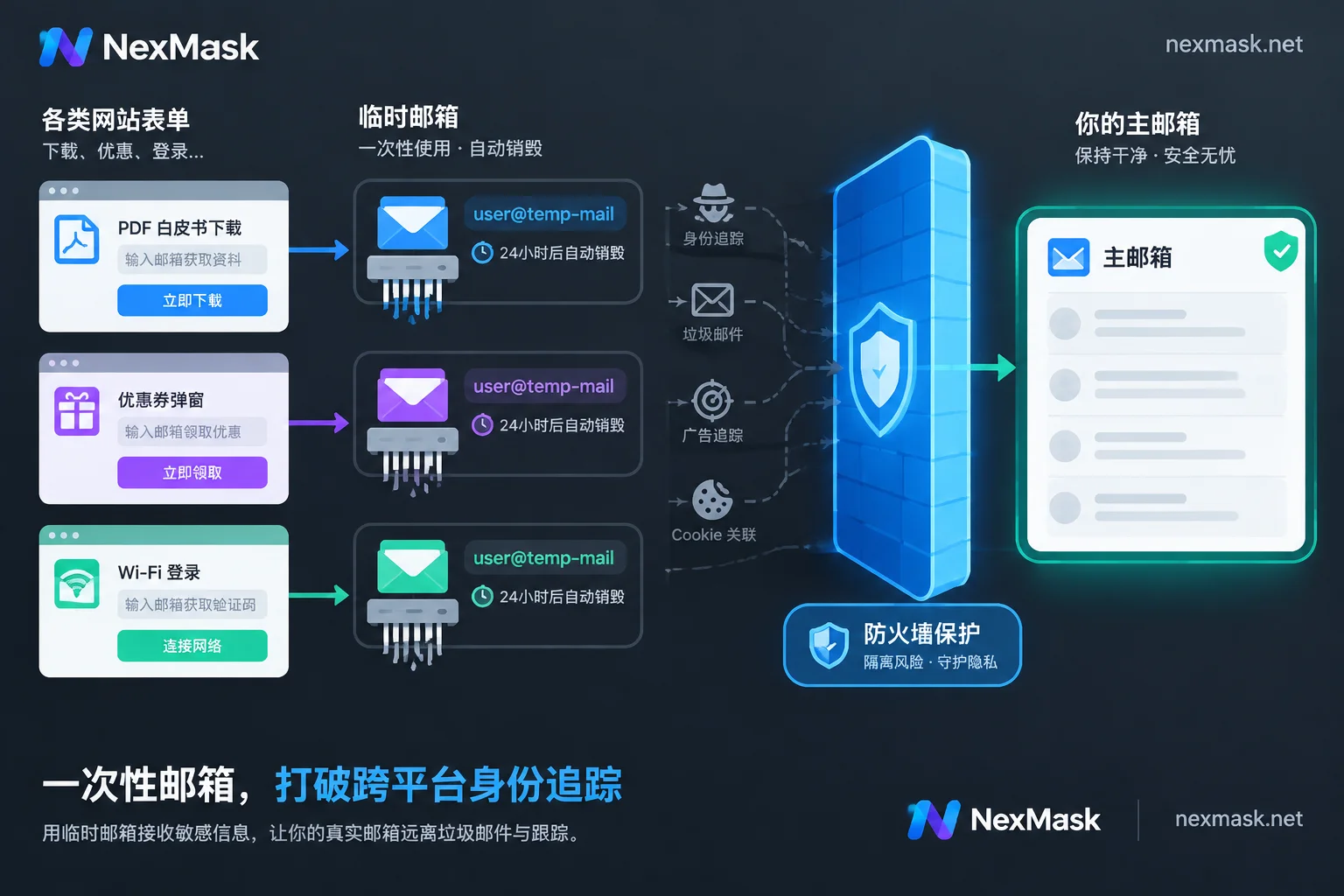
Scenario 1: Downloading Whitepapers, Claiming Coupons, and One-Time Verification—Use-and-Destroy Temporary Inbox
Often, your interaction with a website is just once:
- While researching, you encounter "Enter your email to receive the full PDF in your inbox for free";
- You browse an overseas independent store and want a new customer discount code, but a popup requires subscribing to the newsletter first;
- You temporarily enter a forum to view hidden posts or vote for an open-source project.
The common thread: after getting the verification code or link, you never want to hear from that site again.
If you use your real email, the unsubscribe button is often hidden in small gray text at the bottom of emails—and even clicking it may not work. In such cases, the best move is to open NexMask Temporary Anonymous Email and get a disposable email address:
- Zero-barrier, instant use: No registration, no phone number. Open the NexMask app, pass the human verification, and get a ready-to-use inbox.
- Session-level isolation: Many old public temporary email services let anyone view an inbox by entering its prefix, but NexMask's temporary inbox is only visible within the browser session that claimed it—so no one accidentally stumbles upon your verification link.
- Complete destruction upon expiry: Once you've received the code and downloaded attachments, you can forget about it. The inbox receives mail normally during its validity period (the exact duration can be selected in the app; refer to the in-app display). After expiry, the inbox and all its emails are automatically destroyed—no copies remain on the server, and recovery is impossible. This cuts off future spam at the root.
If you encounter issues receiving attachments, refer to this troubleshooting guide first: Can Temporary Email Receive Attachments? Test for 30 Seconds Before Deciding to Switch to Alias Forwarding.
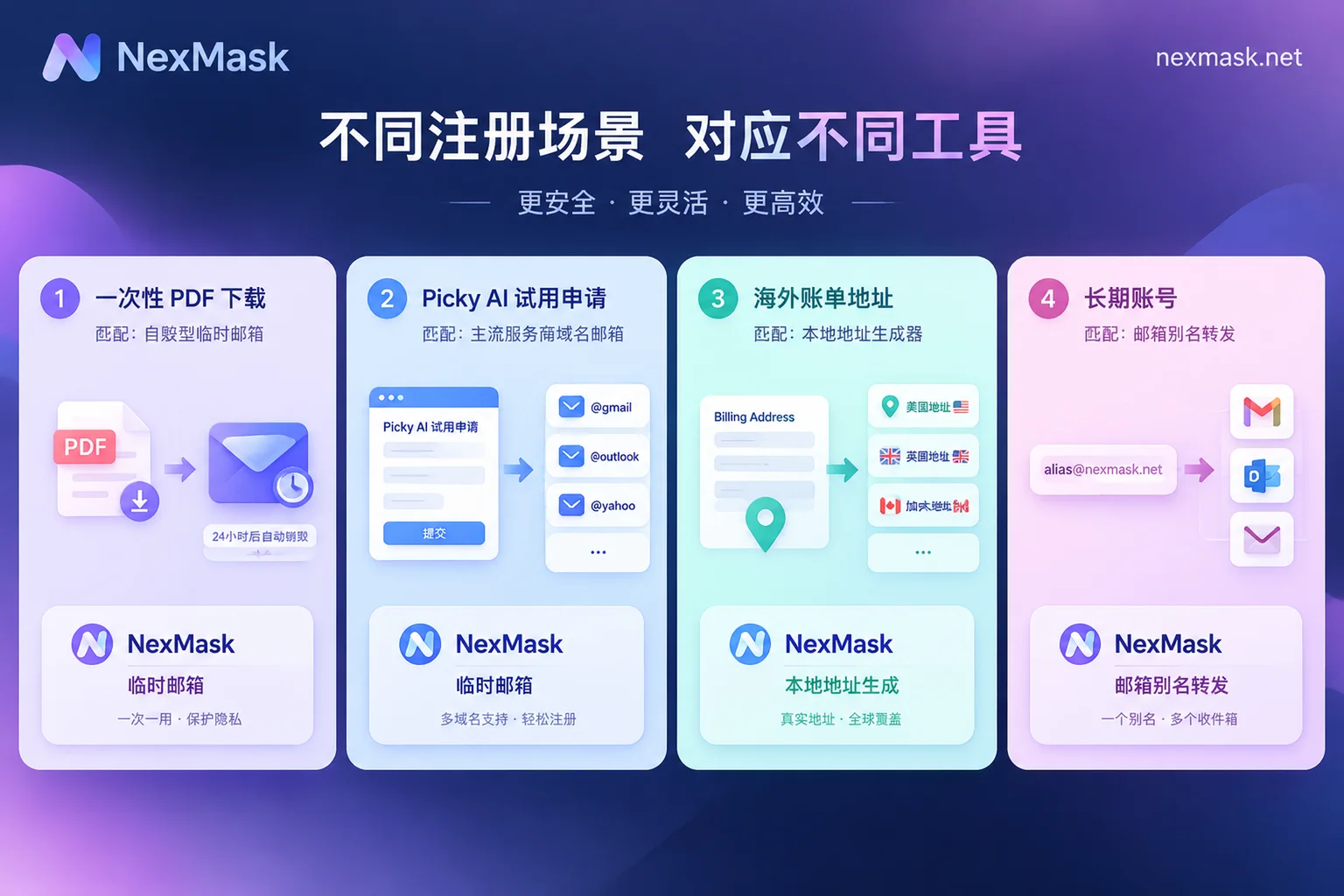
Scenario 2: Intensive AI Tool Testing, SaaS Free Trials, and QA Testing—Switch to Big-Provider Suffixes to Pass Checks
In 2026, AI agents, image generation models, code assistants, and productivity SaaS are emerging endlessly. Whether ordinary users want to try every new tool on the market, or operations, QA, and testers need to frequently run through registration flows and validate form logic, disposable email is used heavily.
But in this scenario, traditional temporary email often hits a wall: many AI platforms and overseas SaaS services employ anti-fraud risk controls that blacklist common public temporary email domains, showing "Please use a valid email address" when you enter one.
Registering a new Google or Microsoft account just to test a tool that may not even be useful is clearly too much hassle—not only does it require tedious verification, but you often get stuck at phone number binding. For forms that only accept mainstream email suffixes, you can switch to NexMask's big-provider suffix temporary email:
- Ready-made
@gmail.com/@outlook.com/@hotmail.comaddresses: Through Gmail Temporary Email, Outlook Temporary Email, or Hotmail Temporary Email, you can claim a real big-provider suffix inbox without registration or phone binding. - Exclusive inbox: During the claim period, this inbox is only accessible to the claimer. It's fast and reliable for receiving registration verification codes or activation emails, and won't be rejected due to an obscure suffix.
- Multiple accounts and testing efficiency: Ordinary users can claim one for free as a backup; for QA form testing or teams conducting multi-platform evaluations, upgrading to a membership allows batch generation and simultaneous holding of multiple temporary or big-provider emails, with longer retention times.
Reminder: Understand the Boundaries of Big-Provider Temporary Email
Big-provider temporary email solves the problem of "passing form suffix validation and securely receiving verification codes." It only provides receiving capability during the claim period:
- No email password is provided; it cannot be used to log into Gmail or Outlook web versions;
- Receive-only, cannot send or reply;
- Cannot be used for "Sign in with Google" (OAuth) on websites, nor for logging into Microsoft services like Teams, Xbox, or OneDrive;
- Whether general temporary email or big-provider temporary email, both are destroyed upon expiry. Never use them to bind accounts that require long-term use or future password recovery (for more on handling website rejections, see: What to Do When Temporary Email Is Rejected: Divide into Three Paths by Purpose, Then Understand Why Platforms Block You).
Scenario 3: Overseas Software Trials Requiring a "Full Billing Address"—Use a Local-Format Identity Generator
When claiming free credits for overseas AI tools, downloading developer kits, or testing cross-border e-commerce checkout forms, a disposable email alone is often insufficient. Many forms, even during free trials, require a complete set of name, street address, city, state/province, ZIP code, and phone number, with strict front-end validation for ZIP and state formats—random letters won't submit, and using your real address feels unnecessary.
At this point, combine email isolation with identity placeholder. Open NexMask Real-Format Address & Identity Generator or Country-Specific Address Generator:
- Covers 8 common countries/regions: Supports the United States (including US state-specific pages and state-based generation tool), United Kingdom, Canada, Australia, Germany, Japan, Singapore, and Hong Kong. Each page strictly follows local postal and address rules, passing common form format and ZIP validation.
- Complete set in one click: Generates a formatted name, address, and phone number in one go, along with an anonymous email. Supports copying the entire set or individual fields, so QA testers don't have to search for overseas ZIP codes.
- Purely local generation, not linked to real people: Country-specific pages generate data locally in the browser, without going through a server. Names and phone numbers are randomly generated and have no relation to real addresses or residents.
Note: Generated identities are for form placeholder, format testing, and privacy isolation only. They are not real documents and cannot be used for bank, securities, government, visa, or other real-name or age verification. They cannot serve as real shipping addresses, and generated phone numbers cannot receive SMS verification codes.
Scenario 4: Deciding to "Keep Long-Term" After Testing—Seamlessly Switch to Long-Lived Aliases or Custom Domains
After trying several tools with disposable email, if you find one genuinely useful and plan to use it long-term or even subscribe, you cannot continue with temporary email. Once the temporary email expires and is destroyed, you'll be stuck when logging in from a new location, receiving two-factor codes, getting billing receipts, or resetting passwords.
But switching to a long-term account doesn't mean exposing your real primary email. You can change the account email to NexMask Long-Lived Anonymous Email (Alias):
- One dedicated address per site, traceable and damage-controllable: Assign a unique alias to each platform you keep. All emails are forwarded via email forwarding as-is (including body, attachments, and sender info) to your Gmail, QQ Mail, 163, or Outlook. After delivery, the server keeps no copy of the body. If one alias starts receiving strange spam or phishing emails, you can immediately identify which platform sold your data and disable that alias alone in the console—other accounts remain unaffected.
- Reply without revealing your real address: If you need to contact customer service for a ticket, temporary email can only receive. Long-lived aliases support sending emails as the alias from the console, or you can simply reply to the forwarded email in your regular inbox—the recipient still sees your alias address.
- Advanced blocking prevention: Bind a custom domain: If some platforms block even public alias suffixes, members can enable the custom domain feature. Add MX and verification records in your domain registrar's backend, follow the console's real-time status to configure SPF and DKIM, and enable catch-all. Any prefix under your own domain can receive email directly (e.g.,
openai@你的域名,github@你的域名) without manual creation. This gives you an exclusive suffix not shared with others, and clear management of all external accounts.
Still unsure whether to use a temporary inbox or a long-lived alias? See this comparison: What's the Difference Between Anonymous Email and Temporary Email? Choose Based on "Will I Need to Receive Emails from This Site Later?".
Conclusion: Take Back Control of Your Email Choices
Today, when every webpage wants to stuff something into your inbox, protecting privacy doesn't require complex encryption—just ask yourself before filling out a form: "Will I still need this site to reach me in 5 minutes?"
- If you just need a verification code or a resource and then leave → use Temporary Anonymous Email;
- For testing new AI tools or passing strict suffix validation → use Gmail / Outlook / Hotmail Temporary Email with Address Generator;
- If the account will need future logins, password recovery, or billing → use Long-Lived Anonymous Email or Custom Domain Alias.
Open the NexMask Scenario Selection Guide now, or go directly to the NexMask Workspace and claim a disposable email without registration—give your real inbox a thorough break.




Comments(0)