 NexMask-官方博客
The one-sentence distinction: anonymous email solves "does the other party know this is you," while encrypted email solves "can anyone else see the email content." The former isolates identity, the latter keeps content confidential — they don't guard against the same thing and cannot replace each other.
For choosing, remember this conclusion first: for everyday website sign-ups, downloading resources, and testing, use anonymous email (temporary mailboxes or long-lived aliases); for sending confidential files or discussing matters involving personal safety, property, or legal issues, use end-to-end encrypted email; if you need both, let aliases face the outside world and forward mail into an encrypted mailbox.
What each protects against
| Anonymous email | Encrypted email | |
|---|---|---|
| Protected object | Your identity and real primary inbox | Message bodies and attachments |
| Common approach | No real-name requirement, random prefixes, one address per site, deactivatable | End-to-end encryption (E2EE) or zero-access server encryption |
| Mainly blocks | Cross-site profiling, credential stuffing, spam reaching your main inbox | Service providers or third parties that intercept data from reading content |
| Cannot block | Content being read by the provider or the recipient's server | The address itself leaking, sender/recipient and other metadata |
Anonymous email: severing the link between "this account" and "you"
Anonymous email comes in two types: disposable temporary mailboxes and long-term email aliases. Their common point is that websites cannot obtain your real primary inbox, which brings several practical benefits:
- Each website gets a different address, making it hard to link your accounts across platforms by email for user profiling;
- If a website suffers a data breach, only that address is exposed; if an attacker uses it for credential stuffing elsewhere, they won't hit your main account;
- With one alias per site, whichever address receives spam reveals which website leaked it, and you can simply deactivate that one.
Its boundary lies in content. Anonymous email services typically only use standard TLS on the transport link and do not perform public/private-key-level end-to-end encryption of message bodies, so emails are readable at the provider and the recipient's mail server. It's fine for receiving sign-up verification codes, notifications, and marketing emails; it's not enough for exchanging trade secrets or sensitive personal data. For more risk points, see Is anonymous email safe?.
Encrypted email: making even the provider unable to read content
Encrypted email services like Proton Mail and Tuta store mail with end-to-end encryption or zero-access encryption, so only the party holding the private key can decrypt it; the provider itself and anyone intercepting data along the way see ciphertext. But it has two often-overlooked limitations.
The address is still fixed. An encrypted mailbox is itself an ordinary address. Using it to register on various websites means the address will still be leaked, resold, and flooded with spam — encryption only covers content, not who ends up with this address.
Metadata is usually not encrypted. Constrained by email delivery protocols (SMTP), the sender, recipient, sending time, and some routing information must be readable for delivery. When required by local law or served with a search warrant, providers may lawfully hand over metadata or connection records. So "content encrypted" does not equal "who is communicating with whom" also being confidential.
One more point: end-to-end encryption requires both communicating parties to be within supported encryption methods. When the other party uses an ordinary mailbox, the email may still be plaintext on their end; sign-up emails sent by websites are also sent in the ordinary way — zero-access encryption protects the state after it lands in your inbox, not the stages it passes through before arrival.
Choose by scenario
- Registering on forums, downloading e-books, claiming discounts, one-time trials: temporary mailbox, no registration needed, leave it be after use, the whole box is destroyed upon expiry.
- Accounts you'll need to log into later, recover passwords for, and receive bills from: long-lived alias, one per site, deactivate individually if issues arise. After a temporary mailbox expires, password-recovery emails can no longer be received; for how the two divide the work, see The difference between anonymous email and temporary email.
- Form testing, multi-account QA: temporary mailbox, to avoid test emails flooding your real inbox.
- Sending confidential files with lawyers, doctors, or partners, or communications involving personal safety and property: end-to-end encrypted email, and first confirm the other party can receive mail using the same encryption method.
- Wanting to hide your identity while also having storage encryption for your inbox: alias plus encrypted mailbox, see the next section.
If what worries you is the "communication relationship" itself being known, both tools above only cover part of it — don't expect email encryption to solve the metadata layer.
Combined usage: alias in front, encrypted mailbox behind
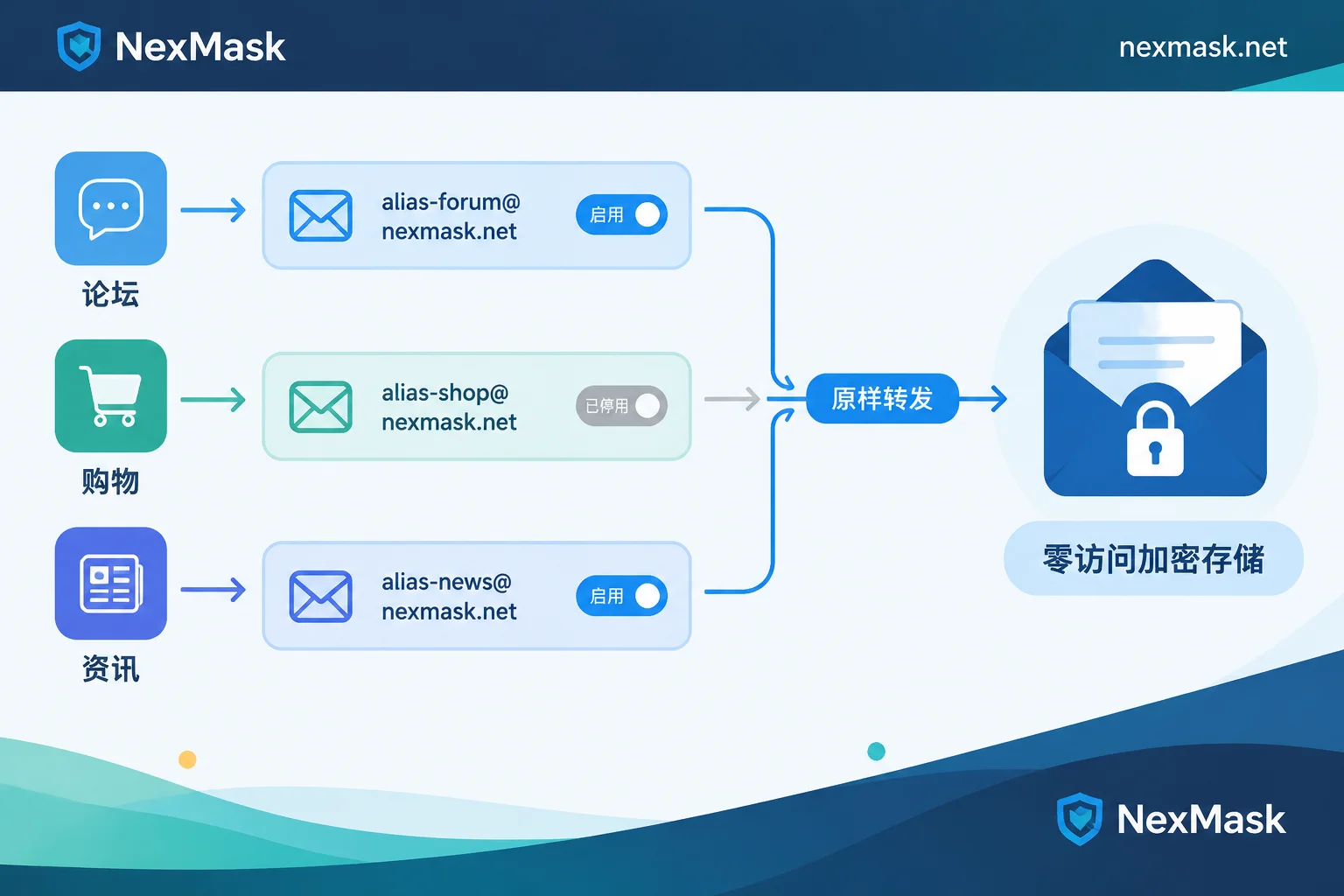
The idea is simple: expose only an alias to the outside, and the alias forwards mail as-is to your encrypted mailbox. The website sees the alias and cannot see your encrypted mailbox address; mail ultimately rests in an inbox protected by zero-access encryption. When an alias starts receiving spam, just deactivate it — the backend mailbox is unaffected.
Setup order:
- Prepare an encrypted mailbox as your final inbox. A regular mailbox also works, it just lacks the storage-encryption layer.
- In the alias service, set the forwarding target to this mailbox.
- Create a new alias each time you register on a website, and note which website it corresponds to.
- When you need to reply, send using the alias identity; the other party still sees the alias address.
Two boundaries to remember:
- The alias-forwarding segment is ordinary email, and the forwarding service can access the content. Don't route truly sensitive content through aliases — use the encrypted mailbox to communicate point-to-point with the other party directly.
- Some platforms reject disposable email domains. In that case, a long-lived alias is usually easier to get through than a temporary mailbox; if still rejected, consider an alias under your own domain.
Forwarded mail occasionally lands in spam; for troubleshooting, see How anonymous email forwarding works.
Where to set it up
To combine things as described above, you can get a long-lived alias at NexMask: it forwards mail as-is to an inbox you specify (including your encrypted mailbox), supports sending and replying under the alias identity, and can be deactivated when no longer needed; the service keeps zero logs and does not record IPs. If you just need to receive a one-time verification code or run a round of form testing, simply use a temporary mailbox — no registration required.




Comments(0)