 NexMask-官方博客
The key to protecting your real email is to stop reusing it everywhere. A more effective approach is to give each website a different address: for one-time signups, downloads, and form tests, use a temporary email; for accounts you'll still log into later and might need password recovery emails for, use a long-lasting alias, one per website; and reserve your real email only for the few people and institutions you need to communicate with directly long-term. This way, even if a website leaks data or sells your address to marketers, the impact stays limited to that one address—you can see who leaked it and disable it individually.
Why Your Real Email Is Worth Hiding
Many services treat email as both a login name and a user identifier. Using the same email across dozens of sites turns it into a universal "digital ID": any one data breach or list-sharing among data brokers can link your registrations, purchases, and interests across different sites, piecing together a fairly complete profile.
The consequences usually come in two forms of email: increasing marketing messages, and phishing emails that know which services you use and therefore appear more credible.
Changing your primary email can help, but it's costly, and old addresses that have already leaked can't be recalled. A more practical approach: from now on, stop giving out your real email for new signups, and gradually rebind old accounts.
Plus Aliases Are Not Privacy Protection
Many email providers support the format [email protected], and messages still go to [email protected]. It's fine for categorizing mail and setting filters, but it doesn't help much with privacy: the part before the plus is your real username, and the sender or a data broker can strip the suffix with a simple rule to recover your primary email.
To keep the other party from getting your real address, you need a completely independent address—either a temporary email or a long-lasting alias.
Temporary Email or Long-Lasting Alias: It Depends on Whether You'll Still Receive Mail Later
Both can shield your real email; the difference is how long the address lasts.
- Temporary email: No registration, no phone number; get one and receive mail immediately, and the entire mailbox is destroyed when it expires. Suitable for downloading materials, claiming one-time offers, or testing signup flows—scenarios where you don't care after verification. The trade-off is that once the mailbox is destroyed, the address can no longer receive mail; if you use it to register an account you'll need to log into later, password reset emails will have nowhere to go.
- Long-lasting alias: Usable throughout its validity period, one per website, forwarding mail as-is to your regular inbox; when you need to reply, you can send as the alias, and the recipient still sees the alias. Suitable for shopping, communities, subscriptions, and various tool accounts you'll use long-term.
Ask yourself: will I still log into this account in three months? If yes, use an alias; if no, use a temporary email. If unsure, treat it as "yes"—one extra alias is better than losing access to an account. For a more detailed comparison, see What's the difference between temporary email and email alias.
Developers doing form testing and QA have different needs: if you need lots of throwaway inboxes, temporary email is more convenient; if you need many at once, check whether the tool supports batch generation.
How to Get and Set Up in NexMask
The two types of addresses correspond to two entry points:
- One-time use: Go to Temporary Email to get one directly, copy the address and fill it in, then return to the temporary email to check for the verification email. Free to get anytime; expiration time is as shown on the page, so save anything useful before it expires. Batch generation is a member feature.
- Long-term accounts: Go to Long-Lasting Alias to create an alias and set it to forward to your regular inbox. Create a separate one for each website, and note in your password manager or memo "which alias goes to which website"—this mapping is what you'll rely on to trace leaks later. The free plan includes one long-lasting alias; for more, check the membership plans on the official website.
For why forwarded mail occasionally lands in spam and how to reply using an alias, see How anonymous email forwarding works.
Receiving Spam or Phishing Emails: Trace the Source First, Then Deactivate
This is the biggest benefit of one alias per site. When you receive unsolicited marketing or suspicious email, look at which alias it was sent to. If that alias was only given to one website, then the address leaked from that site—whether the site sold it, a partner shared it, or it suffered a breach can't be determined from a single email, but the source range is already clear.
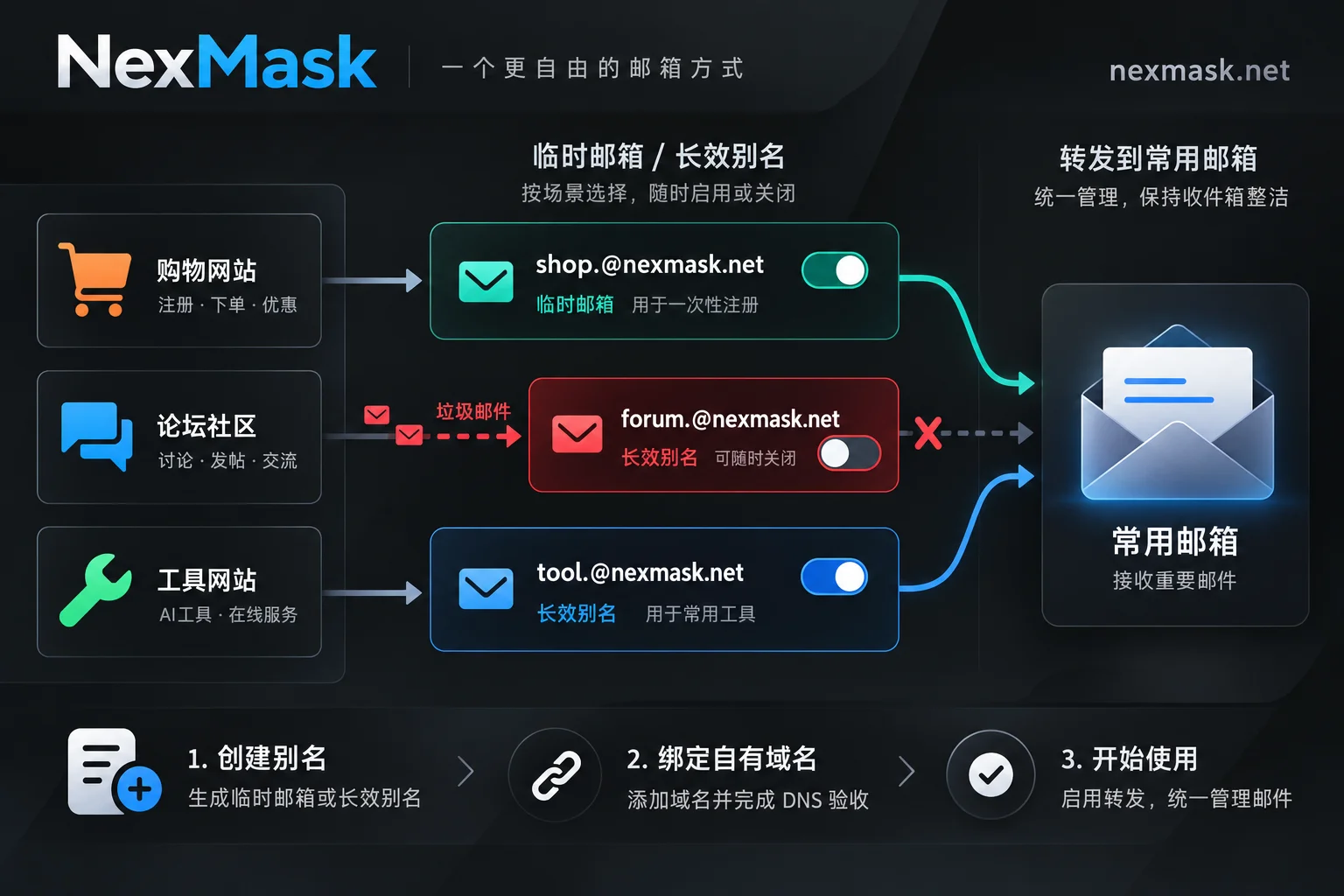
Handling order:
- If you still need the account on that website, first log in and change the account email to a new alias, and confirm the new alias can receive the site's emails.
- Then deactivate the old alias. Mail sent to the old alias will no longer forward to your inbox, and other aliases are unaffected.
- If the account is no longer used, you can deactivate the alias directly, and optionally delete the account.
Don't reverse the order: if you deactivate the old alias first, you won't receive the site's rebinding verification email.
What Aliases Can't Block: Tracking Pixels in Emails
Many marketing emails embed 1×1 transparent images or links with tracking parameters. When you open the email and images load, the sender's server can record the open time, IP address, approximate location, and your email client.
An alias hides your email address, but the email is forwarded as-is, so the pixel also arrives in your inbox; wherever it's ultimately opened, the request originates from that device. To reduce this exposure, you can disable automatic loading of remote images (external content) in your regular inbox or email client, and manually display only for trusted senders; don't click links in suspicious emails.
What to Do If Rejected by a Website
Some platforms block known temporary email domains; the lists aren't public, so you can only try.
- Temporary email rejected: If this is an account you'll use long-term, you should have used an alias anyway—switch to a long-lasting alias and try again.
- Alias also rejected: Consider a custom domain. Add MX records for your own domain, use catch-all to receive any prefix, and the external address will be on your own domain. In NexMask this is a member feature, and the domain always belongs to you and can be migrated out later.
For other reasons you might not receive verification codes and troubleshooting steps, see What to do if anonymous email doesn't receive messages.
What Anonymous Email Can't Do
- It isolates the email address, not full anonymity from everyone. A forwarding service must process the mail passing through, so check its logging policy when choosing; NexMask's public statement is zero logs with no IP recording.
- Other information can still be linked to you. The name, phone number, shipping address, and payment details you enter on websites can all connect the account to you. If you only change email but fill in everything else, the isolation is limited. Phone verification is also outside what email tools can solve.
- Think carefully before using an alias for critical accounts. Recovery processes for banking, government, and work accounts are usually stricter; before using an alias, make sure you can maintain it long-term—once the alias is deactivated or access is lost, recovery can be very troublesome. For these accounts, using your real email or an address under your own domain is more reliable.
- Temporary email is not suitable for sensitive content. Don't send contracts, IDs, or bills to a temporary email; it's destroyed entirely when it expires and isn't a place to store important materials.




Comments(0)