 NexMask-官方博客
Bottom line: For accounts you’ll log into again, might need to reset a password, or that will send bills or notifications, use a long-term anonymous email (alias). For one-off verification codes that you’ll never look at again, use a temporary email.
Both keep your real email private. The difference is how long the address lasts, where the emails go, and whether you still have control if something goes wrong. A temporary email self-destructs when it expires—the address and all messages are gone. An alias persists until you disable it, and during that time it forwards incoming mail to your regular inbox.
First, clear up the terms
“Anonymous email” is a broad term in Chinese. Some use it for temporary email, others for email aliases. This article follows the common distinction:
- Temporary email: Open a website and get an address instantly—no registration, no real email required. You can only view messages in that web inbox, and when it expires, the address and emails are destroyed together.
- Long-term anonymous email (alias): A permanent forwarding address. Emails sent to it are forwarded as-is to your specified regular inbox. You can create a separate one for each site and disable any you no longer want.
Five differences that affect your choice
| Temporary email | Long-term alias | |
|---|---|---|
| Lifespan | Self-destructs on expiry, irreversible | Works indefinitely unless you disable or delete it |
| Where emails go | Only viewable in the web inbox | Forwarded as-is to your regular inbox |
| Can you reply? | Most can only receive, not send | Can send and reply as the alias |
| Account recovery | Once the address is destroyed, you won’t receive reset emails | You keep receiving verification codes, bills, and password reset emails |
| Rejected at signup | Public disposable domains are often blocked | Rarely treated as disposable, but not guaranteed to be accepted everywhere |
The most overlooked row is account recovery. Many people register an account with a temporary email thinking it doesn’t matter, then later store things in it, link a payment method, or accumulate data. When they need a password reset, the address is gone and the reset email goes nowhere. The account still exists, but you can’t get back in. So don’t just think about now—ask whether this site will send you important emails in the future.
How to choose by scenario
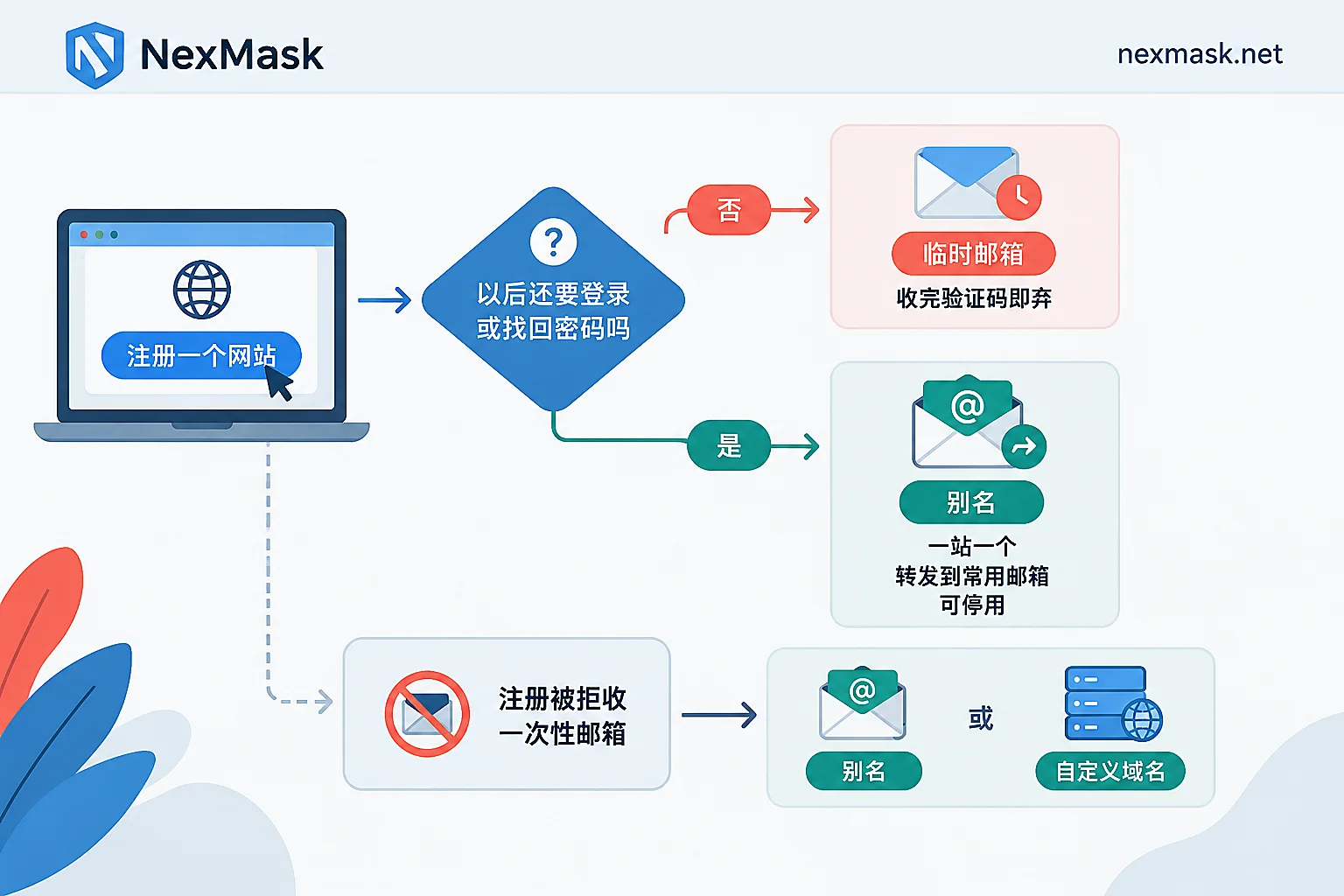
Just need one verification code, download a resource, or try something once: Use a temporary email. Forget about it afterwards; it self-destructs on expiry, and any follow-up marketing emails have nowhere to go.
Accounts you’ll use long-term (shopping, communities, subscriptions, SaaS tools): Use a long-term alias, one per site. Emails still arrive in your regular inbox. If one day an address starts getting weird spam, you’ll know which site leaked or abused your data. Disable that alias and other sites and your real email remain unaffected.
Not sure if you’ll use it later: Go with an alias. You can disable it if you don’t want it; a destroyed temporary email can’t be recovered.
Development testing, form QA: For one-off test cases, a temporary email is enough. But when you need many addresses, repeated test emails, or to simulate “the same user receiving mail long-term,” the expiry of temporary emails becomes a limitation. In that case, a catch-all on a custom domain is better—any prefix will receive mail.
Multi-account operations: Each account needs long-term recovery, so use aliases, not temporary emails. If the platform also requires phone verification, that’s a separate issue that email tools can’t solve.
Alias setup tips for peace of mind
- One alias per site. Don’t share one alias across multiple sites, or you won’t be able to trace a leak and disabling it will affect other sites.
- Set the forwarding target to an inbox you check daily. The alias doesn’t store mail; it forwards. If the target is wrong or rarely checked, you might as well not have received the email.
- Reply as the alias. If you reply directly from your real email, the recipient sees your real address, defeating the purpose. For details on how sending/receiving works and why forwarded mail lands in spam, see How anonymous email forwarding works.
- When you identify the source of spam, disable that alias. Disabling affects only that address. If you still need the site later, first change your registered email to a new alias, then disable the old one—this keeps recovery channels open.
Things to note with temporary email
- Complete registration right after receiving the verification code. Don’t count on coming back days later. For exact expiry times, check each service’s documentation.
- Never use it to receive emails containing personal information, orders, or passwords.
- If the account later becomes important, before the temporary email expires, change your registered email to an alias or your main email. If it’s already expired, see What to do when a temporary email expires.
What to do when a site says “email not supported” at signup
Many websites and anti-fraud systems maintain a blacklist of public disposable email domains. Temporary email addresses are often rejected right at the form—this is a platform rule, and switching to another temporary address usually won’t help.
Two practical approaches:
- Switch to a long-term alias. Aliases are usually not classified as disposable, and such sites are often ones you’ll use long-term, making an alias more suitable.
- Use your own domain. The address looks like your own domain email and generally isn’t treated as a public disposable domain. You just need to add MX records in your DNS settings.
However, some platforms only accept specific corporate emails or are strict about all forwarding addresses. If that happens, follow the platform’s requirements—no address type is guaranteed to work.
Where to get them
Once you’ve decided, get the right address for your use case:
- For one-time verification codes: NexMask Temporary Email. No registration, no phone number, get an address instantly, self-destructs on expiry.
- For long-term accounts: NexMask Long-term Alias. One per site, forwards mail as-is to your regular inbox, allows replies as the alias, and can be disabled anytime. The free plan includes one alias—start with the site you use most.
Bulk temporary email generation, multi-target forwarding, and custom domains are paid features. Expiry days and specific benefits are subject to the official website. Your custom domain is yours—you can migrate it even if you stop using NexMask later. NexMask follows a zero-log policy and does not record IP addresses.




Comments(0)