 NexMask-官方博客
Anonymous email addresses come in two main types: temporary emails, which you grab and use on the spot and that self-destruct entirely upon expiry; and long-term aliases, which remain usable long-term and forward incoming mail to your regular inbox. To choose, first ask yourself: will I need to log into this account again, and will I need password recovery?
- No, you just need a one-time verification code, download a resource, or try something out and then leave: use a temporary email.
- Yes, for example shopping, forums, subscriptions, or SaaS trials that might convert to paid: use a long-term alias.
- The site says "this email is not supported": switch to a long-term alias, or bind your own domain.
- Banking, securities, government, or other services requiring real-name verification: use your real primary email, not an anonymous address.
Below we explain how to use each type, where their limitations lie, and then cover two common issues: rejection and spam source tracing.
Temporary Email: Only Suitable for Accounts You Won't Log Into Again
A temporary email is a standalone inbox. It has no connection to your real email and requires no registration. Usage is simple: open the page, claim an address, copy it into the other party's form, then return to the page to wait for the verification code or confirmation link.
It suits these scenarios:
- Downloading whitepapers, claiming one-time offers, or viewing content that requires registration;
- One-off trials where you don't want to leave your real email;
- Development and QA smoke tests for forms, to confirm that the registration flow sends emails and that links work.
Its limitations stem from the "destroyed upon expiry" feature:
- Once the email expires, neither the address nor the messages can be recovered. If you later forget your password, the reset email will go to an inbox that no longer exists, and the account is essentially lost. If you've already registered an account you want to keep using with a temporary email, while you can still log in, change the account email to a long-term alias or your regular email. For detailed remedies, see What to Do When a Temporary Email Expires.
- Easily blocked by websites. Many sites maintain a blacklist of public disposable email domains, and some also analyze DNS and MX records or call real-time verification APIs. Temporary email domains are easily identified by these methods.
NexMask's temporary email requires no registration and no phone number; the free version lets you claim one at any time, and the entire inbox is destroyed upon expiry. If you need to generate many addresses at once for testing, bulk generation is a paid feature. Valid days are subject to the official website.
Long-Term Alias: A Separate Address for Each Website
A long-term alias acts as a layer between the website and your real email. You give a site a separately generated address, and mail from the site is forwarded as-is to your regular inbox. The site only ever knows the alias.
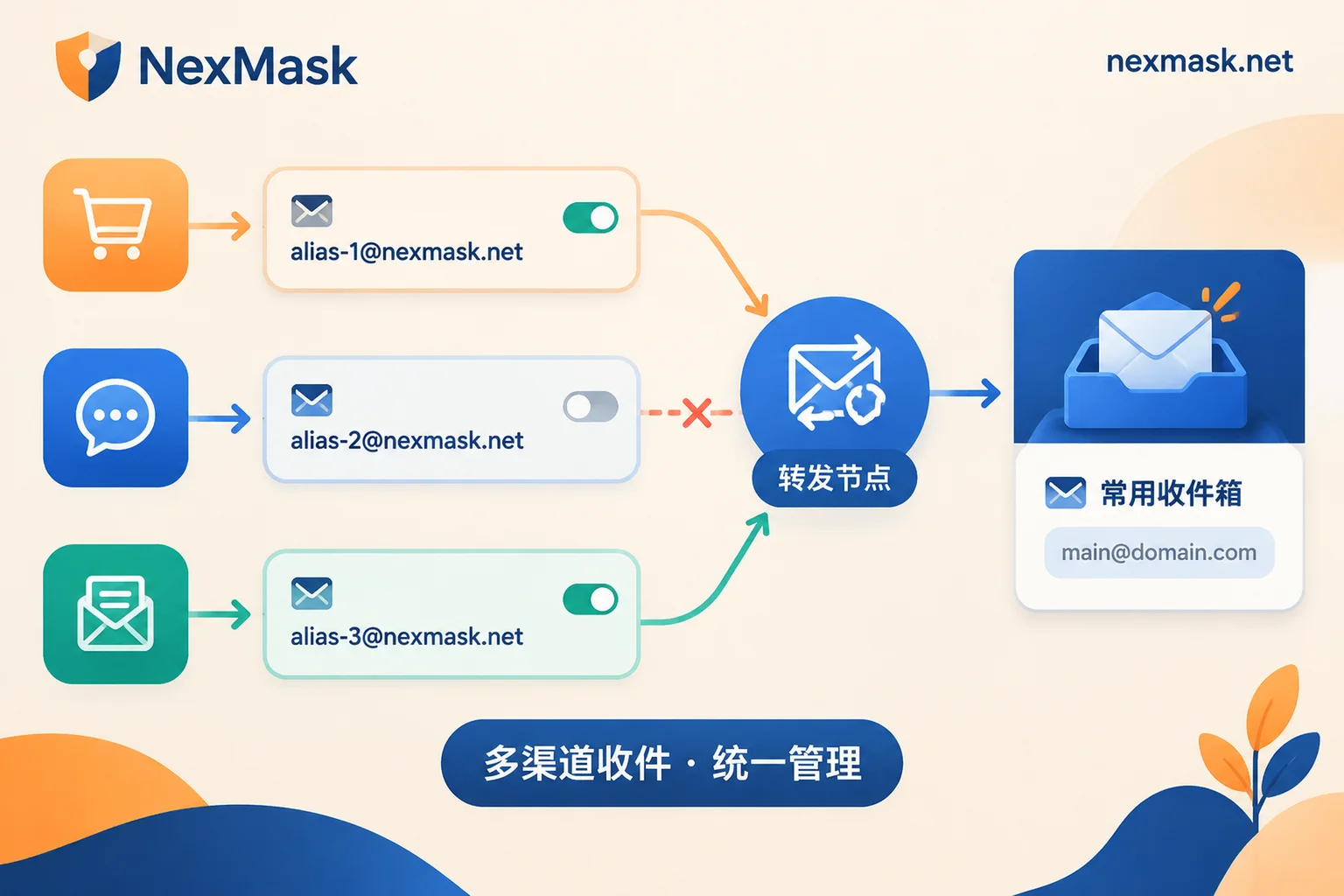
This approach offers three practical benefits:
Accounts can be maintained long-term. The alias remains usable within its validity period, so password resets, billing, and shipping notifications all arrive normally, unlike temporary emails that break upon expiry.
You can trace the source of spam. By sticking to one alias per website, each address corresponds to one site. If the alias you gave to site A starts receiving ads from an unrelated company, you can reasonably infer that A leaked or sold the address. This is a strong clue but not absolute proof; for example, if you filled in that alias elsewhere or the address was guessed, the result would be the same.
You can cut off the source at any time. If an alias starts receiving harassing emails, deactivate it in the backend, and other sites' aliases are unaffected. Before deactivating, consider whether you still need the account: if you do, first log into the site and change the email to a new alias, then deactivate the old one, so you don't miss password reset emails later.
Replies also require attention. Replying directly from your regular email to forwarded messages will expose your real address. Services that support alias identity for sending will replace the sender information when you reply, so the recipient still sees the alias; this mechanism is often called reverse alias. Not every forwarding service supports this, so confirm before choosing a service.
Why Gmail's Plus Addressing Doesn't Count
Many people use addresses like [email protected] to distinguish sources. It does help categorize mail, but it provides no isolation: removing the part after the plus yields the primary address, and Gmail's dot rule works the same way. Anyone can restore your real email with simple rules. Aliases generated by independent services have no literal connection to your primary email, which is what constitutes isolation.
If you decide to use aliases, NexMask's long-term aliases are designed as one per site. Mail is forwarded as-is to the regular email you provide, aliases can be deactivated individually, and you can send and reply using the alias identity. If you need to forward the same alias's mail to multiple people simultaneously (e.g., a shared team test account), multi-target forwarding is available as a paid feature. NexMask uses zero logs and does not record IPs. For more differences between temporary emails and aliases, see What's the Difference Between Temporary Email and Email Alias.
When Rejected During Registration, Handle It in This Order
Rejection usually means the domain you entered is on a disposable email blacklist, or was identified as temporary by MX analysis or a verification API. Handle it in this order:
- Revisit the purpose. If you'll need the account later, you should have used a long-term alias anyway, and rejection is a good time to switch.
- Switch to a long-term alias. Alias domains are different from public temporary email domains, so the pass rate is usually higher. However, some sites also block common alias service domains, so it's not guaranteed.
- Use a custom domain. Point your own domain's MX records to a forwarding service, enable catch-all, and any prefix can receive mail, e.g.,
shop@你的域名,forum@你的域名. The site sees an ordinary private domain, not on any public blacklist. The domain belongs to you, so you can migrate it if you change services later. In NexMask, this is a paid feature. - Still rejected. Some platforms only accept mainstream email providers or require real-name verification; then you must use a real email or switch platforms.
For specific troubleshooting steps, see What to Do When a Temporary Email Is Rejected.
Scenarios Where You Should Not Use Anonymous Email
Anonymous emails and aliases mainly guard against three things: commercial tracking, marketing spam, and credential stuffing elsewhere after a site leak. They cannot replace real-name identity. Continue to use your real primary email in these scenarios:
- Banking, payment, securities, and other financial services;
- Government, statutory bodies, platforms requiring document submission;
- Services whose rules explicitly require real-name or strict identity verification.
One more point: if a site also requires phone number verification, changing email won't solve it—that's a separate issue.
Summary
If you only need a one-time verification code and won't log in again, claim a temporary email. If you'll log in again and need password recovery, create a separate long-term alias for that site and forward it to your regular inbox. If rejected, switch to an alias first, then consider binding your own domain. For services involving money or real-name verification, use a real email directly.




Comments(0)