 NexMask-官方博客
If you just want to receive a verification code from a website once, or download a piece of material, getting an address from a temporary email generator is enough—you don't need to bother with it afterward. If this account will be used for logging in later, receiving bills, receiving security alerts, or might need a password reset someday, generate a long-lasting alias and forward it to your primary email.
When deciding, first ask yourself: Will I come back to use this account in the future?
Anonymous Email Generators Actually Fall into Two Types
Most anonymous email tools on the market generate one of the following two types of addresses. Both can hide your real email, but the difference lies in how long the address lasts and whether you can still open the inbox later.
- Temporary email (disposable email): Open a webpage and an address is generated. The inbox is right on the page—no registration needed. After it expires, the entire mailbox and its emails are destroyed together.
- Long-lasting alias (masked email): Generates an address that stands in front of your primary email. Emails sent to the alias are forwarded as-is to your primary email, and you can also reply as the alias. It works throughout its validity period, and you can deactivate it when you no longer want it.
An analogy: a temporary email is like a mailbox at your door that gets dismantled after use; a long-lasting alias is like a mask you can wear for a long time.
Choose by Scenario
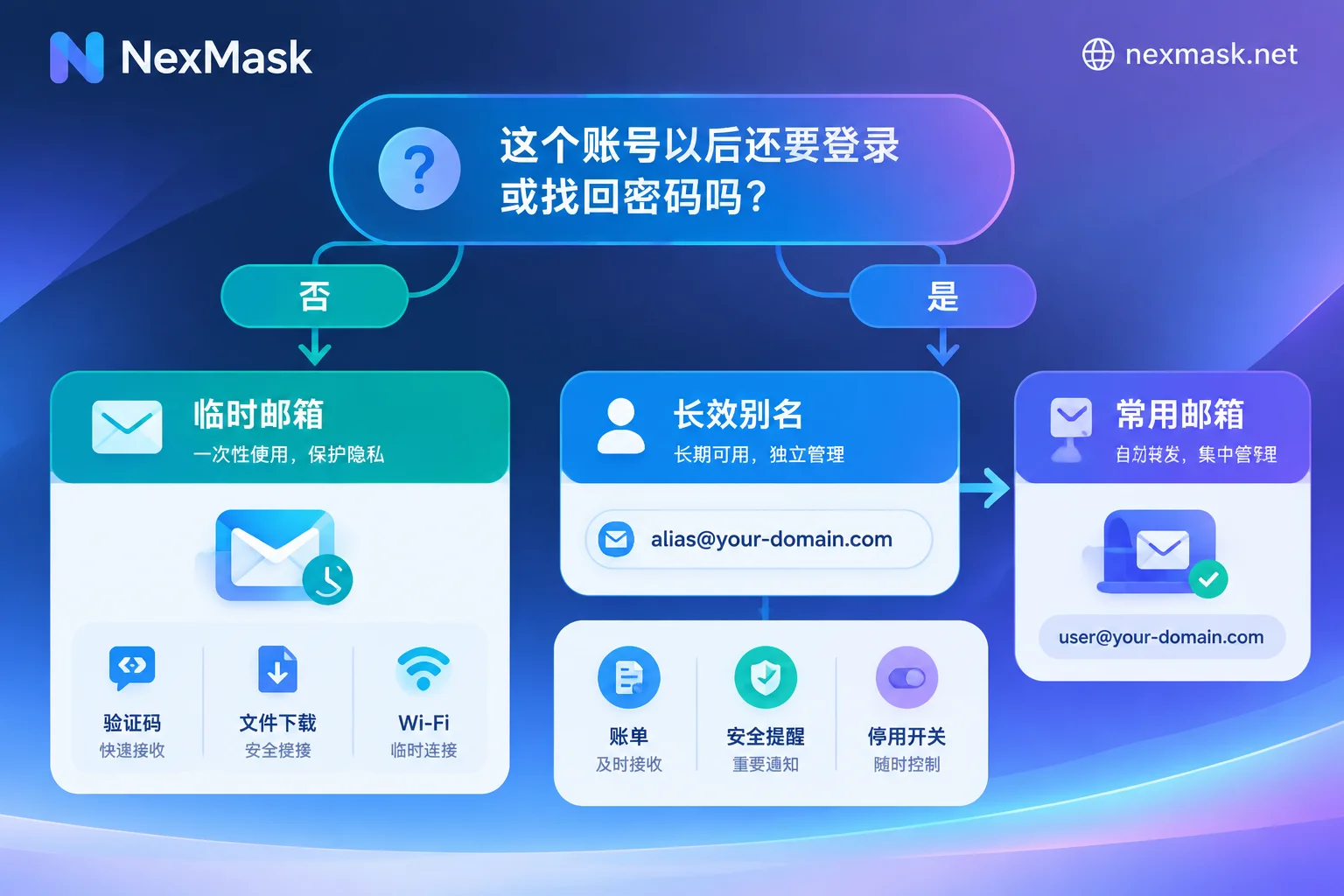
Situations suitable for temporary email:
- Websites where you only need a verification code once and will not log in again
- Downloading whitepapers, demo files, trial resources
- Public Wi-Fi or event pages that require filling in an email
- Testing a registration form to see what the welcome email looks like
Situations suitable for long-lasting alias:
- Shopping, subscription, membership accounts that receive orders and bills
- Forums, communities, SaaS tools, and other accounts you will log in to later
- Services that send security alerts or unusual login notifications
- Accounts that may require password recovery via email
When unsure, a long-lasting alias is the safer choice. After a temporary email expires, the address and emails are basically unrecoverable—when you want to reset a password, there will be no way in (for remedies, see What to Do When a Temporary Email Expires). The cost of using one more alias is much smaller.
How to Use After Generation
Temporary Email: Use It When You Get It, Save Important Content Elsewhere
- Open the temporary email page, copy the generated address, and fill it into the target website.
- Return to the inbox page and wait for the verification email. If you don't receive it, refresh first, then check whether the address was entered correctly.
- After getting the verification code or link, complete the action. For things you may need later—like download links or activation codes—save a copy yourself; once the email expires, they'll be gone.
If you're worried about "never being able to log in again," then don't use a temporary email.
Long-Lasting Alias: One Alias per Website, Forwarded to Your Primary Email
- Generate a separate alias for each website—don't share one alias across multiple sites.
- Set the forwarding target to your primary email. Send a test email first to confirm you can receive it and check whether it lands in spam.
- When replying to customer service or merchants, send as the alias. The other party still sees the alias, not your real address.
- Record which alias corresponds to which website in a password manager or notes—it will save you a lot of trouble later.
Using one alias per website has the benefit of tracing the source when problems arise. If an alias suddenly receives promotional emails you never subscribed to, it's likely that the website had an issue—possibly a leak, resale, or sharing the address with a third party. Deactivating that alias can cut off the harassment, leaving your primary email and other accounts unaffected. If you still need to use that account, first change the email on the website to a new alias, then deactivate the old one.
What to Do When Registration Says "Temporary Email Not Supported"
Many websites and SaaS platforms block disposable emails. Common methods include: comparing against public blacklists containing tens of thousands of temporary domains, analyzing the MX records of the email domain, or calling real-time verification APIs. Once detected, the page will show "this email is not supported" or registration will simply fail.
Handle it in three ways depending on your purpose:
- One-time use only: You can try another temporary email domain. However, the chance of being blocked is high, so it's not worth repeated attempts.
- This account will be used later: Switch to a long-lasting alias. The fact that the platform blocks temporary emails itself indicates it wants users to keep their accounts long-term—a perfect case for an alias.
- The alias domain is also blocked, or you have many accounts to manage: You can bind your own domain to the alias service. Private domains are generally not on public temporary email blacklists; then enable catch-all (emails sent to any prefix at that domain are received), and you can make up prefixes on the fly to receive mail. However, risk control rules vary by platform, so it's not guaranteed that every platform will allow it.
One more point: some platforms are actually blocking phone numbers or browser environments, not emails—in that case, changing emails won't help. For more detailed troubleshooting, see What to Do When a Temporary Email Is Rejected.
Boundaries to Know Before Using
- Public address pools may be visible to others: Some temporary email services use publicly shared addresses—anyone who enters the same address can see the inbox. Don't put verification codes or emails containing personal information in such mailboxes. When choosing a service, check whether it isolates each user's session and whether it has a zero-log policy.
- Temporary emails are not suitable for important attachments or long-term notifications: They are destroyed upon expiration and cannot be retrieved afterward.
- Anonymous email only hides the email address: Websites may still identify you through other information you fill in—pay attention to other details when filling out forms.
- Use placeholder data for test identities: When doing form testing or QA, if you also need a name and address, use placeholder identities generated in realistic formats. Such addresses do not correspond to real residents and cannot be used for receiving shipments.
Get One at NexMask
Once you've decided which type to use, go to the corresponding page:
- For one-time verification codes and downloading materials: go to NexMask Temporary Email to get an address. No registration, no phone number, and the entire mailbox is destroyed after expiration.
- For long-term accounts needing forwarding and replies: go to Long-Lasting Alias to generate one. One alias per website, can be deactivated at any time, emails forwarded as-is to your primary inbox, and you can send and reply as the alias. The free plan includes one alias.
NexMask implements zero logging and does not record access IPs. For details on how long temporary emails last and membership features like bulk generation, multi-target forwarding, and custom domains, refer to the official website.




Comments(0)