 NexMask-官方博客
In everyday usage, "anonymous email" usually refers to two tools with different purposes: temporary email that you discard after use, and long-lived aliases that can receive mail for you over the long term.
When choosing, first ask yourself: Will I still need to log in to this account later, reset a password, or receive notifications?
- If not: use a temporary email and finish once you receive the verification code.
- If yes: use a long-lived alias and set the forwarding target to your main email.
- For accounts tied to your core identity, such as banking or government services: use your real email directly, or use an email on your own domain.
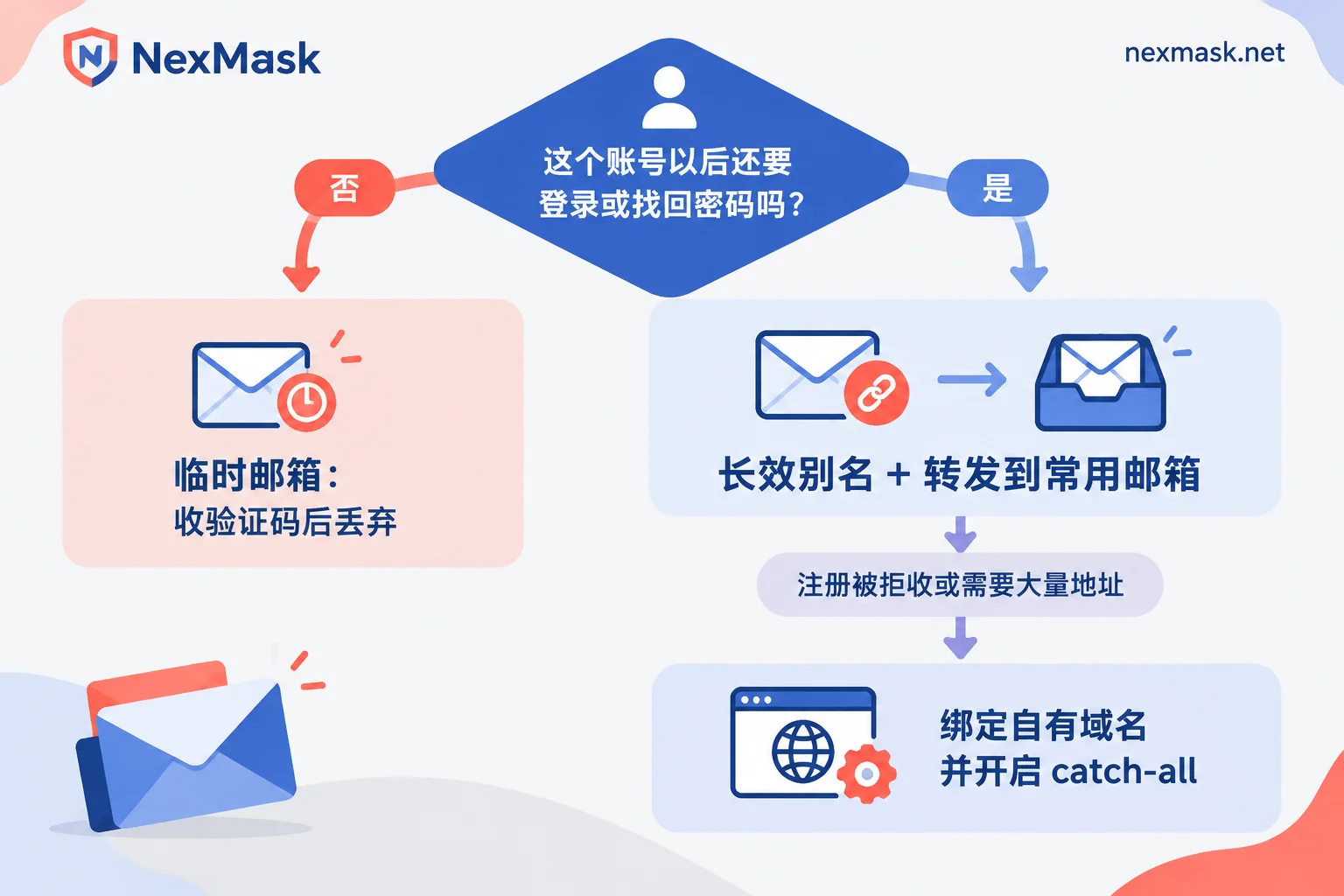
First, decide: temporary email or long-lived alias
The following scenarios suit temporary email: receiving a one-time verification code, downloading public materials, claiming a coupon, or testing a signup form. After that, you won't need to receive any more email.
The following scenarios require a long-lived alias: the account will be used for logins later; you may need to reset a password; email two-factor verification is needed for logins from unusual locations; or you'll receive bills, invoices, orders, or shipping notifications.
When a temporary email expires, the entire mailbox is destroyed and cannot be recovered. If you need to reset a password later, there will be nowhere to receive the reset email. So don't cut corners by registering a long-term account with a temporary email.
Temporary email: receive one verification code and you're done
Steps:
- Open the temporary email page; an address is generated automatically. No registration or phone number is needed.
- Copy the address and fill it into the target website's form.
- Return to the temporary email page and wait for the verification code to arrive.
A few common pitfalls:
- Don't close the page before you receive the email. The address is tied to the current session; if you close and reopen it, you may get a new address.
- If the code doesn't arrive, wait a minute or two first. Repeatedly clicking "resend" may trigger the website's rate limit and actually slow things down. If it still doesn't arrive, see Troubleshooting: temporary email not receiving messages.
- Temporary email can only receive mail; it cannot send or reply.
- After expiry, the mailbox and its emails are destroyed together. For how long they are retained, refer to the official site.
If you need to generate many addresses at once for QA or multi-account testing, you can use bulk generation, which is a paid feature. If you just need one address, go to NexMask temporary email and generate one.
Long-lived aliases: usage for long-term accounts
Create an alias and set up forwarding
Create an alias on the NexMask long-lived alias page, then set the forwarding target to your main email. After setup, messages sent to the alias are forwarded as-is to your main inbox, preserving the body, attachments, and sender information. You don't need to check another inbox. Forwarding happens only in memory; once the message is delivered, no copy of the body is retained.
The free plan includes long-lived aliases and supports forwarding. If you need to forward to multiple mailboxes at once, or specify different forwarding targets for different aliases, you need a paid plan.
Send and reply using the alias identity
Long-lived aliases can receive mail and send mail. When contacting customer support, submitting a ticket, or replying to an email, choose to send from this alias in the console. The recipient will only see the alias address, not your real email.
One alias per website: easier tracking and deactivation
It's best to assign a separate alias for each website. If an alias later starts receiving spam or phishing emails, you'll know which website leaked or sold the address. After you deactivate that alias, mail from that website is cut off. Your main inbox and other aliases are unaffected.
Confirm before deactivating: after deactivation, you won't receive any email from that website, including password reset emails. If you still want to use that account, first go to the website's account settings, change the bound email to a new alias, and then deactivate the old alias.
What to do when signup says "disposable email not supported"
Many platforms block disposable email, especially some SaaS and AI services. They may use public blacklists of disposable email domains, check the domain's MX records and registration age, or call real-time verification APIs. When blocked, the form may show an error directly, or the submission may do nothing.
In this case, repeatedly refreshing and resubmitting with the same batch of public temporary domains usually won't work and may trigger risk controls. Choose how to handle it based on your purpose:
- Only using it once: try another temporary address with a different suffix.
- Account will be used long-term: switch to a long-lived alias directly.
- Even well-known alias service suffixes are blocked: bind your own domain.
For a more detailed analysis of the reasons, see What to do when temporary email is rejected.
Binding your own domain: for strict platforms and large numbers of addresses
Custom domains are a paid feature. The steps are as follows:
- Enter your own domain in the console.
- Follow the page prompts to add two types of records at your domain registrar: MX records pointing to the receiving server, and a record used to verify domain ownership.
- Wait for DNS resolution to take effect. Timing varies by provider.
- Enable catch-all.
After enabling catch-all, you don't need to create aliases in advance. You can write any prefix when registering, such as shop@你的域名, and you'll directly receive mail and forward it to your main inbox. The domain always belongs to you; if you want to switch providers later, you can migrate out by changing the MX records.
Why not just use Gmail's "+" addresses
Gmail, Outlook, and similar services support formats like [email protected], which can be used to categorize and filter mail. But it doesn't hide your real email: anyone who removes the "+" and the part after it can see your main email address; when you reply, it's also sent directly from your main email.
In addition, some public temporary email services have no isolation mechanism, so anyone who enters the same prefix can see your messages. If you use such an email to receive a password reset link, your account may be taken over by someone else.
Boundaries of use
- NexMask follows a zero-log policy and does not record user IPs. But email isolation only protects the email layer: when you click a link in an email, you still visit the target website directly.
- If you run multiple accounts, phone number verification and browser environments need to be handled separately with specialized tools; changing only the email won't solve account linkage issues.
- When you need addresses or identity information for form testing, you can use Identity Generation. The generated information matches the format of real data, but it can only be used as placeholders and for testing, not as a real shipping address.




Comments(0)