 NexMask-官方博客
The most fundamental difference between the two lies in lifespan and whether they can be recovered if lost. A regular email is a long-term identity, with emails stored permanently, able to both receive and send, and can be used to reset passwords. A temporary email is a one-time inbox, requiring no registration, leaving no personal information, and after expiration, the address and emails are destroyed together and cannot be recovered.
So the choice is straightforward: for accounts you'll need to log into later or might need to recover the password for, don't use a temporary email. For receiving a one-time verification code, claiming a single resource, or running a test, a temporary email is the most hassle-free. If you need a long-term account but don't want to expose your real email, you can use a long-lived alias with forwarding, which sits between the two.
Five differences that determine what each can do
1. Lifespan: long-term storage or complete destruction upon expiration
Regular email is designed for long-term communication, with historical emails accessible anytime. The lifespan of temporary email varies by service, from minutes to days; after expiration, the entire mailbox and its emails are cleared.
The practical impact: any email you might need to look up later—such as order confirmations, invoices, authorization links—should not be sent to a temporary email.
2. Identity binding: linked to you or unrelated
Registering a regular email usually requires a phone number, backup email, and sometimes real-name information. After using the same primary email to register on dozens of websites, it becomes an identifier linking those accounts. If any one of those sites suffers a data breach, your primary email will end up on marketing and phishing lists.
Temporary email requires no registration, and the address is not linked to you. Even if leaked, it won't affect your primary email.
3. Functionality: full send/receive or mostly receive-only
Regular email can send, reply, archive, and connect to email clients. Most temporary emails can only receive, cannot send proactively, and lack long-term storage and personalization.
If a process requires you to reply to an email—such as communicating with a seller or responding to a ticket—temporary email generally cannot do it.
4. Account control: recoverable or broken recovery chain
This is the most costly point. Forgot password, two-factor authentication for unusual logins, platform security reviews—almost all are completed through the registered email. Once a temporary email is destroyed, there's nowhere to receive these emails, and the account is effectively out of your hands.
Additionally, some public temporary email services allow anyone to see the messages inside just by entering the same address. When an address is reused by others, emails sent there could be read by strangers.
Therefore, temporary email is not suitable for banking, payment, work, paid subscriptions, and primary social accounts. For accounts already registered with a temporary email that you later realize you need long-term, it's best to change the email in the account settings before the temporary email expires. If it has already expired, refer to What to Do When Temporary Email Expires.
5. Platform acceptance: generally accepted or possibly blocked
Many platforms detect disposable emails, and upon identifying known temporary email domains, they directly refuse registration. Regular email generally doesn't have this problem.
Platform blocking rules are not public and may change, so it's normal for the same temporary email to work on one site and be rejected on another. For how to handle rejection, see What to Do When Temporary Email Is Rejected.
How to choose by scenario
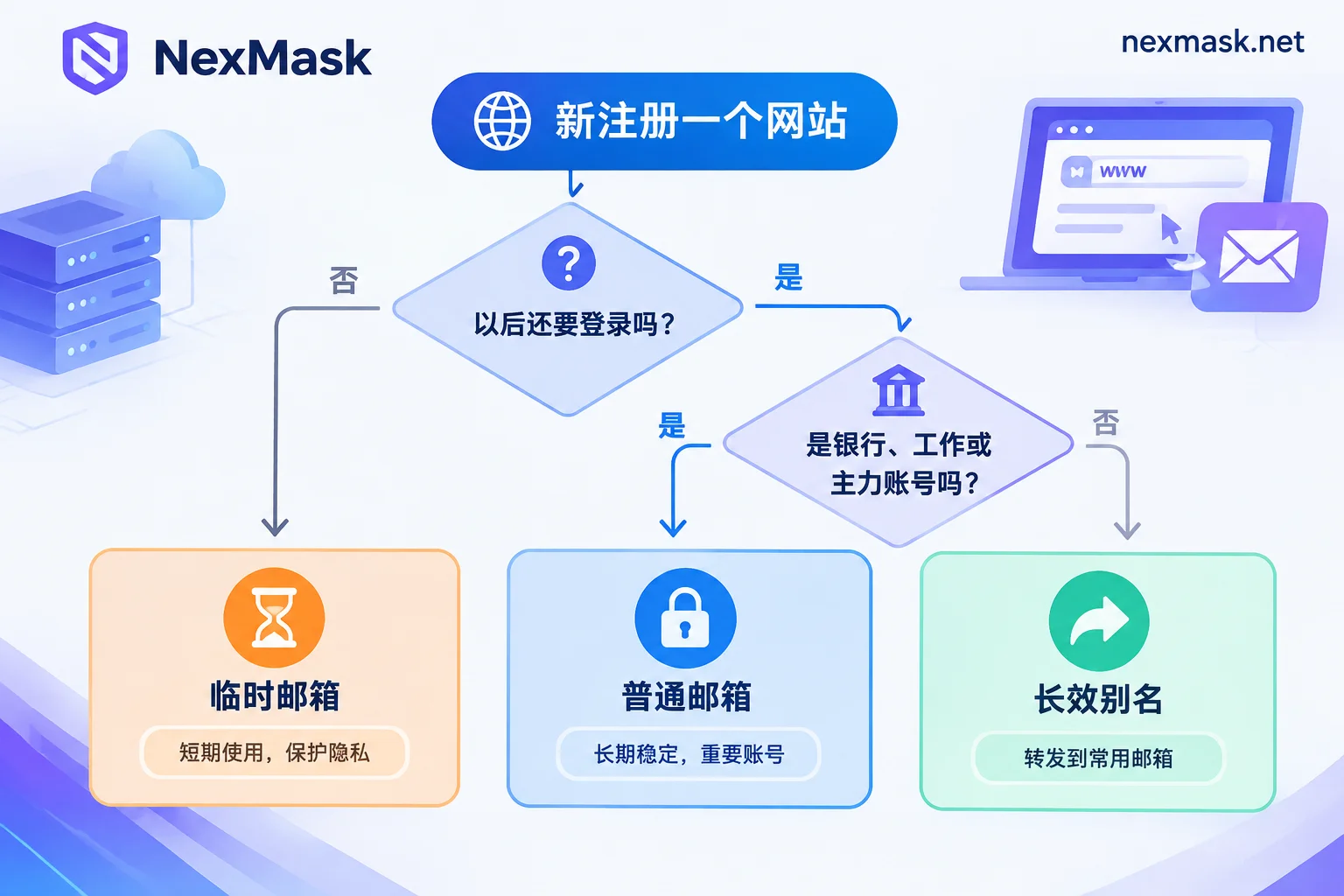
- One-time registration, claiming resources, downloading trials, receiving a one-time verification code: use temporary email. No need to manage after use, and it won't bring follow-up promotional emails to your primary email.
- Accounts you'll log into later but don't want to expose your real email for, such as forums, shopping sites, email subscriptions, and various online tools: use a long-lived alias forwarded to your regular email.
- Banking, payment, work accounts, real-name services, primary social accounts: use your own regular email directly, keeping the recovery channel in your hands.
- Form testing and QA: use temporary email, switching to a new address each round to avoid interference from old data.
- If registration says the email is not supported: switch to a long-lived alias. If blocked often, consider binding your own domain to receive emails.
When unsure, ask yourself: if this account is lost in six months, would I care? If you would, don't use a temporary email. For more risk details, see Is Temporary Email Safe.
Why long-lived alias is a good compromise
An alias is a separate email address, and emails it receives are forwarded as-is to your regular email.
To the website, it's a normal, long-term usable email, and password recovery emails can also be received. To you, your real email is never exposed.
If you stick to one alias per website, when an address starts receiving spam, you can tell which site leaked it. Just disable that alias, and other accounts are unaffected. When a reply is needed, you can send as the alias, and the other party won't see your real address.
There are two boundaries to note when using aliases:
- After disabling an alias, you won't receive recovery emails for that site either. Before disabling, confirm the account is no longer needed or has been switched to another email.
- Whether forwarding arrives smoothly depends on your regular email provider. If forwarded emails go to spam, you need to set up a whitelist or filter rule in your regular email. For troubleshooting, see Temporary Email Goes to Spam.
Once you've decided, go get one
At NexMask, the two use cases correspond to two entry points:
- Just receiving a one-time verification code or testing: go to NexMask Temporary Email to get one directly. No registration, no phone number needed, entire mailbox destroyed on expiration; specific validity period is subject to the page description. For generating test addresses in bulk, that's a member feature.
- Accounts requiring long-term login: go to NexMask Long-Lived Alias to create an alias and set up forwarding to your regular email. The alias remains usable within its validity period; it's recommended to use one per website. The free plan includes one.
Both are zero-log and do not record IPs.




Comments(0)