 NexMask-官方博客
Simply put, temporary email is safe when used in the right scenarios, and it can reduce exposing your real email. The main risk of using it in the wrong scenarios is usually not being hacked, but that others might see your emails, or that you later cannot receive important emails.
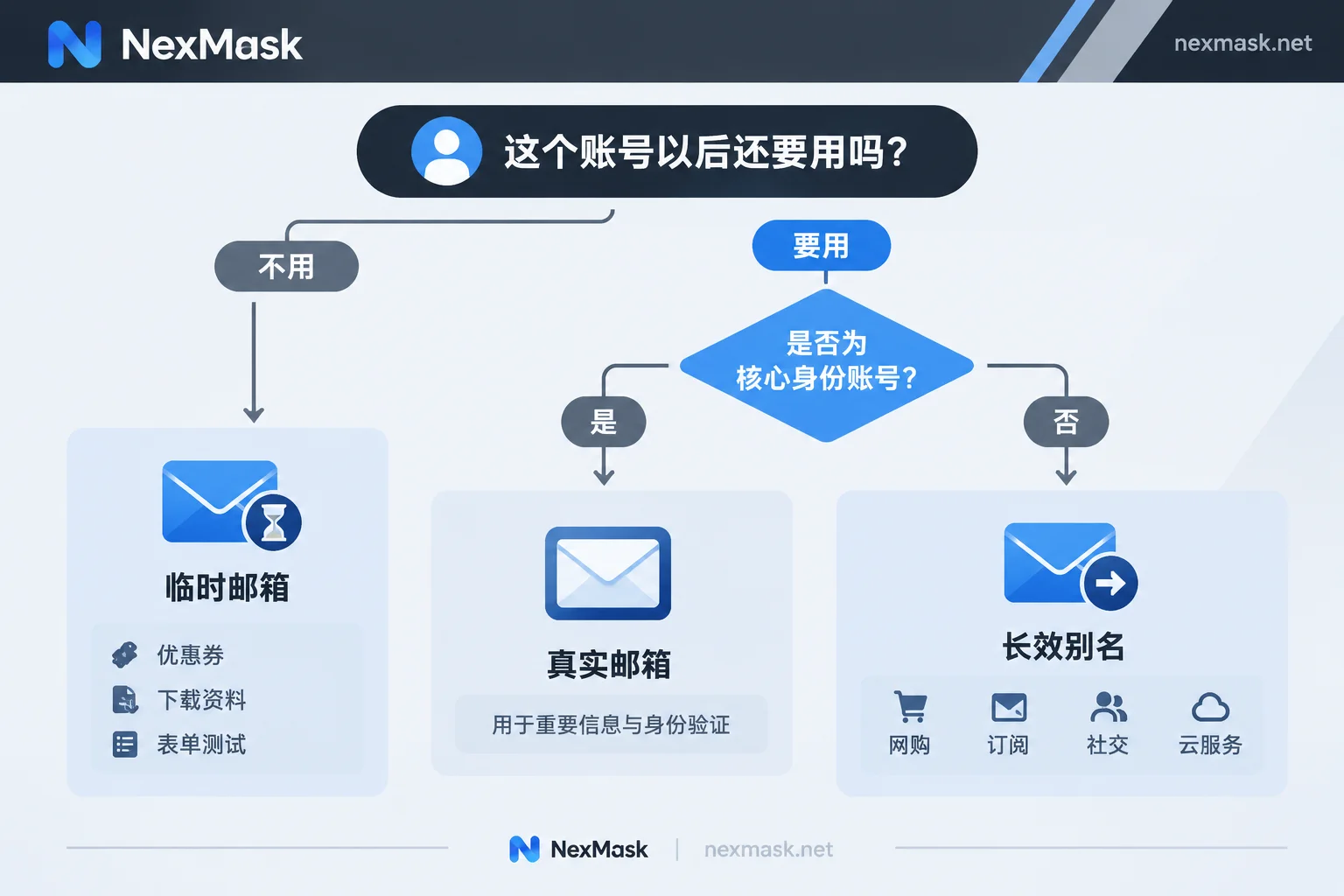
When deciding, first ask: Will this account ever need this email for recovery? If yes, don't use temporary email; switch to a long-term alias that forwards to your regular email and can be disabled at any time. If no, using temporary email is safer than directly providing your real email.
What temporary email can block
- Avoid exposing your primary email: You only need an address to register, without providing personal information like phone numbers. Marketing emails and subscription pushes go to this expiring address, not piling up in your regular email.
- Less impact after a website breach: If a website suffers a data breach, what's leaked is an address that has already been destroyed and isn't linked to other accounts. It's hard for others to use it for credential stuffing or to link your identities across different websites.
- Harder to correlate across websites: Using different addresses for each registration makes it difficult for platforms to link you through the same email.
These benefits all come with a premise: you don't intend to use this address for important long-term emails.
Four risks to note
1. The inbox may be visible to others
Many public temporary email services don't have passwords, and their address prefixes are easy to guess or brute-force. Anyone who enters the same address can see the emails inside. If emails contain login links, password reset links, or order information, they could be taken by others.
Countermeasure: Use a randomly generated prefix from the system, not easily guessable names like test or abc123; complete verification as soon as you receive the link; do not send emails containing personal information such as bills, delivery details, or identity documents to temporary email.
2. You may not be able to recover the account after the email expires
Temporary email has an expiration date, after which the entire inbox is destroyed. There's usually no problem at registration, but problems arise later, such as email verification for logins from new locations, two-factor authentication required by the platform, or password reset. These all require receiving emails again, but the email address is no longer usable. Platform customer service usually only recognizes the email bound to the account, so this situation is hard to remedy. For how destruction works and whether recovery is possible, see How temporary email auto-destruction works.
3. Tracking pixels in emails
Marketing emails often embed an invisible small image. When you open the email, the image loads from the sender's server, and they may record your IP and device information. Some simple temporary email webpages don't block external images or isolate email content from the rest of the page. Temporary email can hide your email address, but it may not prevent this type of tracking.
Countermeasure: Only open the verification emails you need, and don't casually open promotional emails or click links inside them.
4. Rejected by platforms
Many platforms check whether the registration email comes from a disposable email domain. When using such email, the platform may directly indicate the email is unavailable, or allow registration but flag the account as high-risk and restrict features. This is usually the platform's risk control rules, not necessarily your mistake. When rejected, first choose an alternative based on the purpose; for details, see What to do if temporary email is rejected.
Ask yourself three questions before use
- Will this account still be used in a month?
- Will the account contain money, orders, paid content, works, or chat records?
- Will emails contain real names, addresses, identification, or payment information?
If all three answers are "no": For example, claiming coupons, downloading public materials, trying out a tool, filling out one-time surveys, or testing forms and registration processes—these are all suitable for temporary email.
If any answer is "yes": For example, online shopping, subscribing to paid services, registering social accounts, or using developer platforms, cloud services, work tools—these are better with a long-term alias.
Banking, government accounts, and core identity accounts like Apple ID and Google accounts are usually better with your real email, because the simpler the account recovery process, the safer.
How to isolate your real email for important accounts: use long-term aliases
Long-term aliases solve the two main problems of temporary email: they can receive emails as long as they are active, and emails are forwarded as-is to your regular email, so you don't need to open a specific webpage to check. Here's how:
- Use a separate alias for each website: Each time you register on a website, set up a new alias for it. The website only sees the alias, not your real email.
- Set up forwarding: Forward the alias to an email you check daily, so verification codes, password reset emails, and order notifications arrive normally.
- Reply using the alias: When contacting customer service or replying to emails, send as the alias; the recipient still sees the alias.
- Disable the alias if problems arise: If an alias starts receiving lots of spam, you can tell which website leaked or sold your email based on the recipient address. Disabling that alias won't affect other websites.
Note that after disabling an alias, you won't receive emails from that website either. If you still need to use the account, first change the bound email in the website to a new alias, then disable the old one.
How to choose in NexMask
Based on the above, choose the corresponding tool for your purpose:
- One-time verification codes or testing: Get an address directly at NexMask Temporary Email. It requires no registration or phone number, and the entire inbox is destroyed after expiry, suitable for disposable scenarios. If you need a batch of addresses for QA testing, bulk generation is a membership feature.
- Accounts needing long-term login: Create an alias at NexMask Long-term Alias and forward emails to your regular email. This alias can be disabled at any time and can also be used to send and reply to emails. The free version includes one alias; multi-target forwarding is a membership feature.
NexMask uses zero logging and does not record IPs, but this does not hide your behavior on other websites; when you click links in emails, you still visit the other party's website. Specific expiration times and membership benefits are subject to the official website.




Comments(0)