 NexMask-官方博客
Whether it can be recovered mainly depends on two things: whether the address is still within its validity period, and whether you have something that can reopen it (browser session, access key, or the full address).
- Still within the validity period, just closed the page: most likely you can reopen it.
- Already expired and destroyed or manually deleted: the address and historical emails inside are basically unrecoverable, and the service provider can't help either.
- If you're in a hurry to find it because you registered an account with it, then save the account first instead of spending time looking for the email.
Below we explain each scenario one by one.
First, determine which situation you're in
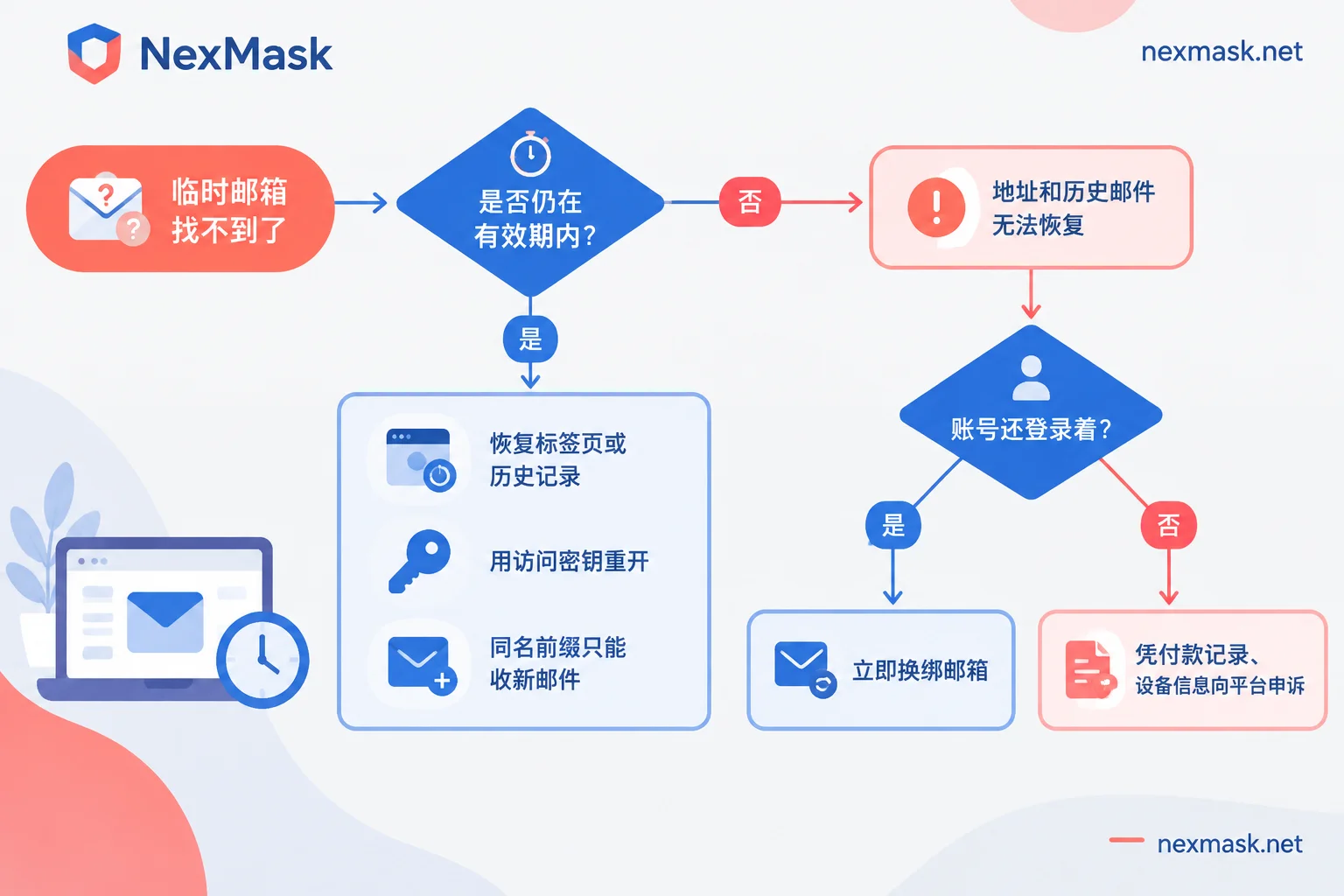
Think back on three questions: roughly when was this address generated, and has it now exceeded that service's validity period? Did you save an access key or write down the full address at the time? Is the website you registered with still logged in? Once you answer these three questions, you can match one of the sections below.
Scenario 1: Not expired yet, just closed the page
Many temporary email services rely on browser cookies or sessions to remember "this is your inbox." As long as that record still exists, reopening the page usually brings the inbox back.
- Restore the tab first: On Windows press Ctrl+Shift+T, on Mac press Cmd+Shift+T, to restore recently closed pages.
- Check browser history: Find the temporary email page you opened at the time and click into it directly.
- Use the original browser: Don't switch browsers, and don't clear cookies or cache first, or the session record may be wiped along with them.
Note that if you were using an incognito window at the time, the session is usually gone after the window closes, and this path basically won't work.
After reopening, while the address is still valid, use the verification code or confirmation link first, and save anything you need to keep separately.
Scenario 2: The service supports access keys or custom prefixes
Some services offer additional recovery methods, but this is only a feature of certain products, not all temporary emails. Please check the instructions of the one you're using first.
Access key (Token): Services like EmailOnDeck and TMailor give you an access key when generating an address. With this key, you can reopen the same inbox within the validity period. However, if the server has already performed routine data cleanup, the key will no longer work.
Custom prefix + public domain: Some services let you fill in the email prefix yourself. If you accurately remember the full address (both prefix and domain), you can recreate an address with the same name to receive newly sent emails, such as a re-sent verification code. This approach has two limitations:
- Old emails from before the recreation won't come back; they've already been deleted.
- If the service provider has already taken down that domain, this address can't be recreated.
There's another risk to consider: under a public domain, others could theoretically create the same address. So using this method to receive a one-time verification code is fine, but don't rely on it long-term for password reset emails for important accounts.
Scenario 3: Already expired or deleted
In this case, neither the address nor historical emails can be recovered. The reason lies in the design of temporary emails themselves: no account registration required, no identity binding, and the whole inbox is cleared upon expiration. The service provider can neither confirm you were the original user nor has a backup to restore. Service providers like Temp-Mail state this in their official support documentation: once an email is deleted or expired, they cannot recover the address or email content.
NexMask's temporary email works the same way: after expiration, the whole inbox is destroyed, and no logs are kept, so there's no recoverable data after expiry. This is a privacy protection design, not a malfunction. If you want to learn about the details of the destruction mechanism, you can read how temporary email auto-destruction works.
How to rescue accounts registered with temporary emails
This is usually what you actually need to deal with.
If the website is still logged in, immediately go to account settings or security settings to rebind the email, switching to your regular email or a long-term usable alias. Also check whether other recovery methods are bound, such as phone number, two-factor authentication, or backup email. Some platforms send a verification code to the old email first when rebinding. If the old email is already invalid, this step may not go through. In that case, see if the platform supports verification through other already-bound methods; if not, contact customer service and explain the situation.
If already logged out, you can only go through the platform's manual appeal process. Prepare the following materials that can prove account ownership:
- Payment records or order numbers
- Commonly used devices and approximate login locations
- Registration time and content details in the account
Platforms won't open a special channel just because you used a temporary email; success depends on each platform's own policies.
Repeatedly creating an address with the same name to wait for a reset email is not recommended. Under a public domain, this is not only unstable but may also let others receive your reset link.
How to avoid losing it again in the future
Before registering, think clearly: will you still log into this account in the future?
- Only verify once, no password recovery needed afterward, such as downloading materials or viewing content once: using a temporary email is fine, and discarding it after use doesn't matter.
- Will still log in later, may need password resets, will receive orders or after-sales notifications: don't use an address that expires and gets destroyed; switch to a long-term alias.
NexMask's long-term alias remains usable within its validity period, one per website. Emails are forwarded as-is to your regular email, and you can also reply using the alias identity. If a website starts sending spam, just disable that one alias, and other aliases are unaffected. The free version includes one alias, which you can start using for your most important account. If needed, you can get one at NexMask long-term alias.
If you just need to receive a one-time verification code temporarily, just use NexMask temporary email, no registration required. It's recommended to note down the address and expiration time, and finish the operations you need before it expires. For which accounts are suitable for temporary emails and which aren't, you can refer to the scenario breakdown in is temporary email safe.




Comments(0)