 NexMask-官方博客
First, the conclusion: expired temporary emails are basically unrecoverable. Most temporary email services clear the entire inbox upon expiration, and both historical emails and rotated temporary domains are deleted together; providers explicitly state they do not offer recovery. So the real rescue target is the account you registered with that email. Whether you can keep it depends mainly on whether you can still log in.
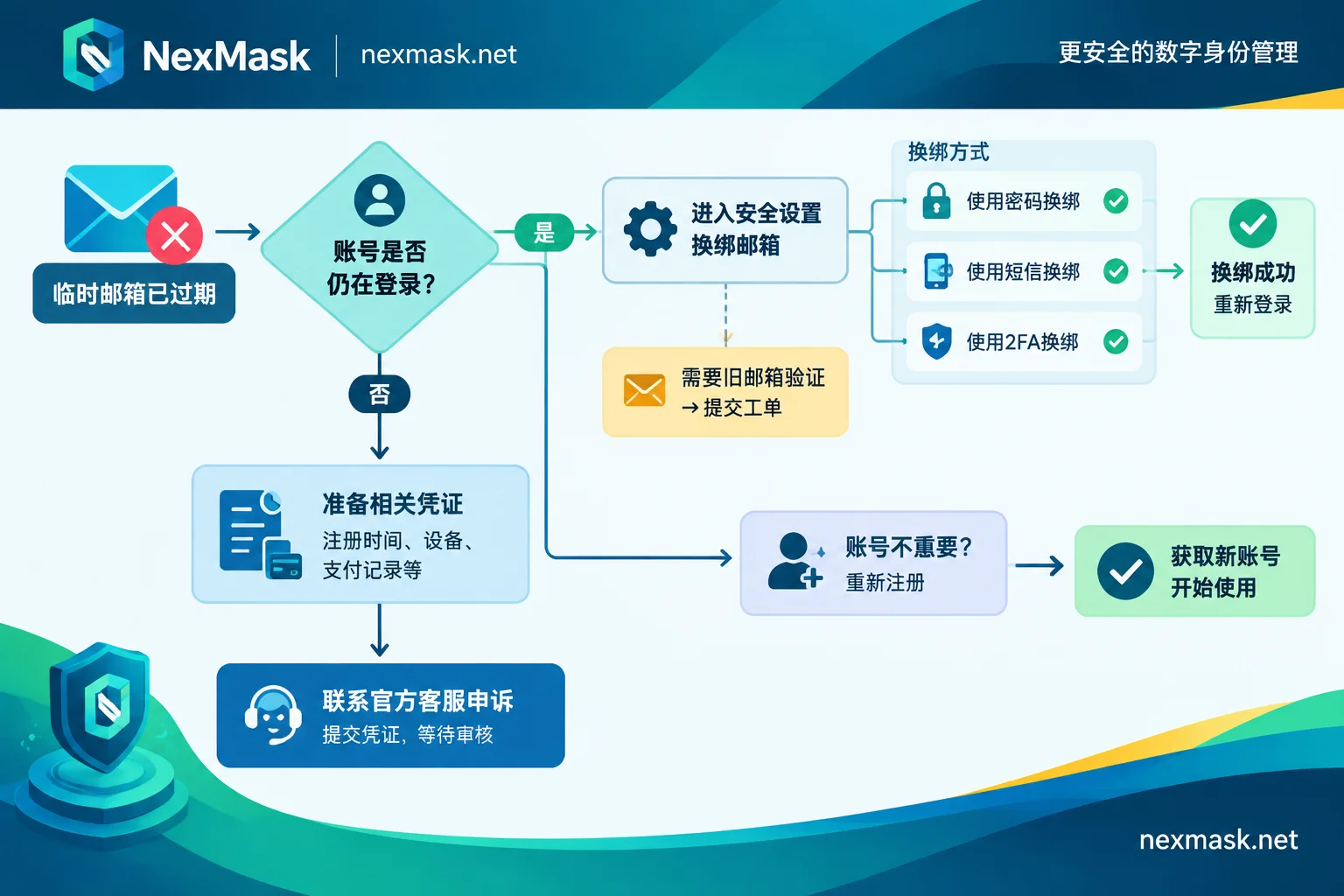
First, confirm: is the email truly expired, or just inaccessible?
Sometimes the email hasn't expired; you just closed the tab or switched devices and can't get back to the original inbox. Some services allow you to reopen the inbox with the original address or access credentials during the validity period. If you can still open it, don't dig through old emails first—go to the target platform and change the bound email, because it could expire at any moment. For specific judgment and which situations still have a chance of recovery, see How to recover a temporary email address.
If it's confirmed expired and destroyed, don't waste time looking for recovery methods; directly handle the account according to the following scenarios. For the specific destruction process, refer to How temporary email auto-destruction works.
Also note: even if a service allows recreating the same address, the original emails won't come back. Conversely, someone else might claim the same address and receive your account's reset emails. This is one reason important accounts shouldn't be bound to disposable emails.
Scenario 1: Account is still logged in—rebind email immediately
This is the easiest case to fix; the key is not to lose the login session.
- Preserve the current session first. Do not log out, do not clear browser cookies and cache, and do not uninstall or reinstall the mobile app. This might be the only way to access the account.
- Go to account settings. Usually under "Account & Security," "Profile," or "Login Methods," find the option to modify or change the bound email.
See what verification is required for rebinding.
- If only the current password, SMS code, or two-factor authentication (2FA) code is required, you can switch to a stable email after filling it in.
- If the platform requires sending a code to the old email first, this path won't work. Check if you can bind a phone number or enable 2FA first; after binding, the rebinding page sometimes offers other verification methods. If still not possible, while logged in, submit a ticket via the in-account help center, stating the original email is no longer usable. Submitting while logged in usually makes it easier for the platform to confirm your identity.
- After rebinding, do a few more things: Confirm the new email received the platform's notification; if the platform provides recovery codes, store them safely; if possible, enable 2FA for an additional recovery path.
Rules vary greatly across platforms. Some allow rebinding with just a password, others require verifying the original email. Follow the instructions on the platform you use.
Scenario 2: Already logged out—contact platform support
When logged out, the platform will send a password reset email to the destroyed address, which you can't receive, so you can't complete recovery yourself. At this point, you basically have to contact official platform support to appeal for a manual change of the bound email.
Before submitting, prepare as much evidence as possible to prove the account belongs to you:
- Account username, approximate registration time, originally bound email address;
- Commonly used login devices and approximate region;
- Payment records, such as order numbers, billing screenshots, deduction records;
- Already bound phone number, or content only you would know, such as posts, friends, saves;
- The new email you want to switch to.
A few things to know in advance: The appeal may not be approved; some platforms don't do manual rebinding, and processing can take a long time. Submit only through official platform channels; third parties claiming to recover temporary emails or find accounts for you are mostly scams—don't hand over account information.
Scenario 3: The account wasn't important anyway
If you only used it to download a file, try a feature once, or fill a survey, losing the account doesn't matter much—just re-register. This is exactly what temporary emails are good for.
How to avoid this in the future: consider whether you'll need to log in again
The problem isn't temporary emails themselves, but binding accounts you'll use long-term to addresses that auto-destruct. When choosing an email, use this principle:
- One-time use, never coming back: For downloading files, temporary trials, one-off forms, a temporary email suffices; expiration and destruction is actually cleaner.
- Will need to log in later, reset passwords, receive bills or 2FA: Don't use auto-destructing temporary emails; switch to a long-term alias. It can receive emails throughout its validity, forwards to your regular email, and you don't have to give the real address to the website.
- Started with a temporary email for trial, later decided to use long-term: Before the email expires, change the bound email to a long-term address immediately; don't wait until after expiration to fix it.
If you use NexMask, you can divide the work like this: for one-time verification codes, use temporary email—no registration, no phone number, entire inbox destroyed upon expiration, so only suitable for scenarios you won't return to. For accounts you'll use long-term, use long-term alias—one alias per website, emails forwarded as-is to your regular email, and you can reply using the alias identity. If a website starts spamming later, just disable the corresponding alias; other accounts are unaffected. The free plan includes one long-term alias, so you can first rebind your most important account. Validity and membership features are subject to the official website.
For other risks and applicable scenarios of temporary emails, refer to Are temporary emails safe?.




Comments(0)