 NexMask-官方博客
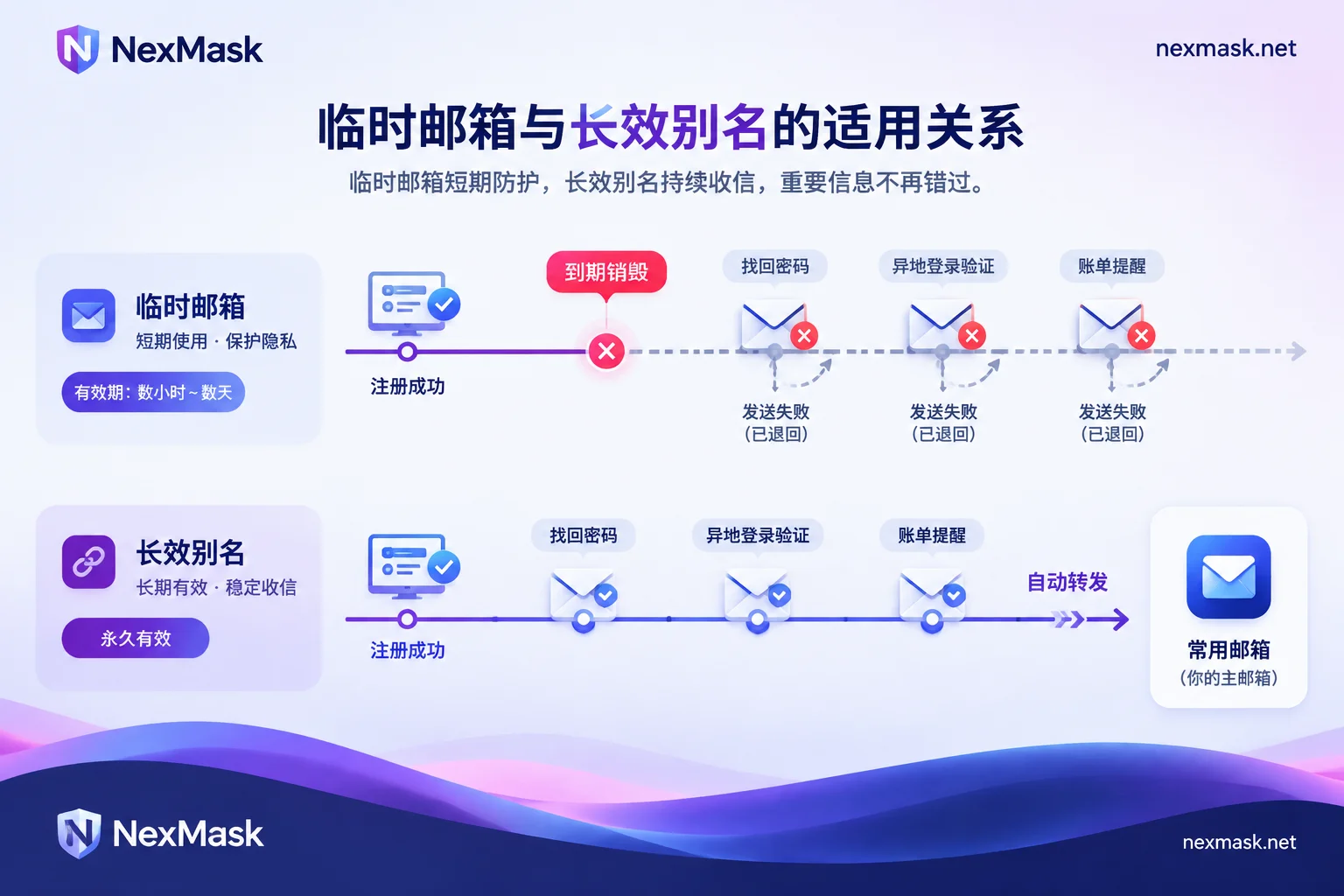
Temporary emails are not suitable for long-term use. They are designed for “receive these few emails and discard”: how long an address remains usable depends on the service's retention period—it could be minutes, a day, or several days. After expiry, both the inbox and the address access become invalid. Using them for one-time verification codes or downloading resources is fine. But if an account will later require login, password recovery, billing, or security alerts, you should switch to a long-lasting alias and forward that alias to your regular email. This way, you still don't expose your real email, and the account won't be lost because the email disappears.
When Problems Arise from Binding a Long-Term Account to a Temporary Email
On registration day, everything usually works. Trouble appears the next time the platform needs to contact you:
- When you forget your password or log in from a new device, no one receives the verification email. Password recovery, login verification from a different location, and email two-factor authentication all send to the registered email. If the email has been destroyed, that message cannot be received, and the account may be lost forever.
- Security notifications and billing reminders go nowhere. Alerts about unusual logins, subscription renewals, or terms changes are sent to an address that no longer exists. You won't know what happened.
- Most temporary emails can only receive, not send. If you need to reply to confirm, submit an appeal to customer service, or prove account ownership via email, you can't do it.
- The account may be flagged by risk control later. Many platforms detect common disposable email domains. Some block them at registration; others mark such accounts as high-risk during later reviews, restricting features or even freezing them. Passing registration doesn't mean it will always be fine.
- The address may be reused by someone else. Some public, no-login temporary email services recycle addresses after expiry; with some, anyone entering the same prefix can see the emails. If future emails are sent to that address—such as a password reset link—they could be seen by a later user. For more risk details, see Is Temporary Email Safe?.
So the key isn't how long a temporary email lasts, but that the account's lifespan outlasts the email. Switching to a temporary email with a longer retention period only delays the problem. 7-Day Temporary Email is suitable for scenarios needing to receive emails over several days, but it's still not for long-term accounts.
First Ask Yourself: Will You Still Need to Receive Emails from This Site in the Future?
- No: one-time verification codes, downloading a whitepaper, claiming a one-time coupon, testing a signup flow. A temporary email is enough.
- Yes, but you don't want to expose your real email: membership sites, forums, shopping platforms, and trial services that might become paid. Use a long-lasting alias plus forwarding.
- Yes, and it must remain under your control long-term: banking, government, primary work accounts, accounts with payment methods bound. Use your own email or an address under your own domain. The domain belongs to you, so even if you change providers later, the address can move with you.
When in doubt, treat it as “Yes.” The cost of setting up an extra alias is far less than losing an account.
Already Registered a Long-Term Account with a Temporary Email? Rebind Now
The temporary email hasn't expired yet, or you're still logged in:
- Go to the “Email” or “Security” section in account settings and change the registered email to a long-lasting alias or your regular email.
- Many platforms send a confirmation email to the old email, the new email, or both. So do this while the old email can still receive mail.
- Also check whether other recovery methods are set up, such as a backup email and two-factor recovery codes—don't leave the account with only one recovery path.
The temporary email has already been destroyed: Emails inside are basically unrecoverable. As long as you're still logged in, you can usually still change the email in settings. If you've logged out, you generally have to go through the platform's customer support appeal. For specific remedies, see What to Do When a Temporary Email Expires.
Switch Long-Term Accounts to a Long-Lasting Alias: Setup Steps
A long-lasting alias is an email address dedicated to a specific website. It remains usable during its validity period, and incoming emails are forwarded as-is to your regular email. Its difference from a temporary email directly addresses the risks above: the address won't expire and be destroyed, password recovery emails can be received, and you can send and reply using the alias identity.
Steps to set it up on NexMask:
- Generate an alias at NexMask Long-Lasting Alias. We recommend using one per website and noting which alias goes to which site. The free plan includes one alias; for more, refer to the official website.
- Set the forwarding destination to your regular email. Then verification codes, password recovery emails, and billing reminders will appear as-is in your regular email—no need to log into a separate email to check.
- Use this alias to register new accounts, or follow the previous section to rebind an old account's email to this alias.
- When you need to contact support or submit an appeal, send and reply using the alias identity. The other party sees the alias, not your real email.
- If a website starts sending frequent spam or suffers a data breach, simply disable the alias for that site; aliases for other sites are unaffected. Because you use only one alias per site, you can also tell which site leaked your email from the recipient address.
One note: after disabling an alias, all emails from that site can no longer be received, including password recovery emails. If you still need to use that account, first rebind it to a new alias, then disable the old one.
For Many Accounts or a Large Number of Addresses, Consider Your Own Domain
If you run multiple accounts or do QA testing and need many long-term usable addresses, creating aliases one by one can be cumbersome. In that case, use a Custom Domain (a paid feature): after adding MX records in your domain's DNS, enable catch-all, and any address under that domain with any prefix can receive mail without pre-creating it. The domain is always yours and can be transferred out. For accounts you need to keep for many years, this is more reliable than depending on any service provider's address. If you need to forward emails to multiple colleagues at once, you can use multi-target forwarding—also a paid feature.
A Few More Edge Cases
- Some platforms also restrict forwarding addresses. If your registration is rejected, you can check What to Do When Temporary Email Is Rejected to determine the reason and then decide whether to switch aliases, use your own domain address, or just use your regular email.
- If the platform also requires phone verification, that's another hurdle—changing email won't solve it.
- For your most critical accounts, such as the recovery email for your primary email, banking, and payment accounts, we recommend using an address you control long-term directly, without adding another layer of relay.




Comments(0)