 NexMask-官方博客
Whether attachments can be received depends on which provider you use. Some disposable temp mailboxes, to save storage and avoid malicious file risks, directly strip attachments and only keep the body and verification codes; others support online preview and even download of images and documents. So there's no universal answer—you need to spend half a minute testing the one you have.
And often more important is the second question: even if it can receive, after the temp mailbox expires, the entire box is destroyed, attachments go with it, and cannot be recovered. If you need things like invoices, contracts, or authorization codes that you'll need to look up later, you should change direction from the start.
Test in Half a Minute Whether Your Temp Mail Receives Attachments
Send a test email from your regular mailbox to the temp address, with a few hundred KB PDF or PNG attached, then check three things:
- Did the email arrive? If the email itself doesn't appear, it's a delivery issue, not an attachment issue. First go through the three causes and four-step troubleshooting method.
- Is there an attachment entry below the body? A download button means it's supported; if it only shows a line like "attachment removed" or nothing at all, this provider strips attachments on inbound.
- Can you get the original file? Some platforms only offer online preview, not download; some block extensions like .zip or .exe separately—it's common to receive PDFs but not zips.
Once it passes, do another test with a larger file, e.g., over 5MB. Most email services have size limits per email; exceeding may bounce, or silently drop with nothing shown on the page. Specific thresholds vary by provider; refer to your actual provider's documentation, don't apply others' numbers.
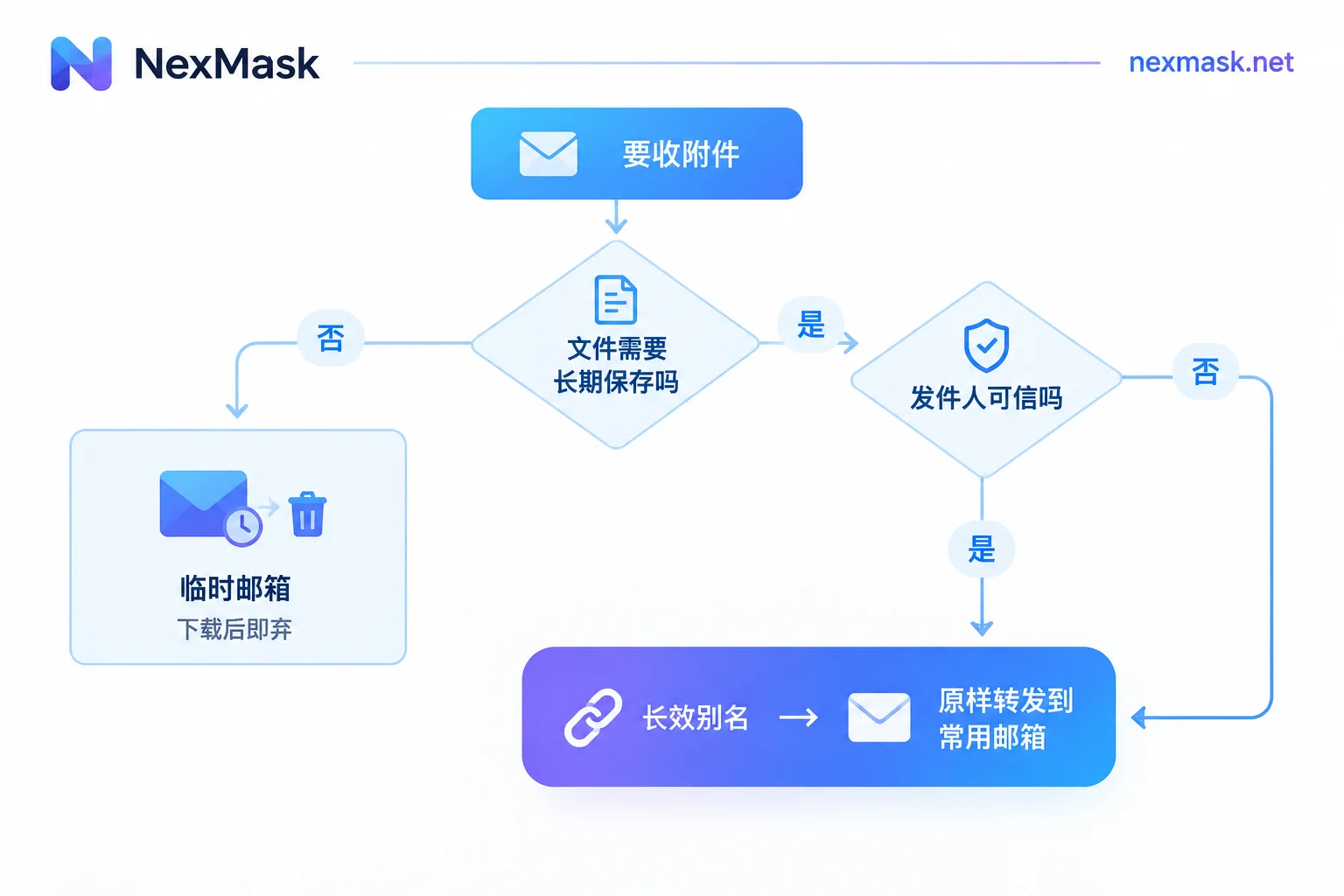
Even If It Can Receive, There Are Two Unavoidable Limits
Destroyed Entirely on Expiry
Temp mailbox lifespans typically range from tens of minutes to over a day. When time is up, emails and attachments are cleared, no backup, no recovery. This is separate from "whether attachments are supported"—supporting download only means within that window. For details on destruction mechanisms, see How temp mail auto-destruction works.
In practice: download attachments immediately to local storage or cloud drive; don't use temp mail as an archive.
No Enterprise-Grade Scanning
Disposable mailboxes generally lack sandbox scanning and virus databases; they give you whatever attachment is sent. If the sender is unknown, executable files (.exe, .bat) and macro-enabled Office documents are highest risk—don't open them directly on your machine. To handle, first upload to an independent online scanning service, or view in a virtual machine or isolated environment.
Scenarios Where Using Temp Mail for Attachments Is Appropriate
- One-time data packs or download links automatically sent after registration, to be discarded after viewing;
- Sending small files to yourself as placeholders or temporary transfer;
- In forms and QA testing, to verify "whether the system actually sent this email with attachment"—only checking result, not content.
Common points: files are unimportant, don't need to be kept, and the sender is a trusted system. If these three hold, temp mail is the most hassle-free choice—no registration, no phone number, get one anytime; open a temp mail and it's ready.
When You Need to Truly Receive and Keep Files, Switch to Alias Forwarding
If the other party is sending contracts, invoices, design drafts, or this contact will continue sending things to you, the right approach is not to find a "temp mail that supports attachments," but to use a long-term alias with as-is forwarding.
The mechanism is simple: you give the other party an alias address. The alias receives the email and forwards it as-is to your regular mailbox, with attachments included. Files ultimately land in Gmail, Outlook, or your corporate email, where there's virus scanning, full-text search, and long-term archiving, while your real address is never exposed. The alias remains usable during its validity period, unlike temp mail which expires.
Recommended setup order:
- Get a long-term alias, fill in the regular mailbox to forward to;
- One alias per site—don't use one alias for multiple sites—so if you get spam later, you can see which site leaked it;
- Give the alias to the other party or fill it in the registration page. First send a test email with attachment yourself to confirm the whole chain works;
- In your regular mailbox, add a filter rule for this alias to auto-sort to the corresponding folder;
- When collaboration ends or harassment starts, just disable this alias—it won't affect other addresses.
When you need to reply as the alias and send attachments back, use the same chain; the other party still sees the alias.
Forwarding Set Up but Attachments Missing
Check in this order; most issues are in the first two:
- Landed in spam. Emails on forwarding chains are more likely to be flagged than direct delivery. Check the spam folder first. For detailed judgment, see First identify which end, then troubleshoot the forwarding chain.
- Target mailbox blocked it. Mainstream mailboxes have limits on email size and attachment types. Encrypted archives, executable files are often rejected or stripped by security policies. This happens on your mailbox side, unrelated to the alias.
- Original email didn't have attachments. Many platforms send download links instead of files; links may require login and have expiry; clicking after expiry gives a blank page.
- Body arrived, attachment missing. If the body is complete but attachment disappears, usually some link in the chain stripped it. Test with a different target mailbox to locate which end.
One-Sentence Selection
For only verification codes and low-risk plain text notifications, use temp mail—destroyed after use is cleanest; once it involves file delivery, account recovery, or long-term contacts, use a one-per-site, disposable, as-is forwarding long-term alias, and let your main mailbox store and scan files. The middle-ground usage of "wanting to use temp mail for long-term file receiving" will sooner or later suffer from expiry destruction, regardless of attachment support.




Comments(0)