 NexMask-官方博客
You clicked "Send verification code" and the temp mailbox is completely blank—the two easiest things to do at this moment are exactly the wrong ones: frantically clicking resend and constantly switching to new addresses.
The vast majority of temp mail delivery delays do not happen on the receiving end. If the email hasn't arrived, it usually means it hasn't been sent yet, has been actively delayed by the sending server, or has simply been blocked by the target platform. Follow the order below to judge, then decide whether to switch tools.
The First Two Minutes: Only Do Three Things
1. Keep the inbox page in the foreground and wait 60 to 120 seconds. Normally verification codes arrive in seconds, but once the sender starts queuing, 1 to a few minutes is within the normal range. During this time, don't switch away.
2. Don't repeatedly click "Resend". Requesting repeatedly in a short time can reset the sending platform's throttling timer and trigger rate limits; more troublesome is that the newly sent verification code usually invalidates the previous one—so the old email that just finished queuing and finally arrived, when you open it, is already invalid. You'll mistakenly think "it failed again", when in fact you overwrote it yourself.
3. Check the address characters. In the random prefix of a temp address, l and 1, 0 and O are very easy to misplace when copying by hand. If you enter one wrong character on the registration page, the email will be silently delivered to another non-existent address. Copy and paste, don't type by hand.
After waiting a full two minutes and it's still blank, manually refresh the inbox once, then read on to see where it got stuck.
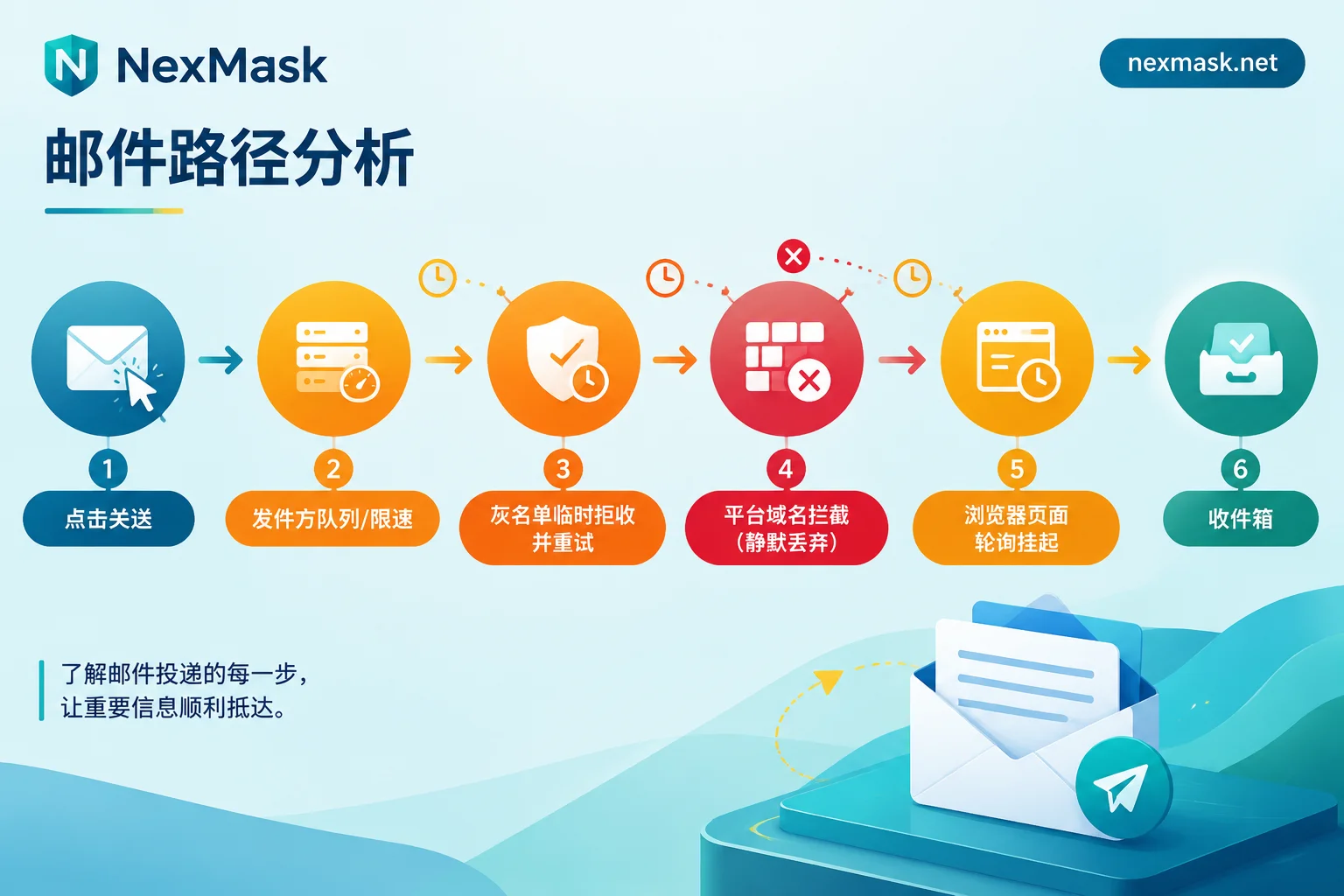
Delays Usually Get Stuck in These Four Places
Sender is queuing and rate limiting
This is the most common type. The target platform is at a registration peak, or its risk control determines your request comes from a proxy IP, data center IP, or the same form was submitted too frequently in a short time, so the system won't send immediately but puts the email in a queue and slows it down. The interface saying "Sent" is true, but "sent" means the task has been accepted, not that the email has left.
This type of delay recovers on its own; waiting patiently is the correct action.
Greylisting makes the first email inevitably slow
Greylisting is an anti-spam mechanism: the email system directly returns a 4xx temporary rejection (commonly 451) for the first occurrence of the "sending IP + sender + recipient" triplet, requiring the other party to come back later. Legitimate sending servers will automatically retry, usually at intervals of 1 to 15 minutes, and conservative configurations even longer.
The key point: this is a designed delay, not a failure, and it only affects the first communication. If the sender's retry queue is loosely scheduled, you'll experience a structural few minutes. Understanding this, you won't conclude at minute 3 that "this mailbox is broken."
Platform silently blocks disposable domains
This type is most easily mistaken for a delay. Many platforms have integrated public disposable email domain detection libraries. Once matched, the front end still shows "Verification code sent", but the back end directly blocks sending or silently discards. No error, no bounce—you'll wait indefinitely for an email that will never exist.
The way to judge is straightforward: after waiting several minutes, retry sending only once. If there's still no response, treat it as "blocked" and stop clinging to this address. At this point, changing the prefix usually doesn't help—it's often the entire public domain that's blocked, not just your one address.
Page asleep, or the mailbox expired first
Mobile browsers and background tabs that have been inactive for a long time will have JavaScript polling and network connections restricted by the system. The email may have already arrived, but the page just won't refresh. A manual pull-to-refresh once will rule this out.
More troublesome is the time gap: temp mail has a lifecycle, and expiry destroys the entire mailbox. If the email is stuck in the sending queue or greylist retry, and during this time the mailbox's life reaches its end, the retried email can never be delivered, and there's no recovery entry for the destroyed content (for this mechanism, see How Temp Mail Auto-Destruction Works). So "the closer to expiry, the more you should not initiate new verification requests" is a practical discipline.
If you want to pinpoint the problem by which step the email has reached, Troubleshoot Verification Codes by Location has more detailed segmented judgment.
When to Stop Waiting and Think Differently
Combining the four points above, the criteria for stopping waiting are actually simple:
- Wait a full 2 minutes → refresh the page, check the address;
- Around 5 minutes → retry sending only once, then continue waiting (leaving room for the greylist retry window);
- After retry and a few more minutes with still no email → judge as sender risk control or domain blocking, try changing the address once; if the same type of domain still doesn't work, it's not a time issue, it's time to switch tools.
Note that "switch tools" doesn't mean "switch to another temp mail website". If the failure reason is a disposable domain being identified, switching to another public temp domain still has a high chance of hitting the same detection library.
Which Accounts Should Never Use Temp Mail from the Start
Delays and expiry destruction combined, the worst result isn't failing to receive the verification code, but successfully registering an account while the bound email disappears a few hours later—then password recovery and security notifications have no landing point.
Separating by use makes it less likely to go wrong:
Suitable for temp mail: one-time downloads, low-risk registrations you just glance at, placeholder testing for forms and registration flows. Use and discard, expiry destruction is actually an advantage. You can always get one at Temp Mail, no registration, no phone number required.
Should switch to a long-term alias: accounts that need long-term password recovery, have assets or subscriptions bound, have two-factor authentication (2FA) enabled, and platforms that explicitly block disposable emails. A long-term alias remains available throughout its validity period, one per site, forwards emails as-is to your regular mailbox, and can also send and reply directly under the alias identity; if a site starts sending spam, just deactivate that one, and your real mailbox is unaffected. For naming and deactivation habits of one-per-site, see How to Manage Aliases.
If you need to register many accounts and want an address space entirely your own, a custom domain (membership feature) is another path: after setting up MX records, any prefix can receive (catch-all), the domain belongs to you, and you can migrate out at any time. For the trade-offs of the three forms, How to Choose a Virtual Mailbox breaks it down more finely by scenario.
A Boundary to Clarify
Switching to a long-term alias solves the two problems of "being identified and blocked by platforms" and "mailbox expiring and losing contact". It does not make emails faster. Sender queue throttling and greylist retries still exist—that's protocol behavior between sender and receiver, and no receiving tool can bypass it.
So the value of an alias is: even if you still wait a few minutes, the email you wait for can actually be delivered, and tomorrow, next year, it will still be there.




Comments(0)