 NexMask-官方博客
You fill out the signup form, hit submit, and a red message pops up: "Please use a valid email address" or "Disposable email addresses are not supported." You didn't type it wrong—the platform is actively blocking the domain you used.
Here's the conclusion first, based on what you need the account for, there are three paths:
- Just downloading a resource, connecting to public Wi-Fi once, or grabbing a trial—switch to a different domain suffix in your temporary email tool and retry; it usually goes through in seconds.
- You might need to log in, change password, or receive security alerts later—stop messing with temporary emails and switch to a long-lived alias that forwards to your regular inbox.
- The platform is very strict, even blocking public alias domains—use your own domain with catch-all forwarding, the least likely to be flagged.
Below, we explain how to follow each path and where each one fails.
How Platforms Actually Recognize You
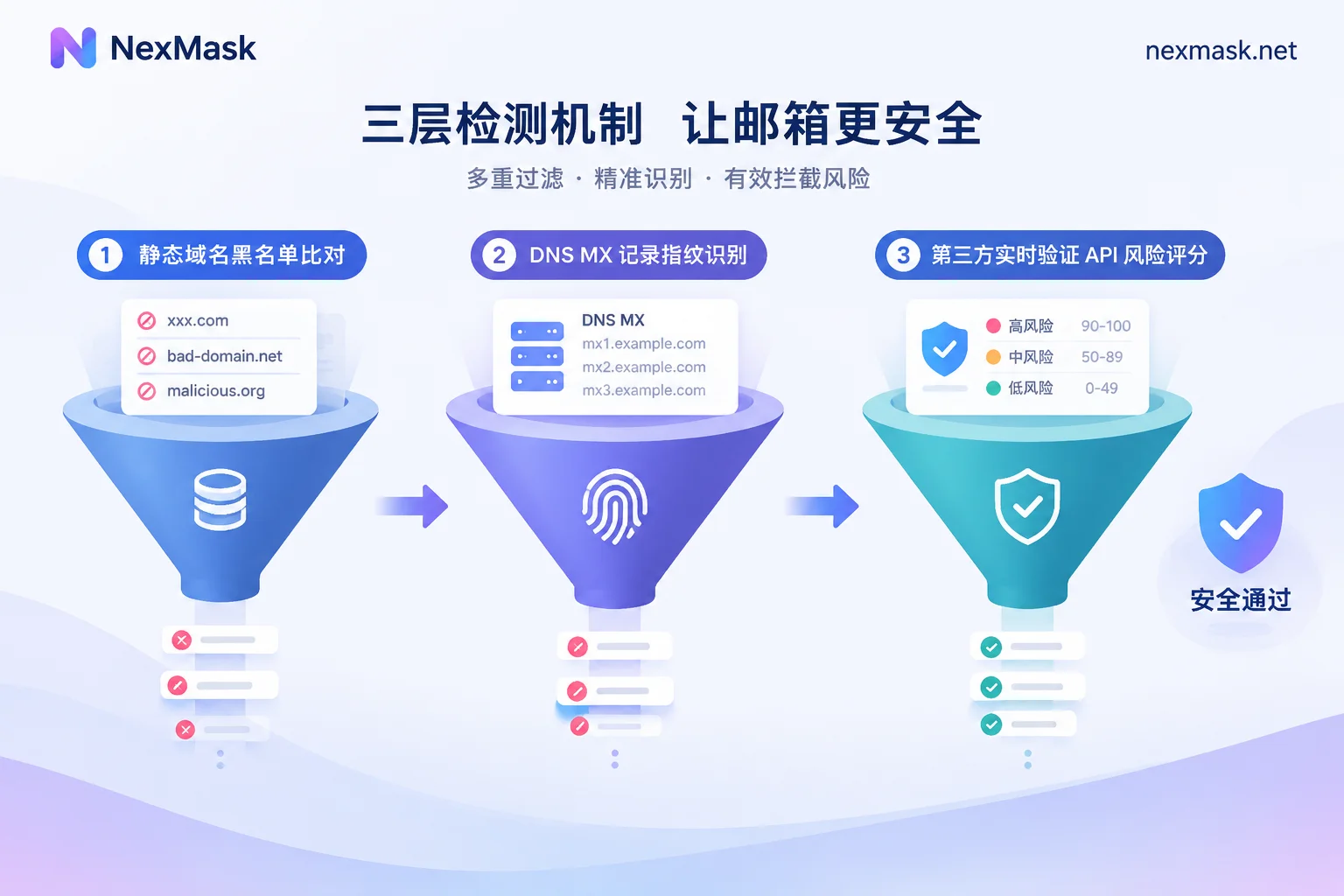
Knowing the blocking mechanism tells you which workaround is useful and which is wasted effort. There are typically three layers, each harder to evade.
The first layer is static blacklists. There are publicly maintained lists of disposable email domains, as well as commercial paid databases. The platform simply compares the domain you entered; if it matches, you're rejected. This layer lags behind, so newly launched domains often aren't listed yet—switching to a new suffix frequently works.
The second layer is MX record fingerprinting. The platform looks up the MX records for your domain to see which server ultimately receives the email. Many temporary email services front dozens of different domains, but behind the scenes they point to the same shared receiving servers. Once those servers are flagged, no matter how many front-end domains you switch to, it's the same fingerprint, and you'll be classified the same way. That's why some people try seven or eight suffixes and still fail.
The third layer is third-party real-time verification APIs. At the moment of submission, an API is called to assess how long the domain has been registered, whether it has a history of normal sending and receiving, and whether its mail exchange characteristics resemble a personal or business email—then it dynamically assigns a risk score. Newly registered domains with no history may be flagged as suspicious.
As for why platforms do this, the reasons are practical: prevent the same person from repeatedly signing up to abuse free trials and new-user perks; block bulk spam accounts; and one easily overlooked—temporary emails expire, so subsequent emails from the platform bounce en masse. A high bounce rate hurts the platform's own sending reputation with email service providers. From the operator's perspective, blocking you isn't personal.
Path 1: One-Off Scenarios—Switch Domains and Retry
The applicable premise is clear: you won't need this email after receiving this one message. Download links, one-time activation codes, Wi-Fi authentication, a one-time forum view permission—all fall into this category.
The approach: refresh or manually switch the domain suffix in your tool, get a new address, and submit again. If you've tried two or three and still get the same message, it's likely they're checking MX fingerprints or using a real-time API. Stop trying this path and jump to the next section.
A reminder: temporary emails are destroyed entirely upon expiration—the messages inside, along with the address itself, cease to exist. So even if you luck out and register successfully, if the account might later need a password reset or abnormal login alerts, it's a time bomb—by the time you need recovery, that inbox is long gone. If you just want to understand which scenarios these tools suit, see how to use temporary email.
Path 2: Accounts You'll Keep—Switch to a Long-Lived Alias
After being rejected, the most worthwhile adjustment is to change your mindset: what you need isn't "a temporary address that tricks detection," but "an address that doesn't expose your real email yet remains valid." That's what long-lived aliases do.
It differs from temporary email in three ways:
- It stays as long as it's valid, not destroyed on a timer, so password reset emails, bills, and security alerts all arrive normally;
- Emails are forwarded as-is to your everyday inbox, so you don't need to keep checking a web page;
- One per site, can be disabled anytime. If an address starts receiving spam, you know which site leaked it—just disable it, and your real email remains unharmed.
One often overlooked point: good alias services support sending and replying as the alias. The other party always sees the alias address; you just reply normally from your own inbox, and your real address is never exposed in the correspondence.
To get one, go to the NexMask long-lived alias page and create it, setting the forwarding target to your regular email. If you just need a disposable address for an emergency, temporary anonymous email requires no registration or phone number and is available anytime. Multi-target forwarding and bulk generation are membership features; for everyday one-alias-per-site use, the free version is enough.
Aliases aren't a panacea. Their domains are the provider's public suffixes, shared by many users, so theoretically they can also end up on some platforms' blocklists—just far less often than disposable email domains, because they lack the feature platforms fear most: "expires and becomes invalid." If you do hit a block, see the third path.
Path 3: Strict Platforms—Use Your Own Domain
A few strict platforms block the public suffixes of well-known privacy alias services as well. The only reliable approach then is to use your own independent domain.
The process: register a domain → add MX records in DNS pointing to a forwarding service → enable catch-all so any prefix can receive. After that, you can make up any address you fill in on each website—taobao@你的域名, forum@你的域名—all land in the same forwarding channel and then reach your main inbox.
This has three benefits: it won't hit any public temporary domain blacklist, because only you use this domain; address isolation is more thorough than aliases—to add a new prefix, no need to create it in a backend; and the domain's ownership is yours—if you want to switch providers later, just change the MX records and migrate; addresses remain valid.
The cost is a barrier: you need to buy a domain and know how to edit DNS, and custom domain on NexMask is a membership feature. If you manage multiple identities or plan to use it long-term, this investment is worthwhile; for just getting through one signup, you don't need to go this far.
Two Situations That Aren't "Rejected"
Two phenomena are easily confused with blocking, but require completely different handling:
Submission succeeded, but the verification code never arrives. This means the domain passed; the problem is in the receiving step—it might be in spam, there could be forwarding delay, or the sender's email was blocked en route. Troubleshoot by location; see three reasons temporary emails don't receive messages and how to troubleshoot.
Email passed, but you're stuck on phone or device verification. Some platforms layer SMS verification, IP reputation, browser fingerprinting, and other risk controls; email is just one part. No email change will help here—you need to address the specific step. Phone verification and browser environment are beyond the scope of email tools.
How to Decide Quickly
Ask yourself three questions:
- Will I still log into this account three months from now? Yes → start with a long-lived alias, not a temporary email.
- Have I tried two or three domains on this platform and still failed? Yes → they're checking MX fingerprints or using a real-time API; go straight to an alias or your own domain.
- Do I need to manage identities across a dozen sites simultaneously? Yes → own domain + catch-all, easiest long-term.
Being rejected is actually a good reminder: it forces you to think ahead about the weight of this account. Registering on a whim, the address disappears days later, and six months later you want to reset a password but have no way—that pitfall is far more troublesome than being blocked once. If you're still unsure which type to use, check how to choose a virtual email before deciding.




Comments(0)