 NexMask-官方博客
Some people say "the temp email verification code went to spam," but they're actually describing two completely different things. Take ten seconds to distinguish them first, so you don't head in the wrong direction when troubleshooting.
Step 1: Identify Which End the Spam Folder Is On
Case A: You don't see the email in the temp email web inbox. A web-based disposable inbox is usually just a message list, not a separate Spam folder like Gmail. The email either appears in the list or never arrived. This is not "going to spam"—you should investigate it as a non-receipt: check for a misspelled address, whether the platform rejects disposable domains, or if it's still in transit. You can refer to How to troubleshoot temp email not receiving messages and Where receiving delays get stuck.
Case B: You've set up forwarding, the email did arrive in your primary mailbox, but it's sitting in the spam folder. This is the issue this article addresses, and it's the real scenario for the vast majority of "going to spam" cases—the problem is at the forwarding hop, not the temp email itself.
The way to tell is simple: go to your primary mailbox's spam folder and search for the sender domain or keywords like verification, code, 验证. Gmail's regular search doesn't include spam and trash by default; you need to add in:anywhere to search everything. If you find it, it's Case B; if not, go back to Case A.
Step 2: Immediate Actions on the Receiving End
Once you confirm the email is in spam, first correct your primary mailbox's judgment—this is faster than studying protocols.
Mark the email as "Not Spam". Services like Gmail and Outlook use your manual corrections as filtering weight for that account, increasing the chance that similar emails land in the inbox next time. Marking once has limited effect; marking several in a row is more noticeable.
Create a filter rule based on your alias address, not the sender. This is the most worthwhile step. For forwarded emails, the recipient field usually still contains the address you used on the temp email or alias service. In Gmail, create a new filter with the condition to:你的别名地址 and check "Never send it to Spam". This way, no matter which platform sends to this alias in the future, it will land directly in the inbox, without whitelisting each sender individually. Outlook and QQ Mail have rule features in different locations, but the idea is the same—match by recipient address.
Check that the forwarding target isn't being accidentally caught by old rules. If you previously set a rule like "move to spam" for a certain domain, or manually marked emails from the same source as spam, new emails will continue to be suppressed. Go through your rule list.
After these three steps, subsequent emails on the same forwarding chain usually work fine. But it's worth knowing why the first one was blocked—it determines whether you need to change your approach.
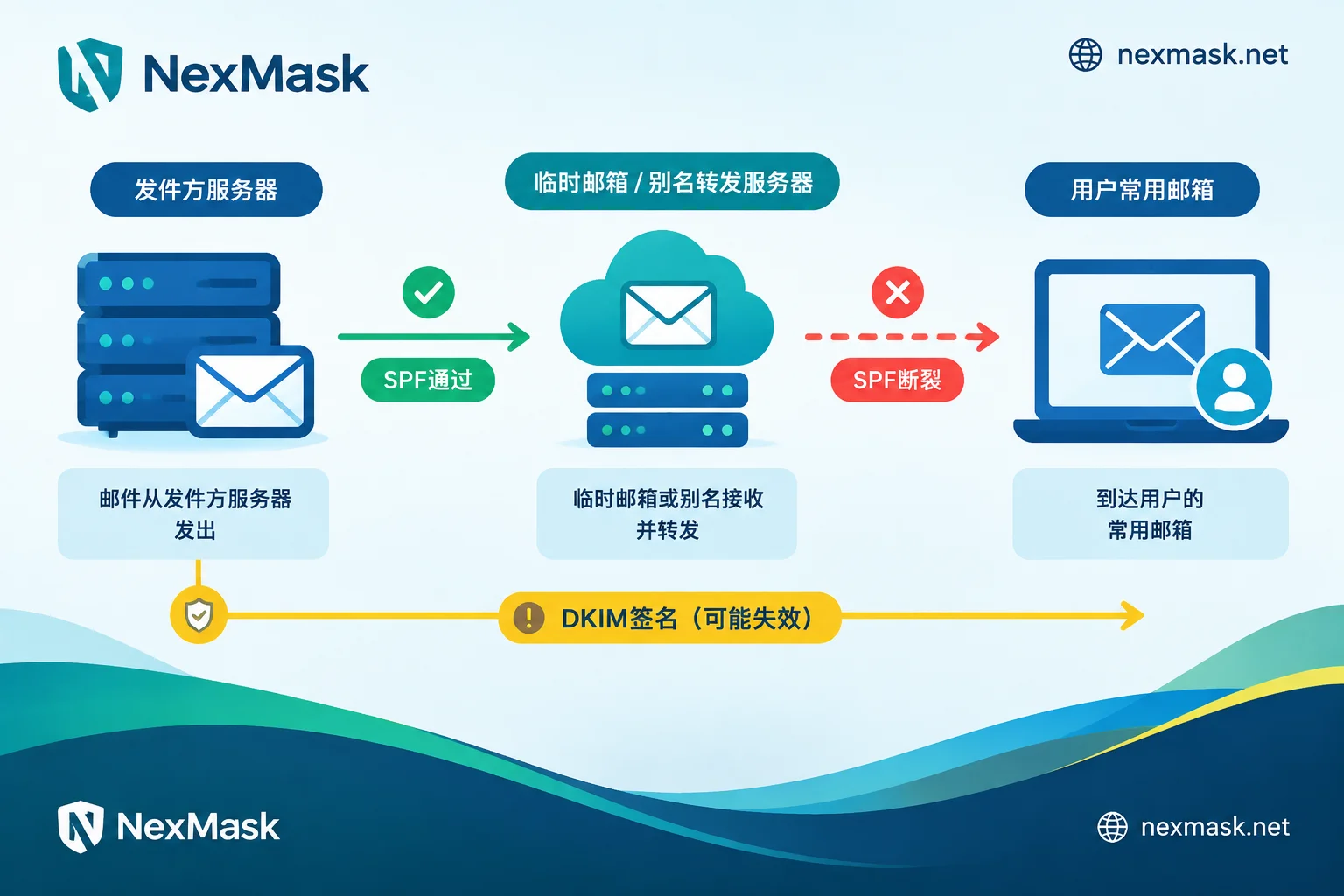
Why Forwarded Emails Are More Likely to Be Marked as Spam
SPF Inevitably Breaks at the Forwarding Hop
When a receiving server performs SPF checks, it looks at the IP of the server that actually connected, then queries the SPF record of the sender domain to see if that IP is authorized.
When email is delivered directly, there's no problem. But after forwarding, the server connecting to your primary mailbox is the forwarding server, and the original sender domain's SPF record certainly won't include that machine. The result is fail or softfail. This isn't a misconfiguration—it's an inherent consequence of forwarding.
DKIM Can Save the Day, But It's Not Always There
DKIM signatures are cryptographic signatures on the email headers and body, travel with the email, and forwarding itself doesn't break them. So according to Gmail's sender guidelines, as long as DKIM passes and aligns with the sender domain, DMARC can still pass, and the email still has a chance to land in the inbox.
The problem lies in two places: first, some senders don't configure DKIM at all, so both fail after forwarding; second, if the relay modifies the email—adding a footer, rewriting the subject prefix, changing the MIME structure or encoding—the signature becomes invalid on the spot. With both SPF and DKIM failing and DMARC alignment failing, if the sender domain has a strict policy, the email may at best go to spam and at worst be rejected outright.
Public Suffix and Shared Exit Reputation Are Linked
Public free temp email domains and public relay exit IPs have long been abused for bulk registrations and marketing, resulting in low overall reputation scores. Your perfectly normal verification code just happened to pass through a channel that's been given a low score.
These three layers stack probabilistically—they're not three independent switches. Major mailbox filtering models are closed-source and also score based on content features, link density, and your personal history. So don't attribute a single email going to spam to one sole cause—what's certain is that each additional forwarding hop increases the chance of being marked as spam.
Step 3: Change Your Usage by Purpose—More Fundamental Than Tweaking Rules
Just Need a One-Time Verification Code: Don't Forward
For signing up for a trial, grabbing a download link, or glancing at a confirmation email—these needs don't require forwarding to your primary mailbox at all. Just read it in the web inbox and be done. One less forwarding hop means one less authentication break, and no trace left in your primary mailbox. NexMask's temp email requires no registration or phone number, you can get one anytime, and it self-destructs when it expires—no management needed after use.
If you're not sure whether this scenario should use a disposable address, check out the three-step process in How to use temp email.
Accounts That Need Long-Term Receiving: Use Long-Lasting Aliases + Whitelist Rules
For accounts involving password recovery, bills, or order status, a disposable address becomes unreachable after expiration and destruction. You should use a long-lasting alias: one per site, continuously usable within its validity period. If an alias starts receiving spam, you can disable it individually, and also trace back which platform leaked your address.
Aliases forward emails as-is to your primary mailbox, so the SPF breakage mentioned above still exists. The correct approach is to do two things together: set the target mailbox in NexMask's email forwarding, then go back to your primary mailbox and create a "Never send to Spam" filter based on the alias address. Configure this rule once and all future forwarded emails benefit.
If you need to reply using this alias identity, the alias supports sending and replying as itself, without exposing your real address.
Want to Completely Escape Public Suffix Reputation Linkage: Bind Your Own Domain
If your use case demands high receiving stability, or the public suffix has been rejected by the target platform, you can use a custom domain (membership feature): add MX records at your domain registrar to connect, enable catch-all so any prefix can receive, and the reputation is tied to your own domain, no longer affected by others' abuse. The domain is always yours, and you can take it with you if you migrate later.
A reminder: a newly activated domain has no sending history, so being treated conservatively in the first few weeks is normal. Don't do marketing blasts on the same domain at the same time—that will drag down the reputation you've worked hard to build.
If you're still hesitating between temp, alias, and your own domain, How to choose a virtual mailbox has a more complete comparison.
Several Situations That Look Like Spam But Aren't
- The platform doesn't accept disposable domains at all. When you submit registration, it reports "Please use a valid email," the email was never sent, so of course you can't find it in spam. See What to do when temp email is rejected.
- It just hasn't arrived yet. During peak times, verification code delays of tens of seconds to a few minutes are normal. Wait two minutes before checking spam.
- The sender itself has issues. Newly registered sending domains, content that's almost all links and images, missing unsubscribe links—these independently raise the spam score, regardless of what mailbox you use.
- The temp email has expired and been destroyed. After the entire inbox is destroyed, the original address no longer receives email, and historical messages are unrecoverable. In this case, you need to change tools, not filtering rules.
Final Thoughts
Just remember three layers in order: first confirm which spam folder the email is actually in, then create a pass-through rule in your primary mailbox matching the alias address, and finally decide whether to continue forwarding based on your use case. For one-time codes, read directly in the web inbox; for long-term accounts, use a disable-able alias; if stability is required, bind your own domain.
Filtering models vary across platforms, and no configuration guarantees 100% inbox placement—but one less forwarding hop, a clear pass-through rule, and a suffix that hasn't been abused can indeed significantly improve your chances.
If what you need now is one-time receiving, go get a temp email and read it directly on the page; if it's for a long-term receiving account, go set up forwarding and configure that rule in your primary mailbox.




Comments(0)