 NexMask-官方博客
First the decision rule, then the reasoning.
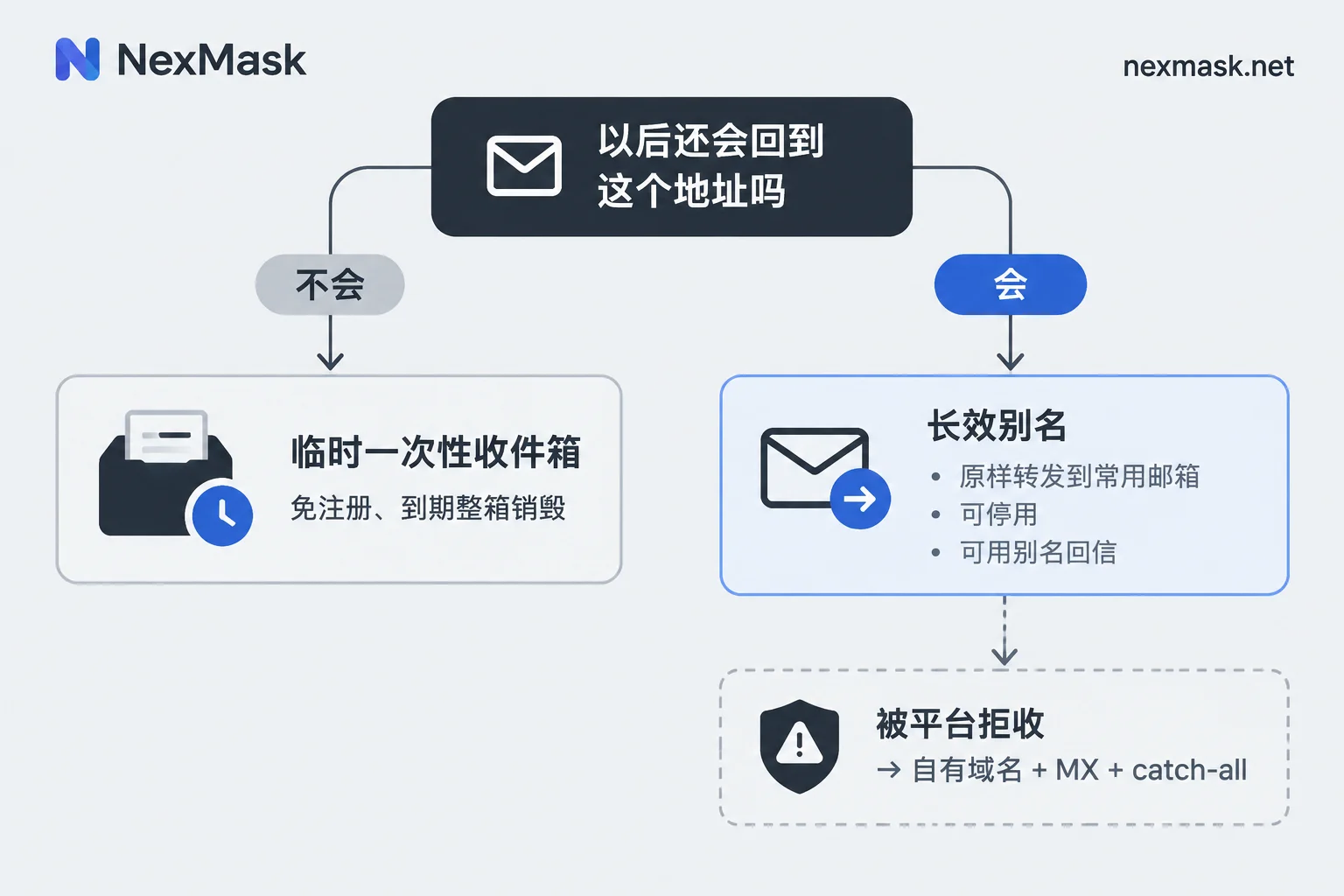
Will you ever come back to this address? No — for example, you just need a verification code once, download a whitepaper, or try out a tool — use a disposable one-time inbox. Yes — for example, the account will stay, you might need password recovery later, or you need to receive bills and shipping notifications — use a long-lived alias. This one rule resolves most of the decision paralysis.
The remaining questions are: how to forward an alias to your regular inbox, how to cut off a site that starts sending spam, and what to do when a signup form outright rejects disposable domains. We'll cover them in that order.
"Virtual email" refers to two completely different things
In Chinese, "virtual email" is used as a catch-all term, but underneath there are two mechanisms, and mixing them up causes problems.
Disposable / Temp Mail: A web page directly gives you an address and a separate inbox — no registration, no phone number, receives mail during its validity period, and the entire inbox is destroyed when it expires — the address and all its emails are gone together. It isn't tied to any identity, so there's no "recovery."
Email forwarding alias (Alias / Relay): The alias itself isn't an inbox, but a routing rule pointing to your real email. When someone sends to the alias, the system forwards it as-is to your regular inbox, and you read it in your familiar client. Better implementations also support reverse relaying, meaning you can reply and send as the alias, so the recipient always sees the alias and your real address is never exposed. The alias remains usable during its validity period and can be individually deactivated when not needed.
The core difference isn't "temporary vs. long-term" but where the email ultimately lands: temp mail lands in a public container that will be destroyed; an alias lands in your own inbox.
Temp mail: for grab-and-go actions
Typical scenarios: claiming a one-time download link, checking whether a site actually requires email verification, trying a service you don't plan to renew, or needing a set of unrelated inboxes for form submission and signup flow testing.
Using it is so simple there's little to explain: get an address, fill it into the form, go back to the page and wait for the email. No registration also means no account to log into, so whether you can recover that inbox after switching devices, clearing cache, or closing the page depends on whether you wrote down the address; after expiration, even if you remember the address it's useless — the entire inbox being destroyed is by design.
Three situations where you should not use temp mail:
- Accounts you'll need to recover passwords for later;
- Accounts involving payments, invoices, or shipping notifications;
- Services you plan to use long-term and won't accept "if I can't log in someday, so be it."
Treat temp mail like a sticky note, not a drawer. For more detailed guidance on when to use it, see the three criteria in When to use a temp mail generator.
To grab one right away, go to NexMask Temp Mail, fill in an address, wait for the email, and forget about it; if you need to generate a batch for testing at once, batch generation is a member feature.
Long-lived aliases: one per site, cut only one line when problems arise
The value of an alias isn't "hiding" — it's isolation and accountability.
The practice is one alias per website. One for shopping, one for forums, one for that newsletter that always blasts emails. All forward into the same regular inbox, so your reading habits stay the same. This gives two direct benefits:
- You can immediately trace the source of spam. When you receive unexpected promotions, see which alias it was sent to and you'll know which company sold or leaked your address — no guessing.
- Stopping the damage takes one step. Deactivate that alias and the line is cut; other sites continue to receive mail normally, your real address was never exposed, and you don't need to change your main inbox or update bindings on dozens of sites.
Points to watch when setting up:
- Confirm the forwarding target first. The first time, always send yourself a test email to confirm it lands in the inbox, not spam. If it lands in spam, add the sending domain to contacts or create a rule to keep it out of spam. If the forwarding chain is normal but you're not receiving mail, it's likely filtering on your main inbox side; for troubleshooting order, see 5-step troubleshooting for missing forwarded emails.
- Reply through the alias too. For accounts where you need back-and-forth communication with a merchant, reply as the alias. Don't take the shortcut of replying once from your main inbox — one reply undoes all the isolation.
- Use a consistent naming convention. Once you have many aliases, you won't remember which maps to which site. Use a fixed convention like site name as prefix; it makes deactivation and troubleshooting easier later. Managing one alias per website has more detailed practices.
The alias feature is at NexMask Long-Lived Alias. The free plan includes one, enough to isolate the most spammy site first; forwarding rules and multi-target settings are on the Email Forwarding page, where multi-target forwarding is a member feature.
Your main inbox's "plus alias" can't replace this
Many people know the [email protected] pattern (subaddressing, RFC 5233) and treat it as a free alias solution. Two problems:
First, many websites' front-end validation outright rejects addresses with a plus sign, so you're blocked before you even submit.
Second, more critically — the part after the plus is plain text. Anyone who gets that address string (including a party that resells the list) can simply delete the plus sign and everything after it to get your real main email. It can help you tag and filter emails, but it doesn't provide isolation; after a leak, you still have to change your main inbox.
So plus aliases are good for organizing your inbox, not as a privacy barrier.
What to do when rejected at signup
Many websites and SaaS use disposable email detection services, comparing in real time against domain blacklist databases to block temp addresses, aiming to prevent trial abuse and bulk registrations. These lists contain tens of thousands of public temp mail domains; a hit triggers "Please use a valid email" or "This email domain is not supported."
When you see this, try in order:
Step 1: First confirm whether it's truly blocked. Some forms just have strict format validation (no plus signs, no overly long prefixes), and a different format will pass; others accept submission but the verification email never arrives — that's a delivery issue, not a blocking issue. See How to distinguish three types of blocking signals for comparison.
Step 2: Switch to a long-lived alias. Blacklists mainly target disposable email domains; alias domains are a different category and often pass. This also solves the question of "will I need to recover this account later?"
Step 3: Use your own domain. If even public alias suffixes are blocked, the other side's list is aggressive. At this point only a dedicated domain can bypass it — because your domain isn't on any public list. The method: add an MX record at your domain registrar pointing to the service provider, enable catch-all, and then 任意前缀@你的域名 can all receive mail — effectively giving you an unlimited alias pool. This is a Custom Domain member feature in NexMask. Domain ownership always stays with you, so you can migrate it later if you wish. For configuration details and common DNS propagation issues, How to configure a custom domain covers it more specifically.
One thing to note: no address can guarantee acceptance by all platforms. Some platforms only accept a few mainstream free email domains — that's not a technical issue but their business policy, and switching tools won't solve it. In that case, either give up or use your main inbox with local filtering rules.
Two boundaries worth mentioning
Test identities and addresses are not real information. For form integration testing and filling required placeholders, you'll use fields like name and address. NexMask's Identity and Address Generation assemble according to each country's postal format rules and can pass format validation, but they don't point to real residents and cannot be used as shipping addresses. This is often misunderstood; see Can generated addresses receive packages? for a detailed explanation.
Privacy boundaries depend on both ends. The service provider's zero logging and not recording IP only addresses "no traces on the tool side"; tracking pixels embedded in emails by senders and the real phone number you enter at signup are outside the email tool's control. Set expectations correctly and the tool will serve you well.
One-sentence summary
Use temp mail for grab-and-go; use long-lived aliases forwarded to your regular inbox for things you'll keep; and if blocked by public domain blacklists, use your own domain. Start by changing the one or two accounts most prone to problems — you don't need to migrate all your email at once.




Comments(0)