 NexMask-官方博客
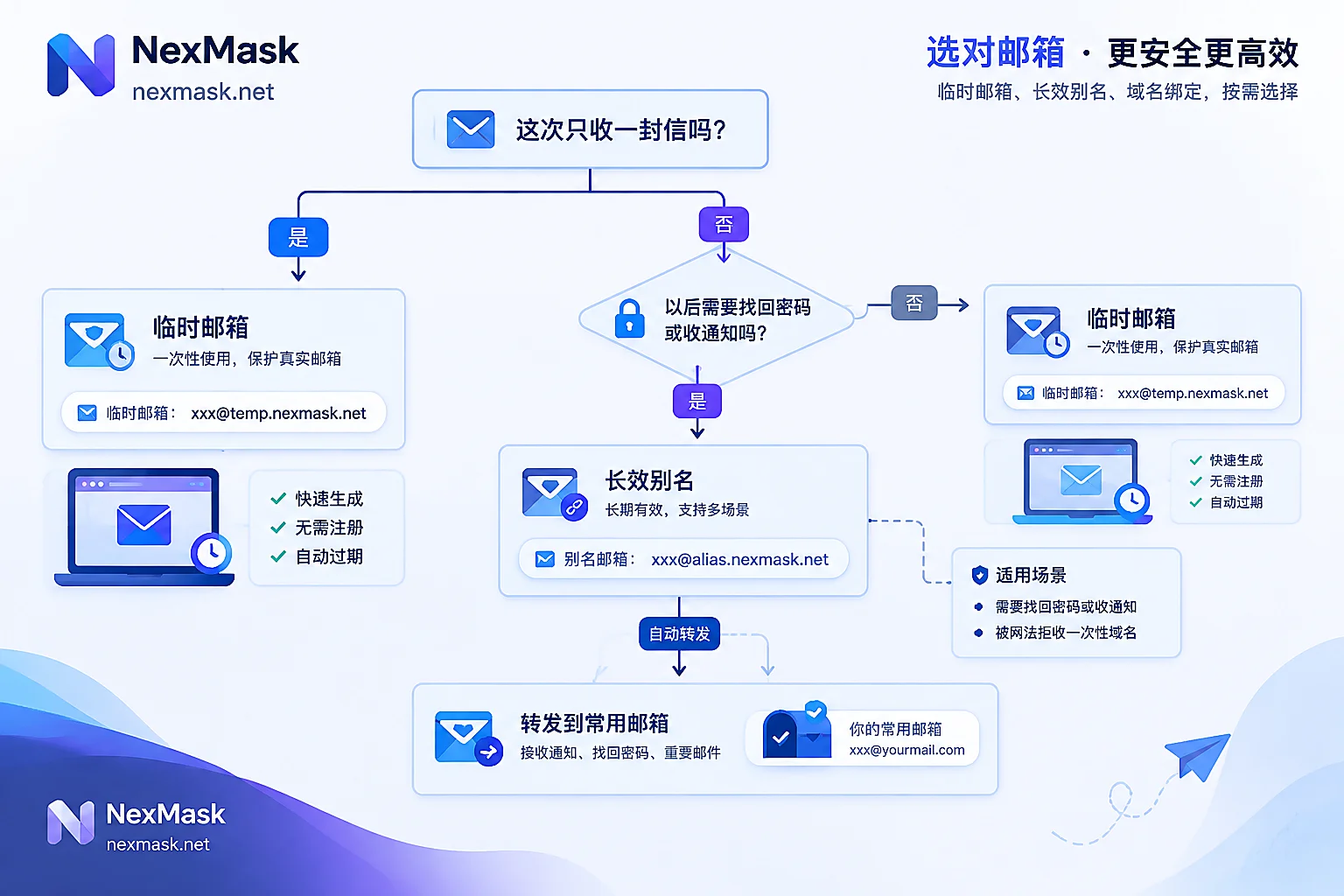
Let's start with the conclusion: when a signup page is in front of you, if three conditions are met at the same time, feel free to use a temporary email generator to get an address; if any one is not met, don't use a disposable address—switch to a long-lived alias plus forwarding.
The three conditions are:
- You only need to receive one email this time—a verification code, confirmation link, or download link—and that's it;
- You don't plan to give your real email to the other party, and you're not sure whether they'll sell the address or add it to a marketing list;
- You won't need this email for password recovery, receiving two-factor codes, or account anomaly notifications later.
These three points are also the common industry criteria: one-time receipt, distrust of the recipient, and no subsequent recovery needs—only when all three are present is it a temporary email's home turf. Missing the third is the most dangerous: after the inbox is destroyed in its entirety on expiry, password reset emails, 2FA codes, and abnormal login alerts will all fall into a nonexistent address, effectively losing the account—and this process is irreversible.
Typical scenarios where you should and shouldn't use it
Clearly suitable for a temporary email generator:
- Exchanging a whitepaper, template, or resource pack where the other party asks for your email;
- Taking a quick look at a SaaS feature, trying it once and leaving, with no intention to continue;
- Forms like Wi-Fi portals, event registrations, sweepstakes, or surveys where you don't care after leaving the address;
- Forums or tool sites that force registration just to view content once;
- Testing forms and signup flows, where you need a batch of unrelated, disposable receiving addresses.
Clearly not suitable for a pure temporary address:
- Accounts involving payment, card binding, or subscription renewals;
- E-commerce purchases where you'll later receive order numbers, shipping notifications, or refund receipts;
- Services tied to assets like cloud storage, code hosting, domains, or servers;
- Work email, or anywhere you'll still need to log in six months later;
- Accounts that already have 2FA enabled and only email as a recovery method.
The criterion isn't "is this website important?" but "will I still need to get something from this inbox three months from now?" If yes, don't use a disposable one.
How to actually get one to use
Operating a temporary anonymous email is short: open NexMask Temporary Email to get an address directly—no registration, no phone number—copy it into the signup field, and return to the page to wait for the email. A few practical pitfalls:
- Don't close the page. The address and inbox are tied to this session; if you close the page and reopen it, you'll usually get a new address, and the previous verification code will be lost. Copy the address, send the verification code, receive the email, and only then close.
- If the code doesn't arrive, wait a few dozen seconds before resending. Clicking resend repeatedly can trigger the other side's rate limiting, and subsequent emails may not arrive. If it still doesn't arrive after a while, consider whether it was blocked (see the next section).
- After receiving, treat it as nonexistent. After expiry, the entire inbox is destroyed and no copy remains—this is by design, not a malfunction. For how long it's retained, refer to the official site's description, and don't use it as temporary archiving.
- Need to open many at once (e.g., running batch signup flow tests): bulk generation is a member feature; for ordinary scenarios, getting one at a time is enough.
Attributes like zero logs and no IP recording matter for privacy, but they don't change the operating order above. What really determines success is "don't close the page" and "will you need password recovery later."
Rejected: first identify which type of blocking
Messages like "Please use a valid email address" or "Disposable emails are not supported" are increasingly common. Sites block disposable emails mainly through three methods; understanding them tells you whether changing addresses will help:
One is a static domain blacklist. Continuously auto-updated disposable email domain lists on GitHub contain tens of thousands to hundreds of thousands of known temporary domains, and many sites use them directly for validation. A hit is a hard block; changing prefixes under the same domain won't help.
Two is looking at MX records and domain registration age. Newly registered domains, shared MX, and domains without a proper sending history get flagged as high risk and may be blocked even before entering public blacklists.
Three is calling third-party real-time email validation APIs. These services package risk assessment into a single request, returning whether it's disposable, catch-all, or deliverable together; the rules aren't public and update faster.
So: if the signup page errors immediately, it's likely the first two, and repeatedly changing temporary addresses won't help much; if signup succeeds but the verification code never arrives, it's more likely filtering or delivery on the sender's side, so troubleshoot differently. For detailed signal differentiation at this step, see "What to Do If Temporary Email Registration Is Rejected? First Distinguish Three Types of Blocking Signals."
Blacklists also cause false positives: some legitimate niche domains and self-hosted emails occasionally get included, and that's not your mistake.
After rejection, or when long-term login is needed, switch to a long-lived alias
If you're blocked, or you realize the third criterion doesn't hold (you actually still need to receive emails with it later), the right move isn't to keep looking for a new temporary email generator but to switch to a different layer of tooling: long-lived alias + forwarding.
Its difference from temporary email is lifecycle: the alias remains usable during its validity period and won't be destroyed on expiry; emails are forwarded as-is to your everyday inbox, so password resets and order notifications still arrive; your real address is never given out; and if the alias starts receiving spam, you can disable it individually without affecting other accounts. And because the address comes from your own alias domain, it won't directly hit public blacklists like common disposable domains.
One habit is worth developing: one alias per site. That way, if an address starts receiving unfamiliar marketing emails, the source is certain—only that site knows it. After disabling, the world goes quiet immediately, and you don't need to change other accounts. For alias naming and disabling workflows, see "How to Manage One Email Alias per Website."
Another often overlooked point: aliases can not only receive but also send and reply as the alias identity. When dealing with customer service, second-hand transactions, or unfamiliar merchants, the other party sees the alias from start to finish, not your real address.
To start using it, create one at NexMask Long-Lived Alias and point it to your frequently used email as the forwarding target. The free version includes one alias, enough to get one important account working first; multi-target forwarding and custom domains (adding MX records, catch-all arbitrary prefixes, domain ownership, and portability) are member features—consider them when you truly need to route by business line. After setting up, if forwarded emails don't arrive, check step by step with "NexMask Email Forwarding Not Received? 5 Steps to Troubleshoot Bounces and Spam Folder"—most issues are spam folder or wrong target address.
How the two types of tools divide the work
Compress the decision into one sentence: temporary email handles "receive and leave"; long-lived alias handles "I'll come back later."
In practice they work together, not as either-or. On the same day, you might use a temporary address to get three resources and run a round of form tests, while using an alias to sign up for a service you plan to use long term. The anchor is always that third criterion—will you still need to get something from this inbox later. For a more detailed account category comparison, see "How to Choose Between Disposable Temporary Email and Email Alias."
One last easily confused boundary: during testing, if you also need to fill in an address and name, real-format address identity generation is assembled according to each country's postal rules, can pass format validation, and is fine for placeholder and testing purposes, but it doesn't point to a real resident and can't be used as a shipping address. To send physical items, you still need to enter your own real address.




Comments(0)