 NexMask-官方博客
To judge why temporary email registration is rejected, look at three types of signals: the registration page immediately says invalid, registration succeeds but the inbox is empty, or registration succeeds but the account is later restricted or banned. First determine which type it is, then act accordingly; otherwise, changing ten domains won't help. Research by Castle.io in May 2026 shows that there are over 160,000 disposable temporary email domains worldwide, and platforms are shifting from static blacklists to real-time detection—this is why changing domains is becoming less effective.
First, Match Your Situation: The Three Rejection Scenarios Are Entirely Different
Temporary email rejection varies by phenomenon, cause, and solution.
| Phenomenon | Timing | Possible Cause | Solution Direction |
|---|---|---|---|
| Page says "Please use a valid email" | When clicking register | Domain-level recognition, blacklist or real-time detection | Switch to long-term alias or real email |
| Registration succeeds but inbox empty | After submitting, during verification code wait | Delivery chain issue, or inbox already destroyed | Check inbox status, resend |
| Registration succeeds but account restricted or banned | Hours to days later | Risk re-evaluation, identified as high-risk address | First rebind to a long-term accessible email, then appeal via official platform channels |
Match your situation first to solve it precisely.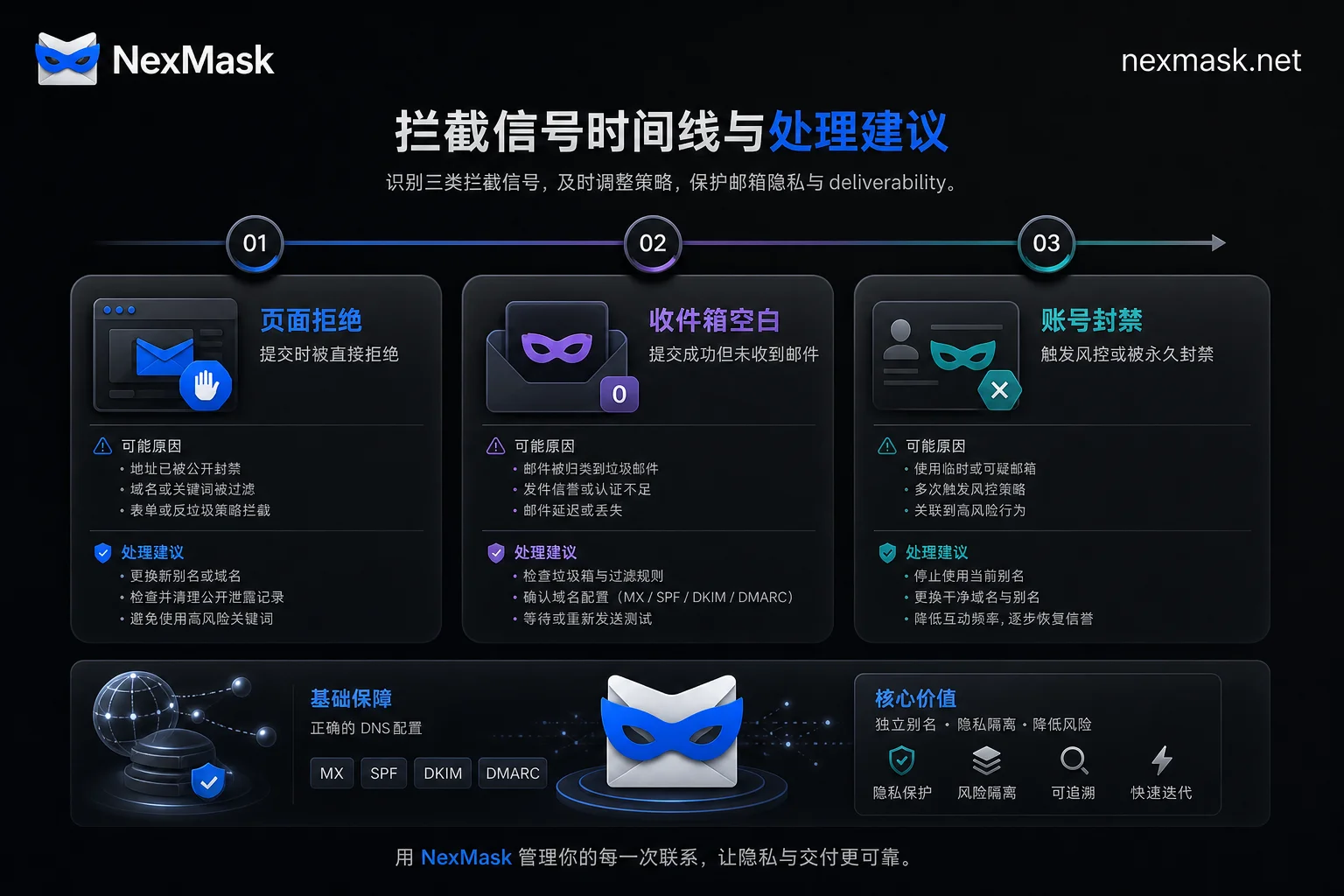
Signal One: Immediate Page Rejection—Why Changing to a Different Temporary Email Domain Often Doesn't Work
What you see: After entering the temporary email address and clicking register, the page immediately says "invalid email" or "not supported."
Reason: The website's risk control system uses domain blacklists or real-time detection to identify that you're using a temporary email domain. Security vendor Castle.io's research in May 2026 shows that there are over 160,000 disposable temporary email domains globally, and providers frequently change domains, causing traditional static blacklists to lose interception effectiveness within 30 days. Platforms have therefore shifted to real-time dynamic detection, recognizing not just a specific domain but behavioral characteristics of a class of addresses.
So, even trying an obscure domain has declining success. If the page explicitly rejects, it means the site doesn't accept such addresses, and continuing to change domains is pointless. Consider switching to a long-term forwarding alias or using your real email to complete registration.
Signal Two: Post-Registration Re-evaluation—Risk Control Now Distinguishes "Disposable Inboxes" from "Long-Term Privacy Aliases"
What you see: Registration goes smoothly and you receive the verification code, but days later you find the account restricted or even banned.
Reason: Risk control no longer blocks all non-mainstream emails indiscriminately but treats "strictly disposable one-time inboxes" differently from "sustainable privacy forwarding aliases."
Disposable inboxes, once destroyed, cannot receive OTPs, password resets, or billing notifications, leaving the account without its only credential entry. If you use such an address for services that require long-term contact, you may be classified as higher risk—this inference is based on the differentiation mechanism mentioned earlier; specific rules are not disclosed by platforms.
Industry rules also corroborate: some service providers explicitly prohibit users from using disposable temporary emails or third-party forwarding emails as registration or target recipient emails to avoid email loops and abuse.
It's important to clarify: the email address type only affects the email layer; it cannot bypass IP, device fingerprint, phone number, or identity verification.
Signal Three: Email Never Arrives—Temporary Inboxes Don't Forward or Return Bounces; Confirm Within Two Minutes
What you see: Registration process completes, but the inbox remains empty, the site doesn't report an error, and the email seems to vanish.
Reason: A temporary inbox is an endpoint, not a relay; it doesn't forward to your main email, and the only way to check is to refresh the page. Once the inbox expires and is destroyed, subsequent emails have nowhere to go, and the sender may not receive a bounce receipt, leaving you in a blind spot where there's no error but also no email.
Two-minute self-check sequence:
- Confirm the address was copied correctly, without extra spaces or characters.
- Confirm the inbox hasn't expired or been recreated (some services recreate the same address inbox).
- Trigger another send from the site, and time it.
- Check if the site shows "sent" notification.
If you use a forwarding alias, the email will at least land in your own mailbox's spam folder or generate a bounce, making the issue traceable. For related troubleshooting, refer to: NexMask email forwarding not received. Note: After a temporary inbox is destroyed, historical emails cannot be retrieved.
Before Changing Addresses, Answer Three Questions: Does This Account Need to Receive Emails in the Future?
Before deciding which email type to use, answer three questions:
- Will this account need to receive verification codes, bills, shipping, or security notifications later?
- Might you need to recover the password or appeal?
- Is it tied to payments, orders, or require long-term login?
If any answer is "yes," do not use a disposable inbox. Conversely, for one-time downloads, single trials, or just to receive a verification email, temporary inboxes remain the easiest choice.
| Scenario | Recommended Type | Reason |
|---|---|---|
| One-time download or trial | Temporary inbox | Use and discard; no future concerns |
| May need password recovery | Long-term alias or real email | Ensures long-term email reception |
| Tied to payments or orders | Real email or long-term alias | Important notifications must be reachable |
NexMask's Temporary Inbox and Long-Term Alias Cover Different Scenarios
Based on the above assessment, NexMask offers two paths:
- Short-term one-time verification: Use the no-registration disposable temporary email; open and use, inbox auto-destroys upon expiration. Suitable for downloads, trials, single verification.
- Long-term email reception: Use long-term anonymous email aliases; emails forward to your main inbox. Use different aliases for different sites, and disable them independently for easy spam source identification.
Operational point: The alias's target recipient should be a real email you can access long-term, not another temporary address or third-party forwarding address (SimpleLogin's official terms of service also prohibit using disposable temporary emails or third-party forwarding emails as target recipient addresses to avoid email loops). The official website currently states that temporary邮箱 and random identity generation require no registration, anonymous alias accounts require no phone number, and there is a no-IP-logging statement. These are official published statements as of August 30, 2026. For storage duration, free quotas, domains, and forwarding limits, refer to the official website for accurate details.
For selection guidance, also see How to choose between disposable temporary email and email aliases.
Frequently Asked Questions
Temporary email registration rejected—what to do?
First determine the type of rejection: If the page immediately says invalid, it's domain-level interception; changing domains usually doesn't help, so switch to a long-term alias or real email. If registration succeeds but the inbox is empty, check if it expired or retrigger the send. If the account is banned after registration, it means risk re-evaluation; change the email and contact support.
Why do some websites not accept temporary emails?
Because temporary email domains are often used for spam registrations and fraud, websites' risk control blocks these domains. Since providers frequently change domains, static blacklists fail, and websites switch to real-time detection, recognizing behavioral characteristics rather than single domains, so even obscure domains may be rejected.
Why no verification code in temporary email?
Possible reasons: address copied incorrectly, inbox expired or destroyed, sender email delayed, or the site didn't actually send. Two-minute self-check: confirm address, confirm inbox status, resend and time it, check site notifications. Temporary inboxes don't forward; once destroyed, emails cannot be retrieved.
Will accounts registered with temporary email be banned?
Possibly. Using a disposable inbox for important accounts may classify you as higher risk; additionally, once the inbox is destroyed, you won't receive password resets or security notifications, making recovery difficult even if the account isn't banned. For important accounts, switch to long-term aliases or real emails.
Can registering with a different temporary email domain work?
Not necessarily. If the site only uses static blacklists, an obscure domain might work; but with real-time detection becoming common, behavioral recognition makes changing domains less successful. Confirm first if the site accepts temporary emails, or switch to long-term aliases.




Comments(0)