 NexMask-官方博客
Whether a temporary private email can block tracking depends on only three conditions: whether the address layer cuts off identity association, whether the rendering layer blocks remote image loading, and whether the link layer avoids parameterized redirects. If all three are met, tracking is essentially severed; if you only change the address and ignore the other two layers, tracking pixels will still leak your IP and open behavior.
Conclusion First: What a Temporary Private Email Blocks and What It Doesn't
Temporary private email solves the issue of "identity association": the sender cannot obtain your real email account, so even if there is a data breach or cross-database correlation, it's hard to bind you to a specific account. But there's a key boundary here—temporary email only changes the receiving address; it does not rewrite the HTML code in the email body.
In other words, if an email embeds a 1x1 tracking pixel, and your mail client defaults to auto-loading remote images, then the moment you open the email, the tracking request still goes out. Statistics based on 15 billion emails in August 2026 confirm this: tracking pixels are not obsolete; instead, they are widely embedded, though the open records they generate are largely muddied by privacy proxies.
So, to truly answer whether a temporary private email can block tracking, you must break the question into three layers: address, rendering, and links.
Layer 1 · Address Layer: After Switching to a Temporary Email or Alias, What Can the Other Party Still Obtain?
The core issue the address layer solves is "whether the sender can find your true identity." After using a one-time temporary inbox or a long-term anonymous alias, the sender can only see the temporary address you assigned, and cannot trace back to your primary email account. This is highly effective in preventing advertisers from cross-platform profiling and reducing targeted spam.
But remember a hard boundary: whether it's a temporary inbox or a forwarding alias, their core mechanism is "receive and forward," and they do not modify the email body. In other words, if the sender embeds tracking code in HTML, the email is delivered as-is, and the address layer is powerless against it.
Address Layer Self-Check Actions:
- Use a unique temporary address or alias for each site and subscription type, ensuring "one site, one address."
- If a particular address starts receiving spam or suspicious tracking emails, immediately disable or destroy that address for precise cutoff.
- Do not use temporary addresses for services requiring long-term contact (e.g., online banking, account recovery), otherwise you won't receive important notifications after the address expires.
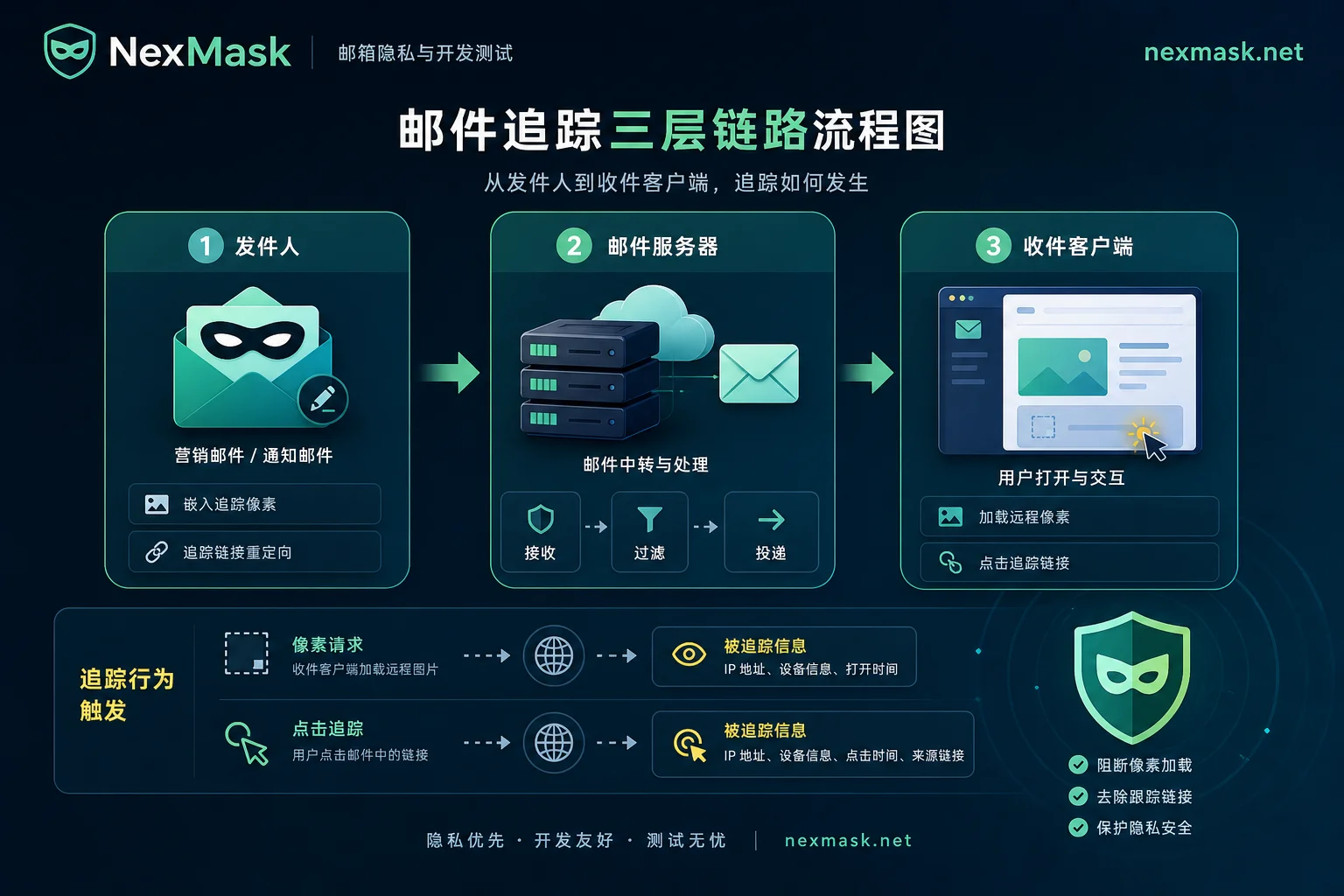
Layer 2 · Rendering Layer: How a 1x1 Tracking Pixel Records Open Time, Device, and Network Location
The 1x1 transparent image in an email is essentially a remote image placeholder. When your email client renders the email and loads remote images, it initiates an HTTP request to the sender's server, carrying metadata such as your IP address, client type (device model, OS, email client name), and request time. Marketers count this request as an "open."
So, the answer to "Will a temporary email leak my IP address?" is: under default settings, yes. As long as the client auto-loads remote images and no privacy proxy is enabled, even with a temporary email, your IP and network location will be exposed to the sender through the pixel request.
Rendering Layer Self-Check Actions:
- Turn off "auto-load remote images" in your common email clients (usually under "Privacy" or "Display" settings).
- If your client supports "privacy protection" or "hide my IP," make sure it's enabled.
- Use privacy relay services with server-side filtering to strip invisible pixels during email forwarding (but note that official documentation cannot guarantee absolute blocking of all obfuscated tracking techniques).
Privacy Proxies Have Made Nearly Half of Open Data Unreliable: What MPP Pre-Fetching Shows and Misses
Apple's Mail Privacy Protection (MPP) offers a more thorough solution. According to Apple's official privacy documentation, when MPP is enabled, the system pre-loads all remote content, including tracking pixels, in the background through two separate relay proxies upon email receipt. This way, the sender sees the proxy server's IP and cannot pinpoint the exact time the email was opened—because pre-fetching occurs before the recipient actually opens it.
This mechanism directly causes a significant distortion in marketing open-rate data. Stripo's benchmark based on 15 billion emails in August 2026 shows that 49.29% of open records are actually machine pre-loads, not human opens. This explains why "email open rates are inflated"—tracking pixels are still there, but the data is no longer reliable.
However, note that MPP's pre-fetching only handles remote content loading; it does not cover user-initiated link clicks. In other words, if you click a link with parameters in an email, that click behavior is outside MPP's proxy range, and the sender can still track you via the link parameters. This is why the link layer needs separate attention.
Layer 3 · Link Layer: Why Parameterized Redirect Links and Unsubscribe Links Are Harder to Avoid Than Pixels
The principle of link-layer tracking is that links in emails often carry UTM parameters or redirect IDs. When you click, the request first jumps to the sender's or a third-party tracking server, which records your IP, device info, click time, and the page you were on (if referred from a specific page), then redirects to the target page. This process is entirely user-triggered, and privacy proxies do not act on it.
Unsubscribe links are the same. Clicking the "unsubscribe" button is essentially a click event; the sender records that "this address is active" and may even know your IP and device. So the answer to "Will clicking unsubscribe be recorded?" is: yes. But this doesn't mean you shouldn't unsubscribe—it's just a reminder to be aware that it will be logged.
Link Layer Self-Check Actions:
- Hover over links and check the URL tail in the browser's bottom-left corner for parameters like "utm_" or "ref_". If found, try to bypass the email redirect by manually entering the target site address or using the official entry point within the site.
- When unsubscribing, try to use the "block sender" or native unsubscribe feature within the email client instead of clicking the link in the email.
- If you must click the unsubscribe link, consider disabling the network proxy or using a VPN (but this adds extra dependency and is not recommended as a regular measure).
Three-Layer Self-Check Checklist: Client Settings, Image Loading Strategy, and Pre-Click Checks
| Layer | Prevention Target | Core Actions | Applicable Tools or Mechanisms |
|---|---|---|---|
| Address Layer | Identity association | One site one address, separate by use | One-time temporary inboxes, long-term aliases |
| Rendering Layer | Tracking pixel requests | Disable auto-load remote images, enable privacy proxy | MPP, Gmail image proxy, server-side filtering relay |
| Link Layer | Click behavior tracking | Check link tail parameters, use official entry | Manual checks, native unsubscribe in client |
How to stop email tracking open receipts? The most direct method is to disable auto-loading of remote images. General path: in your email client's "Settings > Privacy > Mail," select "Do not auto-load remote images" or similar. This way, the 1x1 pixel in the email cannot trigger a request, and open behavior won't be recorded.
How to disable auto-loading images in email? Most major clients have a toggle under "Settings > Display" or "Privacy." If you can't find it, search "remote images" in the help. A sign of success: if images in emails appear as gray placeholders with a "click to load" prompt, it's disabled.
Short-Term Receiving Use Temporary Inbox, Long-Term Subscriptions Use Independently Disableable Aliases: How to Divide the Two Entries
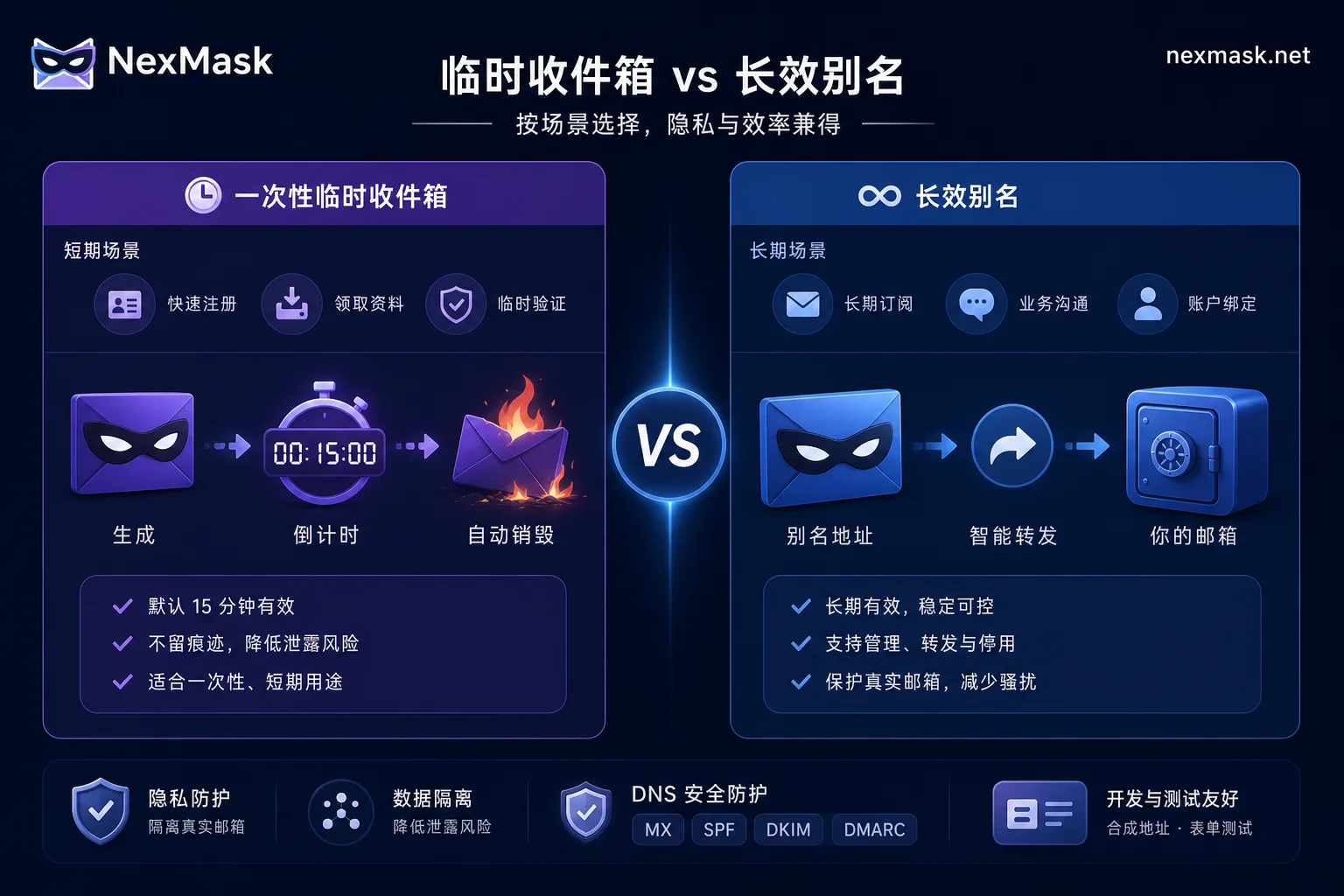
Finally, let's discuss tool selection. One-time temporary inboxes are suitable for short-term verification codes, downloading materials, trying tools, etc. They expire and are non-retroactive, so they're not suitable for services needing long-term contact like bills or account recovery. Long-term anonymous aliases, on the other hand, are suitable for subscription emails and promotional emails because they can be independently disabled. If you find a specific source continuously tracking or spam surging, you can precisely block that site without affecting other aliases.
Take NexMask as an example: its official website currently publicly verifiable capabilities (verification date: August 2026) include registration-free one-time temporary inbox, long-term anonymous aliases and forwarding, custom domain aliases, and an explicit privacy statement that they "do not record IPs." If you need long-term per-site receiving, check the current alias and forwarding details on the official site before deciding to enable it. But please understand: address isolation is not pixel stripping. Even with such services, you still need to combine rendering layer settings to block tracking.
For specific choices between temporary inboxes and aliases, refer to How to Choose Between One-Time Temporary Email and Email Alias; if you encounter forwarding delays, refer to NexMask Email Forwarding Not Receiving.
FAQ
Can a temporary email be tracked?
Yes. Temporary email isolates your real address, but tracking pixels and parameterized links in the email body still execute unless your client disables image loading or uses a privacy proxy. The address layer solves identity issues; the rendering and link layers need additional handling.
Can anonymous email hide your real IP?
Not directly. Only when you enable client privacy proxies (like MPP) or use server-side filtering relays will the sender not see your real IP. Otherwise, pixel requests or link clicks in HTTP requests expose your IP. So, anonymous email ≠ IP hiding.
What if I can't see images after disabling image loading?
This is normal. After disabling auto-load, images in emails will show as placeholders or prompts. You can manually click "load images" after confirming the sender is trustworthy; tracking pixels will still be recorded, but at least you're not automatically exposed. If images are crucial to email content, consider whitelisting such emails and enabling a "trust sender only" loading policy.
Will clicking unsubscribe be recorded?
Yes. Unsubscribe links are essentially parameterized redirect links; clicking sends a request to the sender's server, recording your IP, device, and click time. However, legitimate senders typically don't specifically track you for unsubscribing, but for privacy, it's recommended to use the client's "block sender" feature to avoid clicking links in emails.
Why are email open rates inflated?
Because privacy proxies like Apple MPP pre-load email content in the background, causing many "machine opens" to be counted. Stripo's benchmark based on 15 billion emails in August 2026 shows this accounts for as high as 49.29%. So inflated open rates don't reflect real reads, and marketers themselves are troubled by this.




Comments(0)