 NexMask-官方博客
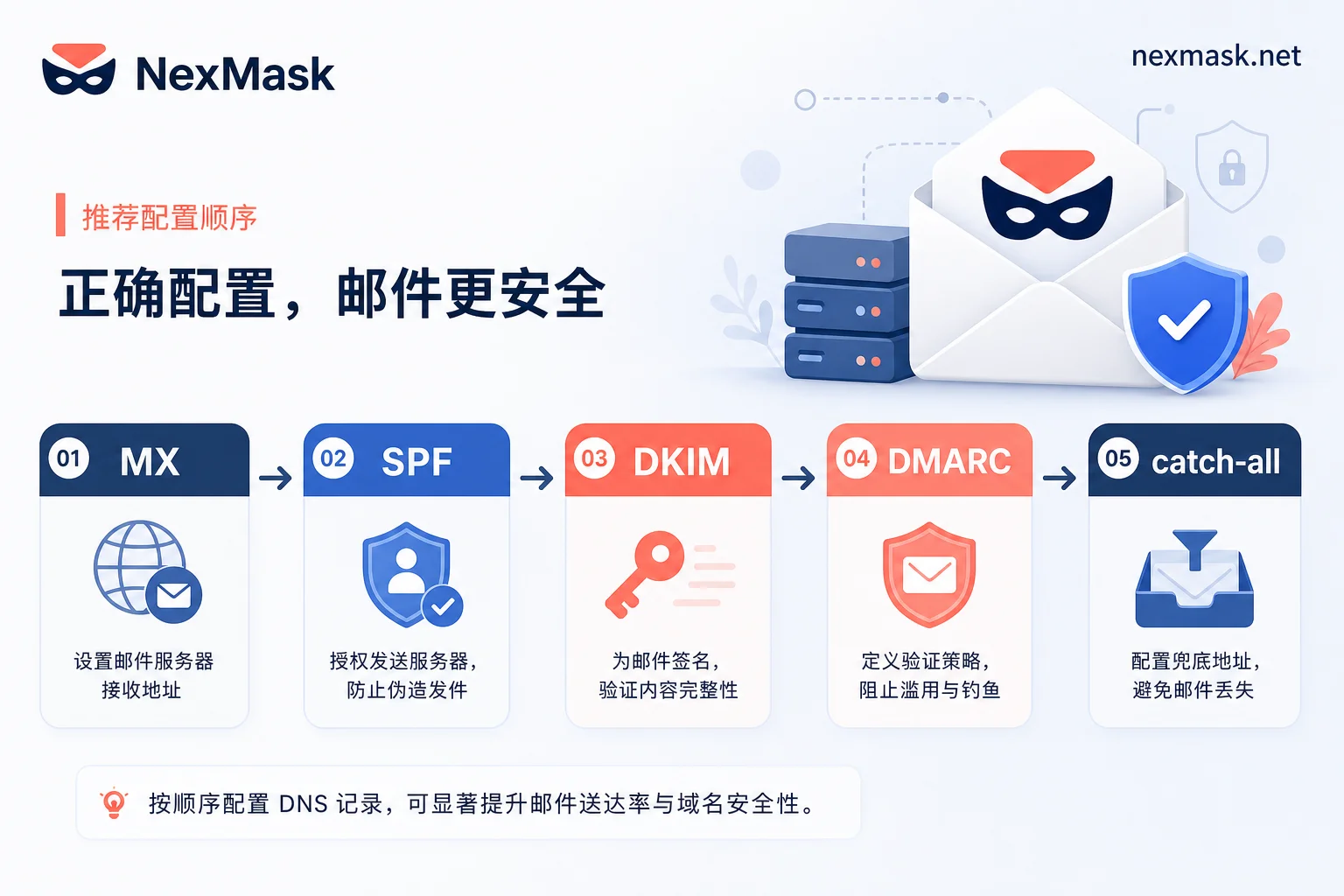
Configuring a NexMask custom domain only takes five steps: MX → SPF → DKIM → DMARC → catch-all. Missing any one step results in a website rejecting the address or not receiving verification codes. To judge whether an alias can survive long-term, look at three conditions: whether domain ownership is clear, whether the delivery chain is complete, and whether you can handle problems yourself when they arise. As long as you can change DNS and configure these records, most issues can be diagnosed. Apple's August 24, 2026, withdrawal of the standalone Hide My Email subdomain confirms the domain-granularity blocking mechanism, and custom domains offer greater control.
Conclusion First: What to Configure for a Custom Domain, and What It Can and Cannot Solve
The core configuration for custom domain aliases consists of five items: MX records determine which server receives your mail; SPF declares who can send mail on behalf of your domain; DKIM publishes your public key according to the service provider's selector; DMARC starts with a permissive policy to observe, then tightens; and the catch-all switch decides whether to accept all misspelled addresses. What it solves is "control" and "migratability" — the domain is under your name, and if a site blocks it by mistake, you can troubleshoot, switch providers, or adjust policies yourself. However, it doesn't mean every website will accept it. Apple's August 24, 2026, withdrawal of the standalone Hide My Email subdomain shows that large providers may abandon isolation because third-party sites filter by domain granularity.
Step One: Layer the Diagnosis — Is It Domain Rejection, DNS Not Propagated, or Forwarding Chain Authentication Failure?
Before touching DNS, determine which layer the problem is in. If the registration page directly says "email domain not supported," that's a domain layer rejection. If the address can be entered but no mail arrives and dig shows no MX record, that's a DNS layer issue. If the sender has logs, or your primary inbox has mail in spam with DMARC/SPF errors, that's a forwarding authentication layer issue. The order cannot be reversed — authentication issues cannot be judged before DNS has propagated.
Why Websites Block by Domain: What Apple's Withdrawal of Hide My Email Standalone Subdomain Reveals
Apple originally planned to migrate all iCloud+ Hide My Email aliases to a standalone subdomain private.icloud.com, but withdrew the plan with a developer notice on August 24, 2026, keeping aliases on the main icloud.com domain, while new Sign in with Apple credentials still go to private.icloud.com. The reason: when a batch of privacy aliases is concentrated on a recognizable proprietary subdomain, third-party sites can block the entire domain with a single rule. This confirms that domain-granularity blocking is a real mechanism. For you, public alias domains share reputation; if a site blocks the domain, you individually cannot appeal. Custom domains have independent reputation, but you bear the configuration and maintenance responsibility.
Four Preparations Before Getting Started: Domain Ownership, MX Delegation, DNS Propagation Time, and Migration Path for Old Aliases
Before configuring, confirm four things: the domain is under your name and you can change DNS; whether the domain's MX is already occupied by another email service; TTL and propagation time — lower TTL before making changes; and the migration order for old aliases — first get receiving working on the new domain, then replace sites one by one. These are all handled at the domain registrar or DNS hosting side, and no alias service can do it for you.
NexMask Custom Domain Configuration Order: MX → SPF → DKIM → DMARC → Catch-All
The configuration order for NexMask custom domains is fixed: MX → SPF → DKIM → DMARC → catch-all.
| Record | Purpose | Symptoms of Misconfiguration |
|---|---|---|
| MX | Determines which server receives mail | No mail at all; dig shows no MX |
| SPF | Declares who can send mail on behalf of your domain | SPF fail on forwarded mail; DMARC fail |
| DKIM | Publishes public key per provider's selector | DKIM invalid after forwarding gateway rewrites headers |
| DMARC | Use p=none to collect reports, then tighten | Starting with reject may block legitimate forwarding |
| Catch-all | Whether to accept all misspelled addresses | Spam volume increases when enabled |
If MX is misconfigured, you won't receive any mail. SPF only affects sending and forwarding alignment, not receiving. DKIM breaks if content is modified. DMARC should start with p=none for observation, then tighten to quarantine/reject after alignment. Catch-all should be decided last; a safer approach is to create aliases explicitly. Each step can be self-checked: dig MX/TXT, send a test email.
Why Forwarding Breaks Authentication: SPF Fail, DKIM Invalidation, and the Remedial Position of ARC/SRS
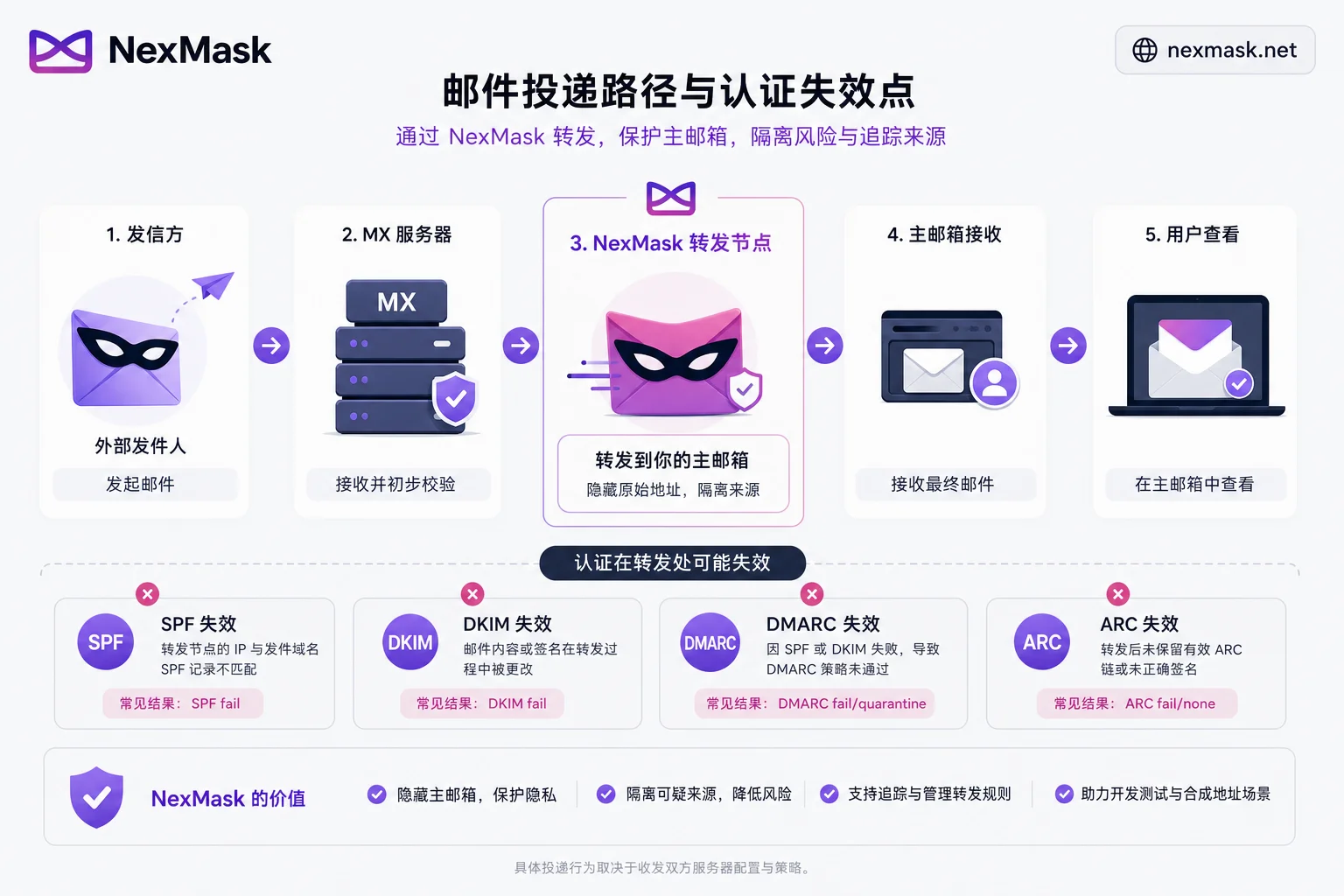
Email aliases are essentially forwarding, and forwarding inherently conflicts with SPF's design assumptions. SPF checks the sending IP; when a forwarding node changes the IP, it inevitably fails. In theory, DKIM is not affected by IP, but if the forwarding gateway rewrites email headers or adds footers, it can break the signature. If both fail, DMARC fails completely. The above forwarding failure mechanisms and the positioning of ARC/SRS are based on the DMARCbis documents published by the IETF (RFC 9989/9990/9991) and public analysis; this article does not conclude whether any specific service has implemented ARC signing or SRS rewriting. On the user side, you can: avoid setting DMARC policies stricter than the delivery chain can handle, and learn to read email headers to determine which hop broke.
End-to-End Acceptance Testing When Custom Domain Aliases Don't Receive Verification Codes
After configuring the NexMask custom domain, follow four acceptance steps: send a test email from an external mailbox to the new domain alias; check the spf, dkim, and dmarc fields in Authentication-Results; perform a real registration flow test; and confirm whether the bounce code is permanent or temporary failure. Common readings: spf=fail but dkim=pass is usually a normal forwarding phenomenon; both fail and DMARC=fail requires checking DNS.
Public Alias Domain vs. Custom Domain: Severity-Based Comparison Table
| Dimension | Public Alias Domain | Custom Domain |
|---|---|---|
| Control | Low | High |
| Migratability | Low | High |
| Whole-domain block risk | Shared reputation; if blocked, cannot appeal | Independent reputation; can handle yourself |
| Configuration & maintenance cost | None | Requires self-managed DNS |
| Need to manage DNS yourself | No | Yes |
Classify by account importance: one-time downloads/trials/one-time verification → no-registration temporary inbox; forums, subscriptions, shopping and other long-term but disposable → public alias domain; main email replacement, cross-provider migration identity → custom domain. Any category may be rejected by individual sites; the value of a custom domain is that you have disposal rights when problems occur. If you're still deciding which type to use for short-term receiving, you can refer to How to choose between one-time temporary mailbox and email alias.
Which Segment Does the NexMask Custom Domain Alias Fit, and What Must You Do at the Registrar Side?
According to the current public tiers on the NexMask official website, no-registration one-time temporary mailboxes are for short-term receiving (mailbox auto-destructs after expiration); anonymous email aliases support one alias per site, can be individually disabled, and forward to a common mailbox; email forwarding and custom domain aliases are for scenarios requiring long-term use, migration, and management of email identities. However, domain purchase and renewal, MX pointing, SPF/DKIM/DMARC record publishing, catch-all switch, and TTL adjustments must be done by you at the domain registrar or DNS hosting side (subject to the current official page; verification date: 2026-08-26). Temporary mailboxes are not a substitute for secure email, password managers, and 2FA. If you encounter email forwarding not receiving or registration rejection, first go through the layered diagnosis above.
FAQ
What should I do if an email alias is rejected by a website during registration?
First determine the layer: if you see "domain not supported," your alias domain may be blocked as a whole domain; switching to a custom domain can resolve this. If DNS is normal but still rejected, the site may be detecting MX or behavioral patterns. Custom domains do not share the blacklist reputation of public alias domains, but individual sites may still block based on MX host or registration behavior; pass/fail must be tested in practice.
When a custom domain alias doesn't receive verification codes, which layer should I check first?
Check if the MX record is in effect first; dig the domain. If MX is normal, check if SPF/DKIM/DMARC are fully configured, and whether ARC preserves authentication results along the forwarding chain. Finally, check the spam folder; verification emails may be filtered.
What are the reasons for MX record configured but still not receiving emails?
MX only routes mail to the server; if SPF/DKIM/DMARC authentication fails, the receiving server may still reject. Also check whether catch-all is enabled, whether forwarding rules point to the correct mailbox, and whether the external mailbox blocks due to spam policy.
Does catch-all cause a lot of spam?
Yes. When catch-all is enabled, dictionary-based deliveries to the entire domain will land in your mailbox, increasing spam volume. It's recommended to explicitly create aliases rather than enabling catch-all for the whole domain. For low-frequency use, disabling catch-all reduces noise.
What does it mean when forwarded email SPF fails but DKIM passes?
This is normal. The forwarding node changes the sending IP, causing SPF fail, but as long as the DKIM signature is not broken, the receiving side may still deem it trustworthy via DKIM and DMARC alignment. However, if both fail, check whether the forwarding gateway rewrites headers and whether ARC is in effect.
Which is more likely to be blocked: custom domain or public alias domain?
Public alias domains are more likely to be blocked as a whole domain because they share reputation; once blocked, you cannot appeal. Custom domains have independent reputation but require self-maintained configuration. Apple's withdrawal of the Hide My Email standalone subdomain proves that proprietary privacy subdomains are easy targets for risk control; custom domains mixed with normal traffic are more stable.




Comments(0)