 NexMask-官方博客
Determining whether a free temporary email is sufficient requires checking just four conditions: address count limit, whether replies are supported, whether the domain is yours, and how long emails are retained. These four boundaries define which scenarios it can cover and where it might suddenly fall short. In May 2026, a security organization publicly released a daily-updated list of active temporary email domains, indicating that platform risk controls are shifting from static blacklists to real-time dynamic detection—meaning today, whether a free service remains usable depends not only on quotas but also on the type of receiving tool you choose.
The Bottom Line: Where Free Temporary Emails Cover, and Where They Fall Short
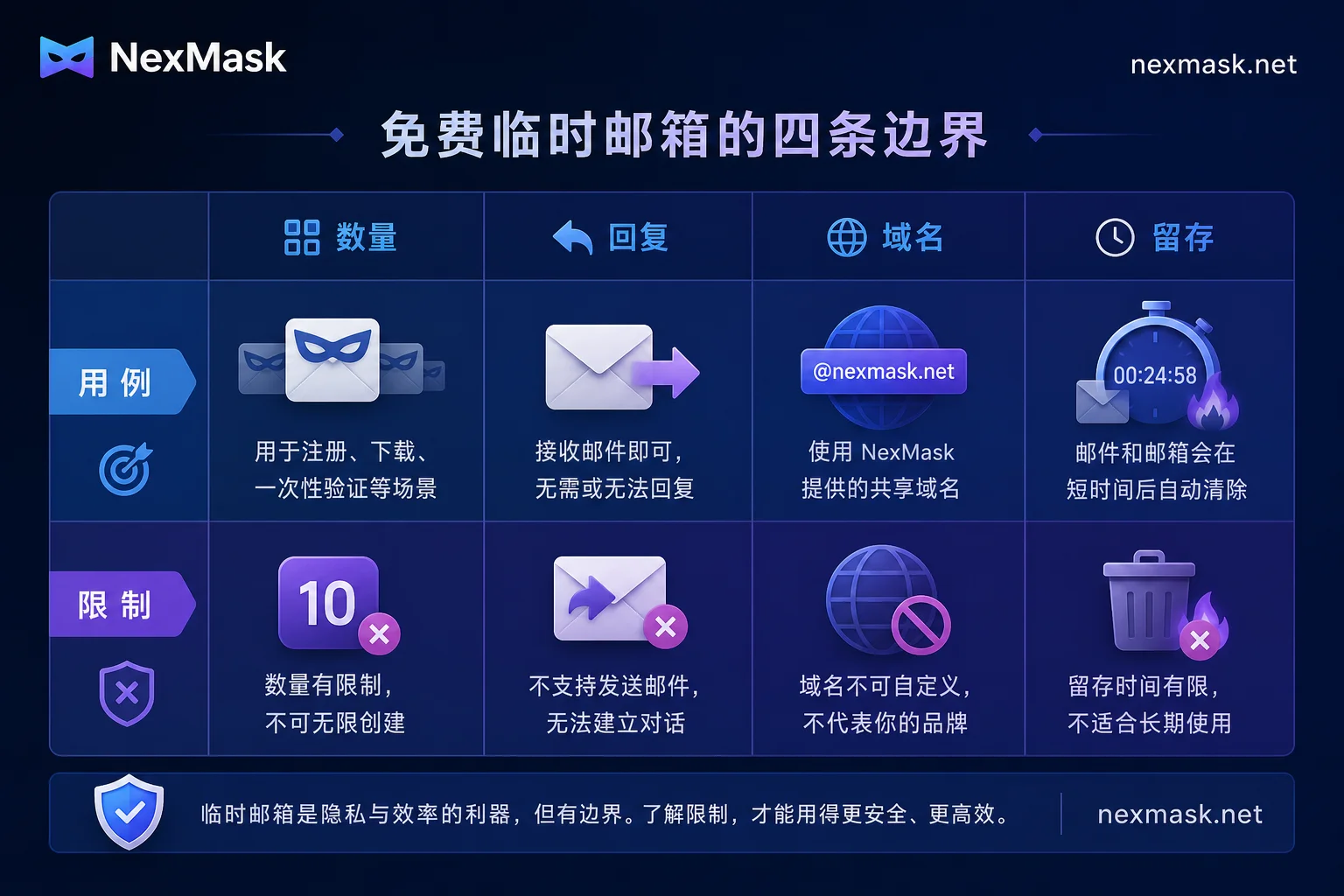
The boundaries are clear: Free temporary emails are suitable for short-term, one-time receptions—like registration verification codes, download links, or one-time trials. However, they hit a wall when it comes to replies, long-term correspondence, account recovery, or domain control. This difference is essentially the distinction between "disposable inboxes" and "long-term email aliases," not just low-tier vs. high-tier versions of the same tool.
Specifically, there are four boundaries to check: quantity quota, reply capability, domain ownership, and retention. Before reading on, keep one sentence in mind: Reception is one-time, replies are long-term, domain is control, and retention is asset management. Below, we break down where each of these gets stuck in the free tier.
Boundary One: Quantity – What Really Changes When Free Masks Expand from 5 to 50
In Firefox 150.0.1, Mozilla increased the free account mask quota for Firefox Relay from 5 to 50, which indeed lowers the barrier for light users. However, note that some official Mozilla marketing pages still show the old 5-mask quota, though release notes and real-world tests confirm 50. Always trust the official page on the day you use it, and note the date of verification to avoid being misled by outdated info.
The real change is lowering the "registration count threshold": previously you could only have 5 aliases, now 50, enough for most everyday website sign-ups. But remember, quantity is not functionality—50 masks still only provide reception, without features like replies or custom domains. If you're running out of masks, don't rush to switch services—often it's not a real shortage, but you've opened addresses and forgotten where you used them. First, audit by website and disable old addresses that no longer receive mail; that's more effective than opening new ones.
Boundary Two: Reply – Where "Receive Only" Directly Hits a Wall
The free tier of Firefox Relay still restricts email replies, a common trait among most free services: you can receive but not reply. This limitation stumps deceptively simple scenarios:
- After-sales tickets: customer support sends a confirmation email requiring you to reply "Yes, I confirm" to proceed.
- Returns and exchanges: merchants require email confirmation of refund account.
- Second-hand transactions: the other party needs you to reply to confirm details.
- Developer review receipts: app stores require email replies to verify credentials.
- Subscription cancellations: some sites require replies to specific emails to unsubscribe.
The judgment is straightforward: ask yourself if this email thread requires a response. If you only need to receive verification codes or click links, the free tier suffices; if back-and-forth communication is needed, skip this tier and use a reply-capable alias or full email account.
Boundary Three: Domain – Control Differences Between @Public Domains and Custom Domains
Free tiers typically restrict addresses to the service's public domain; Firefox Relay free is limited to @mozmail.com and doesn't support custom domains. This "domain ownership" determines three things:
- Whether websites block the entire domain: some risk control systems blacklist entire temporary email domains, so your registration could be rejected on the spot.
- Whether addresses survive if the service changes policies: if the service adjusts its free tier, your addresses might become invalid overnight.
- Whether you can migrate elsewhere: addresses under public domains usually can't be taken with you; switching services means starting over.
So, a custom domain is the layer that brings control back to you. If you need long-term reception and don't want to be tied to a specific service, consider paid alias solutions that support custom domains, or set up your own email with a real domain. For actual domain integration, refer to NexMask custom domain configuration. For most free users, public domains handle daily registrations, but be prepared for "whole-domain blocks."
Boundary Four: Retention – The Lifecycle of Disposable Inboxes and Their Irrecoverable Emails
The answer to "how long does a free temporary email last" depends on the tool. For disposable inboxes, the lifecycle is "address expires and is destroyed." The address is valid for a set period after creation, then automatically invalidates, with no way to retrieve past emails. The validity period is set by the service provider, ranging from tens of minutes to hours, usually indicated on their website—always check the service's official notice on the day of use. So, if you register an account with a temporary address and later try to recover the password via email, you'll find you can't access that inbox anymore.
Practical tips:
- Use verification codes immediately, don't wait until the next day.
- Transfer important info on the spot, like copying account names, passwords, order numbers to a password manager or notes.
- Don't set recovery emails to temporary addresses, otherwise you lose the recovery path when issues arise.
If you need long-term reception (like subscription notifications or bills), use long-term aliases instead.
Risk of Free Public Domains: What Real-Time Screening Means
In May 2026, security firm Castle.io published research and open-sourced a daily-updated list of the Top 1000 active temporary email domains. The report clearly states that temporary email infrastructure is moving toward automated API and high-frequency subdomain rotation, while website risk controls upgrade from static blacklists to real-time dynamic detection and behavior fingerprinting.
What does this mean for ordinary users? It's no longer easy to get by with just any temporary email domain. Platforms' risk controls can identify temporary email domains in real time; if your domain is on the list, registration might be rejected, or after registration, features might be restricted or the account banned. This isn't about a particular service being "bad," but the entire mechanism shifting—the availability of free public domains for short-term testing is declining. For specific solutions when registration is blocked, see temporary email registration rejected.
Tiered by Use Case: Short-Term Verification, Long-Term Subscription, Important Accounts—Which Tier for Each?
Summarize the four boundaries into a decision table to see which tier suits you:
| Use Case | Recommended Tool | Reason |
|---|---|---|
| One-time downloads, trials, verification codes | Disposable inbox | No reply or long-term storage needed; discard after receiving |
| Long-term subscriptions, communities, shopping | Independently deactivatable alias | Need ongoing reception, one address per site, can deactivate anytime |
| Banks, government, work, account recovery | Real primary email + two-step verification | Need two-way communication, long-term retention, and account recovery |
This also answers "the difference between free temporary email and paid aliases": Free temporary email is not a watered-down version of paid aliases; it's a completely different product. The former is a "disposable paper cup," used and thrown away; the latter is a "reusable glass cup," usable long-term but requires payment or higher barriers. For detailed trade-offs, see how to choose between disposable temporary email and email aliases.
NexMask's Disposable Inbox and Anonymous Alias: Which Boundaries Each Cover
If you're looking for a no-registration, ready-to-use tool for short-term reception, the NexMask official website currently states that its one-time temporary email requires no registration, works out of the box, and the inbox auto-destroys upon expiration—ideal for short-term, receive-and-discard needs (covering the retention boundary). When you need long-term reception, one alias per site, independent deactivation, or custom domain aliases, switch to NexMask's anonymous alias side (covering the domain and reply boundaries). All quotas, retention times, and free scopes are subject to the official website information at the time of your verification.
FAQ
How long does a free temporary email last?
It depends on the service: a disposable inbox's address expires and is destroyed, and historical emails are unrecoverable; long-term aliases can be used indefinitely until you deactivate them. The specific duration is per the service's public notice on that day.
Can free temporary email reply to messages?
Most free tiers don't support replies; Firefox Relay's free tier also restricts replies. For two-way communication, use a reply-capable alias or a full email account.
How many masks does Firefox Relay free tier have?
Free accounts now have 50, but some marketing pages still show 5; check the Firefox 150.0.1 release notes or the official real-time page. Despite the number, replies and custom domains are still unsupported.
Can free temporary email use its own domain?
Usually not. Free tiers restrict to the service's public domain, like Firefox Relay's @mozmail.com. For custom domains, you'd need a paid alias service or self-hosted email.
What to do when free temporary email addresses run out?
First, clean up old addresses you no longer use, and confirm whether you've truly run out; if still insufficient, upgrade to a paid plan with more aliases, or switch to a disposable inbox (no registration, use and discard).
Why am I always rejected when signing up with a temporary email?
Because platform risk controls can now identify many temporary email domains in real time (see the "Risk of Free Public Domains" section above). Switch to a long-term email alias or use a real domain email.




Comments(0)