 NexMask-官方博客
Random email generators produce three fundamentally different types of addresses, and whether they can receive email depends on the type. When an email address generated by a tool is entered into an automated test script, the system may directly throw a "format error" or "domain not supported," causing the entire test case to abort. This frustration stems from a misconception about what a random email generator outputs: it is not a single product, but rather, based on the underlying mechanism, it can be a synthetic placeholder address that only satisfies regular expressions, a one-way short-lived disposable inbox, or a forwarding alias that can receive mail long-term.
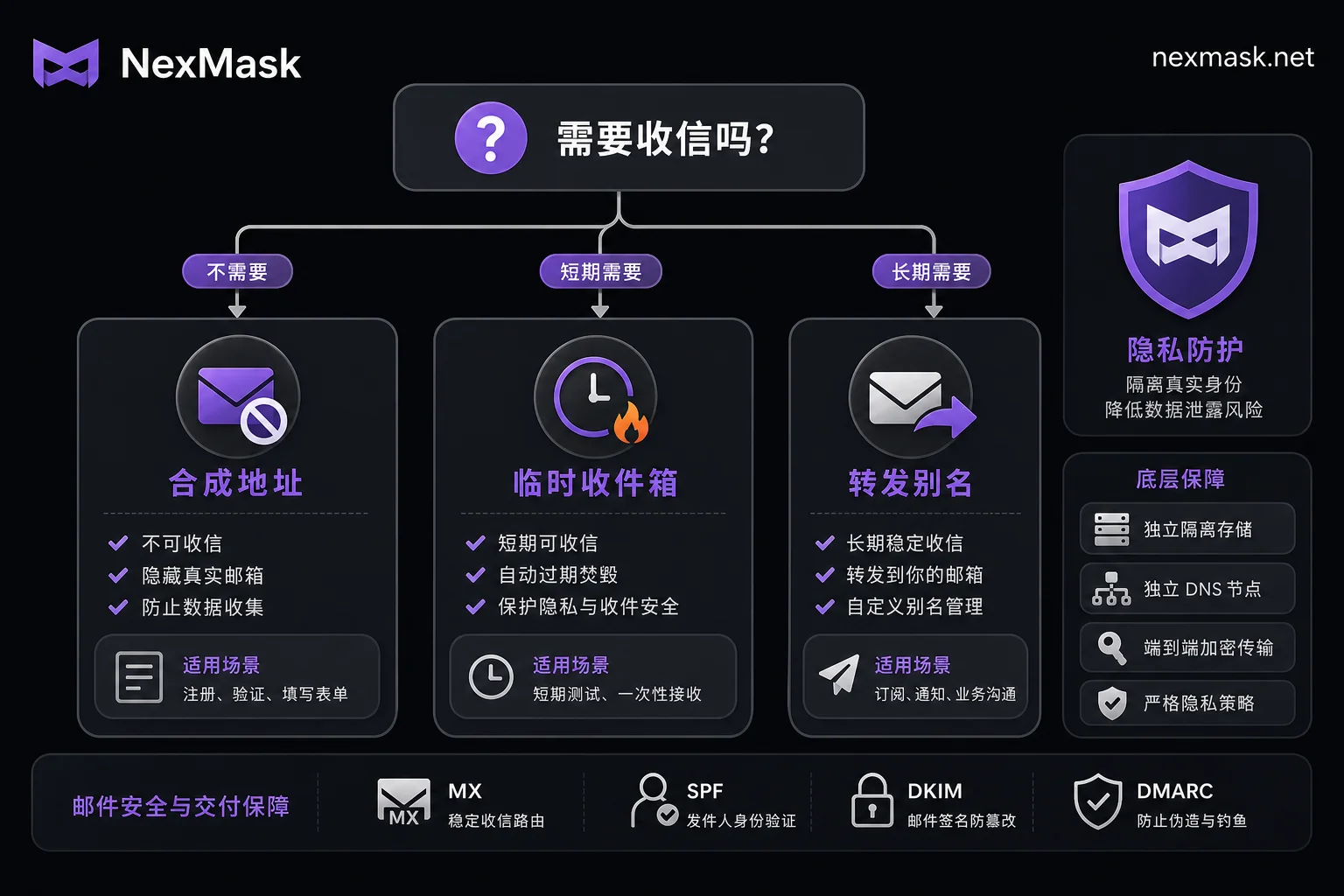
Decision Tree: From Receiving Capability to Long-term Survival
To choose the right type of address, answer three core questions in sequence. First: does this address need to actually receive email? If not, and it only needs to pass front-end form validation, it is a synthetic placeholder address. If yes, proceed to the second question: after receiving, do you need to reply from that address or receive subsequent notifications? If not, and it is for a one-time verification, it is a disposable temporary inbox. If you need to maintain the account status long-term, such as for password resets, you must use a forwarding alias. Most misuse happens when users misjudge the first question, using a synthetic address that cannot receive mail for a real registration process, or ignoring the third question and using an expired disposable inbox, leading to permanent account loss.
Only Passing Front-End Regex and Form Validation: How Far Can a Synthetic Placeholder Address Go?
The core value of synthetic placeholder addresses lies in testing efficiency and data isolation. They strictly follow email syntax rules (e.g., include @ symbol, valid domain format), allowing them to pass front-end JavaScript regex and basic back-end field validation, enabling form submission. For developers and QAs, such addresses are ideal for building test fixtures because they completely strip real personal information, separating test data from real user data, avoiding privacy leaks from using employees' real emails for testing.
However, their hard boundary is equally clear: the domains for such addresses typically have no valid MX records (Mail Exchange Record, the DNS record responsible for receiving email), so any real SMTP send attempt will fail because no receiving server is found. Therefore, they must not be used to receive verification codes, perform account identity verification, or trigger real business order flows. Forcing mail reception on such addresses will inevitably break the process.
Lifecycle of Disposable Inboxes: One-Way Reception, Expiration and Destruction, No Reply
Public temporary inboxes (like common 10MinuteMail-type products) operate on an "open and use" model. These services only provide one-way reception, with a very short lifecycle, typically auto-destroying data when the session ends or a set time is reached. The key flaw is that they do not provide persistent credentials and do not support sending or replying.
Once the platform later triggers secondary verification (2FA) or the user requests a password reset, since the inbox has expired and been destroyed, related emails cannot be read, leading to permanent loss or freezing of account assets. Therefore, disposable inboxes are only suitable for one-time verifications, downloading trial files, or short-term coupon collection where no subsequent interaction is needed. Using them as a primary email or security backup email poses a high risk to account security. To understand how to choose between one-time temporary email and email alias, you must first clarify whether you need long-term mail forwarding.
How Long-Lived Aliases Handle Verification Codes and Password Resets
Unlike temporary inboxes, forwarding aliases (Email Alias) are tied to the user's real primary email. When external emails are sent to the alias address, the provider forwards them to the user's long-term accessible real inbox via internal forwarding. This structural difference allows aliases to reliably handle subsequent login verification, risk-control re-checks, and password reset requests. Reply capability depends on the specific service implementation and is not universally guaranteed here.
Furthermore, a "one-site-one-alias" management strategy offers significant operational benefits: users can independently deactivate an alias for a specific site without affecting other services, and can quickly trace data leak sources through the alias. Although alias addresses are also randomly generated strings, their persistence and functionality rely on the underlying forwarding infrastructure and account system, not the address characters themselves.
Real-Time Validation of 259K Domains: Why Is It Judged Invalid?
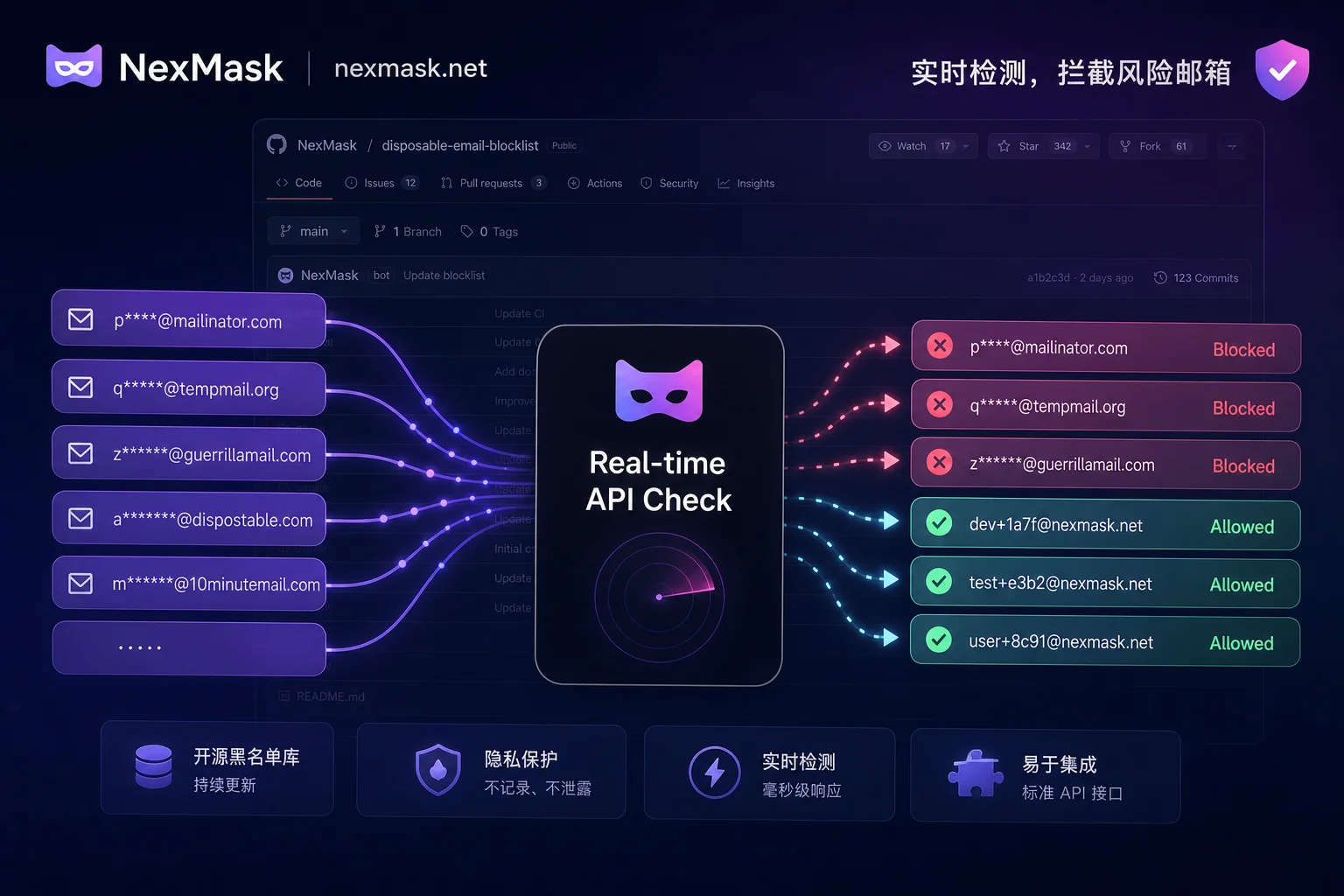
Many users encounter "random email registration shows invalid email" errors, stemming from the evolution of website risk-control technologies. The open-source project disposable-email-domains has aggregated over 259,000 disposable/temporary email domains as of August 2026, and uses automated workflows to fetch, clean, and deduplicate daily. These blacklist data are widely integrated into the registration validation logic of major frameworks and SaaS platforms.
Modern detection no longer relies solely on static lists but combines millisecond-level real-time APIs to dynamically probe MX record availability, DNS resolution characteristics, and SPF record patterns. Even if you switch to a lesser-known suffix, if its resolution pattern matches high-risk disposable patterns, it will still be blocked; whether it is allowed ultimately depends on each platform's own policy. This explains why repeatedly switching randomly generated addresses is often futile, because platforms identify domain reputation and infrastructure characteristics, not just string matching. If you encounter a situation where temporary email registration is rejected, you should first check whether the domain is on the blacklist.
| Address Type | Typical Mechanism | Can Receive? | Can Reply? | Use Cases | Main Risks |
|---|---|---|---|---|---|
| Synthetic placeholder | Local algorithm generated, no DNS | No | No | UI testing, database seeding | Cannot pass real send validation |
| Disposable inbox | Public server, scheduled destruction | Yes (short-term) | No | One-time verification, anti-spam | Account recovery failure, data loss |
| Long-lived forwarding alias | Tied to primary email, continuous forwarding | Yes (long-term) | Depends on service | Registering important accounts, marketing tracking | Depends on provider stability |
Managing Test and Real Data in Separate Channels by Purpose
To effectively implement the above classification, it is recommended that development and QA teams establish three separate data channels. Fixture data that only needs format validation should use synthetic addresses; integration scenarios requiring real machine registration and verification codes must use addresses that can receive mail; channels involving real user data must be strictly isolated and comply with regulatory requirements.
In terms of specific execution steps, first determine whether the use case requires real delivery. If long-term mail forwarding is needed, switch to an alias that can forward to your own mailbox on the day of account creation, for example, using the anonymous email alias service provided by NexMask, which allows different aliases for different sites and independent deactivation, effectively handling subsequent verification and password reset needs. If you only need form placeholders and demo data, use synthetic identities with real formats, such as its generated random names, addresses, phone numbers, and other synthetic test identities, and ensure that in the dataset you clearly mark them as non-real individuals to avoid confusion. The above capabilities are subject to the official public descriptions on the day of verification, and synthetic identities do not correspond to real residents or real individuals.
Checklist for Purpose, Lifecycle, and Exit Strategy for the Three Address Types
Before final deployment or use, verify the following handling directions item by item:
- Does it need to receive real emails? If no, use synthetic placeholder addresses; if yes, proceed to the next step.
- Does it need to reply from this address? If no, disposable inboxes can be used; if yes, must use an alias or real mailbox that supports two-way communication.
- Will the account need password reset in the future? If yes, it is strictly forbidden to use disposable inboxes; you must use a long-lived forwarding alias.
- Is there an alternative contact method if the address becomes invalid? If no, do not register high-value accounts with this address.
- Has the test dataset been marked as synthetic? Ensure physical or logical separation from real user data to prevent production incidents.
- When judged invalid, will you change address type? If you receive an "invalid" prompt, first check whether you are using a blacklisted domain. If you need to receive mail, switch to a forwarding alias; if you only need to pass regex, use a synthetic address, rather than simply changing to another random address of the same type.
- Have important accounts been switched to aliases that can be independently deactivated? It is recommended to assign a unique alias to each important service so that if leaked, you can precisely cut off the flow.
FAQ
What email should I use for form filling during QA integration testing?
It is recommended to use synthetic placeholder addresses. These addresses pass common front-end regex and form syntax validation and are not associated with real personal information, complying with data protection requirements. Avoid using real employee emails or public temporary inboxes to prevent privacy leaks or test interference.
What should I do if registering for overseas SaaS shows invalid email?
This usually means the domain you are using is already listed on the open-source disposable email blacklist (such as the 259K+ domains in the disposable-email-domains project). Modern platforms use real-time APIs to validate MX records and DNS characteristics; if a high-risk domain is detected, registration is rejected, no matter how random the address string looks.
Can I still use a temporary mailbox to change my password after a year?
Only long-lived forwarding aliases based on real forwarding can be used long-term. Disposable temporary inboxes have a fixed short life cycle; data is destroyed upon expiration, making them unsuitable for long-term account maintenance. Synthetic placeholder addresses can be regenerated but lack receiving capability, so they cannot serve as active accounts.
Can randomly generated email addresses receive verification codes?
It depends on the address type. Synthetic placeholder addresses cannot receive any email; disposable temporary inboxes can receive verification codes one-way within their validity period, but once expired, they cannot be accessed again; long-lived forwarding aliases can reliably receive verification codes and forward them to the primary inbox, suitable for accounts that need to be maintained later.
What is the difference between temporary email and email alias?
Temporary email focuses on anonymity and anti-spam, is one-way and volatile; email aliases focus on management and traceability, are two-way or multi-way forwarding and persistent. The former is suitable for one-time verification, while the latter is suitable for formal registrations that need to receive notifications long-term, perform password resets, and facilitate leak management.




Comments(0)