 NexMask-官方博客
NexMask email forwarding not received? In most cases, the problem isn't the forwarding address itself, but that the authentication chain from sender to recipient breaks at the forwarding hop. By systematically checking DNS records, authentication results in email headers, the forwarding service's rewriting capabilities, recipient policies, and then performing a reproducible end-to-end test, you can locate and resolve the issue. In 2026, major recipient services like Gmail and Yahoo require senders to fully configure SPF, DKIM, and DMARC alignment, and keep spam complaint rates below 0.3%. Once the forwarding chain breaks authentication, emails are likely to be rate-limited or rejected.
First, Distinguish Three Types of "Not Received": Bounce, Silent Drop, and Spam Folder
Before changing any settings, determine which type of "not received" you're experiencing. Each leaves different evidence, which determines where to start troubleshooting:
| Symptom | Characteristic | Common Cause | Where to Find Evidence |
|---|---|---|---|
| Bounce | Receive a failure notice from mailer-daemon with a status code | SPF failure during forwarding or recipient rejects at SMTP stage | Full email headers and error code in the bounce message |
| Silent drop | No trace on either sender or recipient side | Recipient accepts during SMTP session but discards based on policy during content filtering (common with DMARC failure) | Only deducible by contrast testing—send the same email to a different recipient address from another provider; if that address receives it, the original recipient likely discarded it by policy |
| Spam folder | Email is received but lands in Spam or Junk folder | Authentication passes but reputation or alignment score is insufficient, or user manually marked it | Check spf, dkim, dmarc results in the spam folder email headers |
Step 1: Check Domain Records—Confirm MX, SPF, DKIM Selector, and DMARC Point to the Correct Forwarding Chain
Minimum records for custom domain forwarding include MX, SPF, DKIM, and DMARC. Check in this order:
- MX record: Ensure it points exclusively to the forwarding service, with no priority conflicts or residual old records. Correct MX only guarantees emails "enter," not that they "exit" after forwarding—this is a common early misconception.
- SPF record: Per SPF protocol, a single SPF record is limited to 10 DNS lookups; exceeding this returns a PermError and may trigger a bounce.
- DKIM record: Publish the selector record as required by the platform, usually in the format
selector._domainkey.yourdomain.com TXT. - DMARC record: Check whether the current policy is
none,quarantine, orreject. If set toreject, any authentication failure in the forwarding chain will cause rejection; it's recommended to start withnonefor observation.
DNS changes take effect based on the TTL you set at your DNS provider. Before re-testing, confirm updates with dig or an authoritative DNS lookup tool.
Step 2: Read Email Headers to Locate Authentication Results—Determine if SPF Fails Due to Forwarder IP Mismatch or DKIM Signature Breaks After Relay
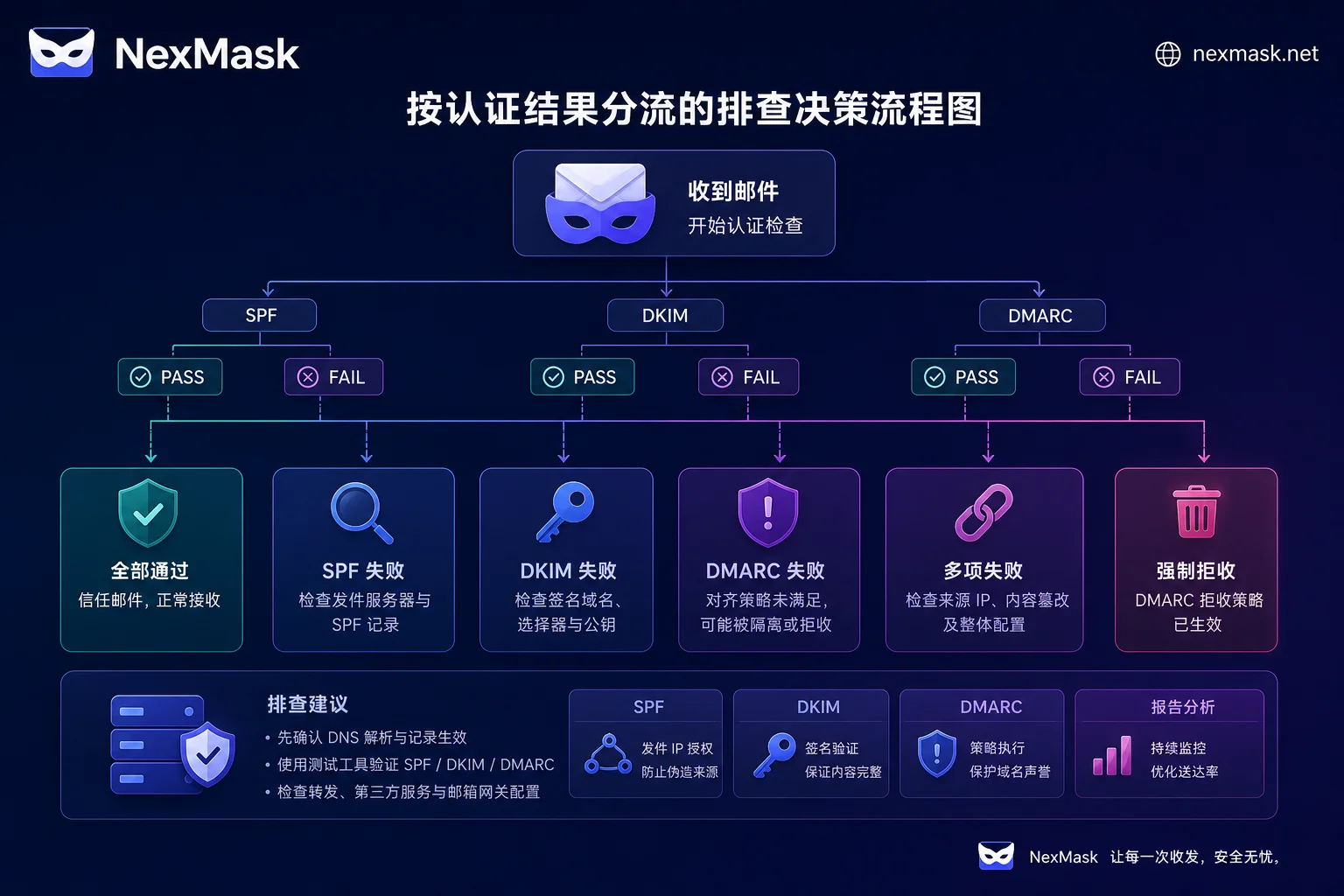
Retrieve the raw headers of the undelivered email (or bounce), focusing on the Authentication-Results field's spf, dkim, dmarc results, and the Received chain. Typical combinations and their meanings:
| Header Result | Meaning | Next Action |
|---|---|---|
spf=fail, dkim=pass | Forwarding service didn't rewrite envelope (SRS), but original signature is intact | Confirm if the forwarding service supports SRS; if yes, check if it's enabled |
dkim=fail, spf=pass | Message body or headers were modified during relay (e.g., footer added, re-encoded), causing original DKIM signature to fail | Check if forwarding service re-signs; if supported, enable it |
| Both fail | DMARC inevitably fails; recipient likely rejects per policy | Check SRS and re-signing configuration on forwarding service and confirm domain records are correct |
dmarc=fail (regardless of spf/dkim individual status) | Alignment mode not satisfied; handled per recipient's DMARC policy | After enabling SRS, DMARC alignment falls back to forwarding domain, usually fixing it |
Note: The Received chain shows the IPs and hostnames of servers the email passed through. If the forwarding node IP doesn't match the Sender Domain's SPF record IP, that's a signal of SPF mismatch. NexMask email forwarding troubleshooting also starts with these three results.
Step 3: Understand Why SRS Rewriting and DKIM Re-signing Are Essential Forwarding Service Capabilities
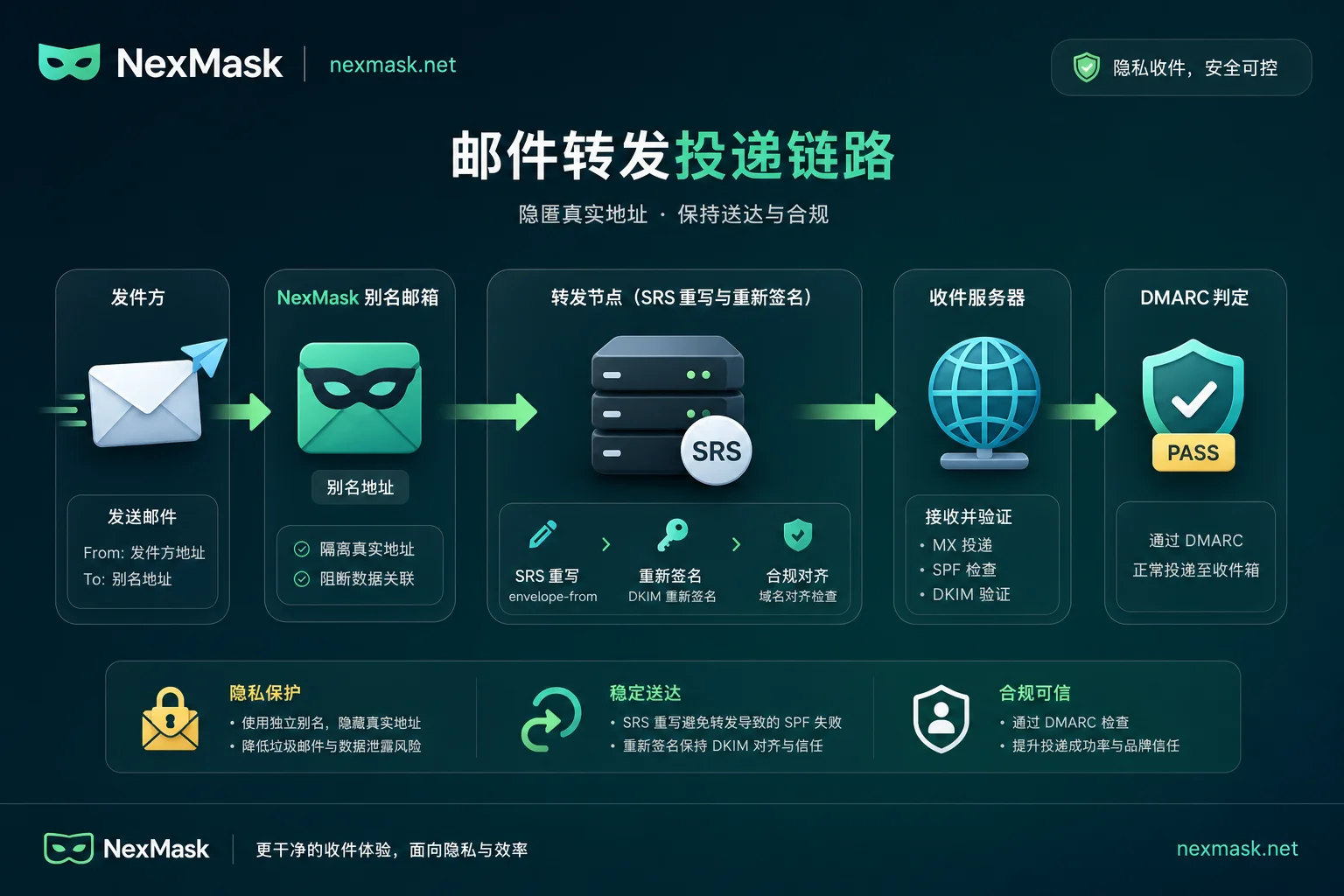
When forwarding without rewriting the envelope sender, the recipient checks the original sender domain's SPF record against the forwarding node IP, which inevitably fails (since the forwarding server IP isn't in the original domain's whitelist). SRS (Sender Rewriting Scheme) rewrites the envelope sender (e.g., SRS0=xxxx=原发件域=原发件人@转发域) so SPF validation falls back to the forwarding service's own domain, passing validation. Additionally, the forwarding service should re-sign the email with DKIM to restore alignment. This mechanism references the public technical docs of alias forwarding services (e.g., SimpleLogin anti-phishing docs).
Thus, the selection criterion is simple: whether a forwarding solution declares and implements SRS and re-signing determines its usability in strict validation environments. Implementations vary by provider; always read their official docs before configuring. Also, ARC (Authenticated Received Chain) lacks a unified standard for multi-hop forwarding, so don't rely on it exclusively; focus on SRS and re-signing.
Step 4: How Recipient Policies and Complaint Rate Limits Affect Delivery—How to Reduce Rate-Limiting and Rejection Risks
Even if all authentication passes, recipients still make decisions based on sending reputation and complaint rates. Google, Yahoo, and major providers require senders to fully configure SPF, DKIM, DMARC alignment, and keep spam complaint rates strictly below 0.3% (recommended below 0.1%). This data comes from Gmail's official "Sender Guidelines." The following recommendations can reduce the risk of rate-limiting and rejection:
- Avoid forwarding large volumes of marketing subscriptions to the same inbox; this easily inflates complaint rates.
- Disable compromised aliases promptly to avoid continuous delivery of unwanted mail that might annoy recipients into reporting spam.
- For misclassified emails, actively mark as "not spam" in the inbox and create filter rules so services learn over time.
Clearly note: No configuration can guarantee 100% delivery or never landing in spam; this is common to all email systems.
Step 5: Run a Reproducible End-to-End Delivery Test and Keep a Troubleshooting Log
Send a test email from an external mailbox to your NexMask email forwarding alias, recording the following fields, and proceed with a "change one thing, test once" rhythm.
| Field | Before Value | After Value |
|---|---|---|
| Sending time | ||
| Sender domain | ||
| Alias address | ||
| Final inbox (yes/no) | ||
spf result | ||
dkim result | ||
dmarc result | ||
| Bounce code (if any) | ||
| Missing trace (no bounce, no arrival) |
Change only one variable at a time (e.g., only SPF, or only SRS), record before/after differences, to avoid confounding variables.
What NexMask Email Forwarding Handles in This Chain and What You Must Configure Yourself
Understanding the chain clarifies NexMask email forwarding's responsibility boundary. The platform side handles receiving emails, forwarding per alias rules, and envelope and signature processing during forwarding; the user side is responsible for publishing MX, SPF, DKIM, and DMARC records on the domain DNS, and final inbox filtering rules.
| Stage | Who's Responsible | Description |
|---|---|---|
| Receiving emails addressed to aliases | Forwarding platform | Relies on MX records to route emails to the platform |
| Forwarding to target address per rules | Forwarding platform | Based on alias rules; may perform SRS rewriting and re-signing |
| Publishing DNS records | User | MX, SPF, DKIM selector, DMARC all need configuration |
| Final inbox filtering rules | User | Set filter rules in the inbox to avoid misclassification |
Envelope sender and signature processing during forwarding are done by the platform side. Whether SRS and DKIM re-signing are enabled should be confirmed on the official website's current public docs (verified: 2026-07-27).
Per the official site's current public info, NexMask offers: registration-free disposable temporary mailboxes (inbox expires and auto-destroys, suitable for short-term verification, not for account recovery or bills), long-term anonymous aliases and forwarding, custom domain aliases; anonymous alias accounts don't require a phone number, and explicitly state "no IP logging."
Note: Disposable temporary mailboxes and long-term aliases serve different use cases. Don't use temporary mailboxes for accounts requiring long-term contact (e.g., account recovery, bank statements).
Regarding forwarding limits, available domains, free quotas, and retention periods, refer to the official website's current pages (verified: 2026-07-27). Don't trust fixed numbers. After completing Step 5's end-to-end test, you'll understand which part each error corresponds to. If planning to use custom domains for alias forwarding long-term, check the official site's current domain and forwarding conditions first before proceeding.
FAQ
Why is NexMask email forwarding not received but no bounce?
Possibly the recipient accepts the email during SMTP but silently drops it during content filtering due to DMARC policy. Check the Authentication-Results field's dmarc result; if it's fail, you need to enable SRS and re-signing.
Email alias forwarding lands in spam folder; how to reduce misclassification?
First check email header authentication results. If any spf or dkim item fails, fix that first; if all pass, the issue may be high complaint rates. Recommend reducing marketing subscription forwarding, mark as "not spam" in the inbox, and create filter rules.
Forwarded email SPF fails and bounces; how to determine the cause?
Bounces typically occur when the recipient rejects at SMTP. Refer to the actual status code and explanation in the bounce message, not fixed codes. If the bounce indicates authentication/unauthorized sending, it's likely the forwarding didn't rewrite the envelope, causing SPF validation against the forwarding node IP to fail; confirm whether the forwarding service implements SRS and DKIM re-signing.
DMARC alignment failure causes email rejection; how to check alignment mode?
Look for the adkim and aspf tags in the DMARC record. r is relaxed alignment, s is strict alignment. During forwarding, if the original domain can't align, SRS can make DMARC fall back to the forwarding domain for relaxed alignment.
Custom domain MX is configured but still not receiving emails; what could be the issue?
Correct MX only ensures emails reach the forwarding service; successful delivery after forwarding also depends on SPF, DKIM, and SRS. Follow Step 2 to check email header authentication results to confirm if SPF mismatch or DKIM failure is the cause.




Comments(0)