 NexMask-官方博客
Using a temporary email is simpler than most people think: open the page and you get a ready-made address, paste it into the signup form, come back and refresh to receive the code, and then forget about it. The real decision is whether you'll ever need to receive mail at that account again—if yes, don't use a temporary email.
Get a Verification Code in Three Steps
- Get an address. Open the temporary email page and the system immediately gives you a random address. No account, no phone number. Copy it.
- Paste it into the target form. Signup boxes, download forms, trial requests—use it exactly like a regular email.
- Go back and refresh to receive. Verification emails, OTP codes, or activation links usually arrive within tens of seconds. Click the link or copy the code.
When you're done, there's nothing to log out of and no cancellation step. Once the inbox expires, the entire thing is destroyed and all its emails vanish with it. That's both the convenience and the entire risk.
To grab one and use it right away, the entry point is here: NexMask Temporary Email. No signup, no phone number, zero logs, no IP recorded; bulk generation is a member feature. The exact expiry duration depends on what the official page shows—different services vary widely.
Where This Works Best
- One-off downloads of documents, ebooks, or whitepapers where you just need the email with the link
- A forum or tool site that forces registration to view content, and you only plan to look once
- Short-term feature trials where you don't intend to keep the account
- Developers and QA engineers testing signup flows or email triggers in a staging environment who need a batch of unrelated inboxes
These scenarios share one thing: you only need that one email, and you'll never go back to that inbox. As long as that holds, a temporary email is the easiest choice.
Accounts You Should Never Use a Temporary Email For
Online banking, payment tools, exchanges, primary social accounts, work-related SaaS, domain and server consoles—any account where you might click "Forgot password" later is off-limits. Once the inbox expires, you can't access it again, which means throwing away the only key to password recovery. Customer support can't help either, because that address no longer exists.
One more thing that's easy to overlook: most temporary emails are receive-only and don't support sending or replying. If the task requires back-and-forth communication (business inquiries, support tickets, submissions), don't use it from the start—otherwise you'll be stuck on the first reply.
For details on expiry and recovery, see how temporary email auto-destruction works.
If You Don't Receive the Verification Code, Check in This Order
First, see if the form gives an immediate error. If it says "this email is not supported" or "please use a valid email" on submit, the platform uses a disposable-email detection database and public temporary domains are blocked. Refreshing won't help.
The form passes but the email never arrives. Refresh a few times and wait a minute or two before concluding—some platforms are just slow to send. If it still doesn't arrive, it's likely silently dropped: the platform accepts the address but doesn't send mail to such domains.
Try a different domain or address. Different services and domains have different levels of blocklist coverage, and switching sometimes works. Note that blocklists are not standardized or public, and they change, so the only real test is the specific form.
If two or three attempts fail, the platform has a clear policy against disposable domains. Don't force it—switching methods is faster. For the full playbook after rejection, see alternatives after an anonymous temporary email is rejected.
If You Need Long-Term Receiving, Switch to a Long-Lived Alias
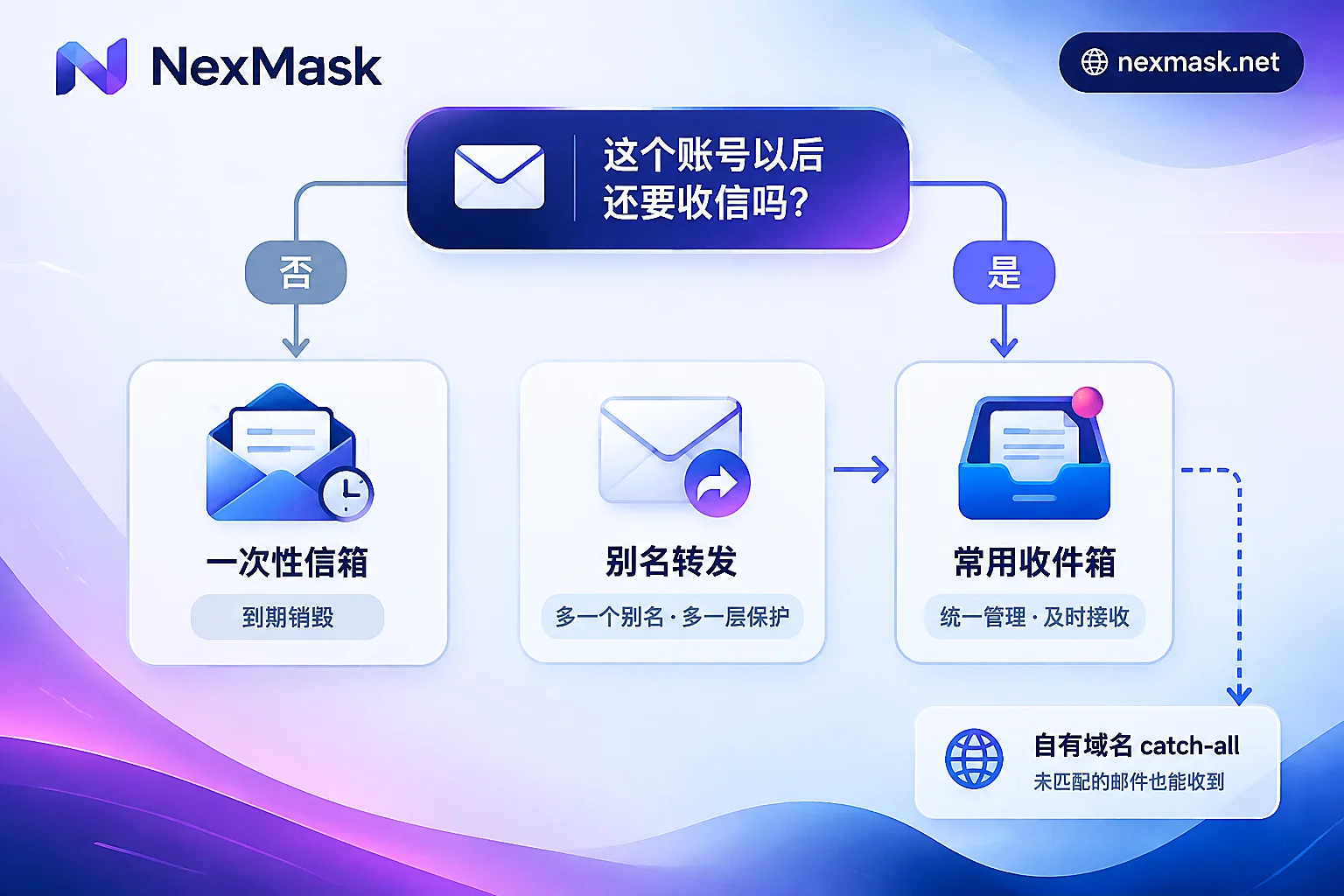
The criterion is one sentence: will this account ever need to receive mail again? If yes, don't use a temporary email.
A long-lived alias gives each website its own address that stays active for its lifetime and forwards incoming mail as-is to your regular inbox. Password resets, order notifications, and bills all arrive normally, and the inbox stays in your hands. If a site starts sending spam, just deactivate that alias—mail to it stops there, no need to change your signup email, and other accounts are unaffected. It also supports sending and replying as the alias, so the recipient sees the alias, not your real address—something temporary email can't do.
To set one up, start here: NexMask Long-Lived Alias. The free plan includes one alias, and forwarding to your regular inbox is enough to begin; multi-target forwarding is a member feature.
Once you have many aliases, naming can get messy. For a one-site-one-alias management approach, see how to manage one email alias per website.
If you own a domain, you can also go the custom domain route: add an MX record and enable catch-all, and any prefix will receive mail. The domain is yours, and you can migrate to another service later. This is a member feature, suited to people with high address volume who want long-term stability. For a side-by-side comparison of the three approaches, see how to choose a virtual mailbox.
Two Common Misconceptions
Temporary email is not a multi-account anti-linking solution. It only isolates the email address layer; it doesn't touch IP, device fingerprints, or browser environment. Platforms still look at other signals for linking. Isolating account environments requires other tools; phone verification isn't part of this chain either.
Test addresses and identities are placeholders only. Real-format names and addresses are assembled according to each country's postal rules and pass form validation, but they don't point to real residents and can't be used as shipping addresses—only for development, QA, and demo data.
One-Sentence Decision
If you only need a code once and will never look back, use a temporary email—it takes seconds. If the account might ever need a password reset, notifications, or replies, or if the platform explicitly rejects disposable domains, use a long-lived alias forwarding to your regular inbox. Sort by this rule first, then worry about details—most trouble won't happen.




Comments(0)