 NexMask-官方博客
Receiving verification codes with a temporary email usually takes just a few seconds; when things go wrong, people tend to get stuck in the same spot—repeatedly clicking "Resend", trying another domain, and then another, until the registration process breaks. The first thing to do isn't to switch addresses, but to determine at which step the failure occurred and whether this account should even be registered with a temporary email.
Before You Start, Ask: Will You Need to Log In to This Account Again?
This step determines everything that follows.
If you just need to download a PDF, claim a trial link, run a form test, or view limited-time content, and you'll never come back after receiving the code—a temporary anonymous email is perfect: no registration, no phone number, and the entire inbox self-destructs upon expiry, leaving no trace.
If this account will store things: cloud storage, subscriptions, linked cards, support tickets, developer permissions, or even just one more login in the future—then don't use a temporary email for this verification code. The reason isn't that it can't receive it, but that it will disappear. Temporary inboxes cannot be recovered after expiry or deletion. Later, when you need two-factor authentication for a login from a new location, password reset, or account recovery, the platform will send a code to that address and you'll never receive it—effectively killing the account. Such accounts should use a long-lived alias, one per site, forwarding incoming mail directly to your regular email.
Once you've thought this through, the troubleshooting below makes sense.
The Verification Code Didn't Arrive: Three Types by Where the Failure Occurs
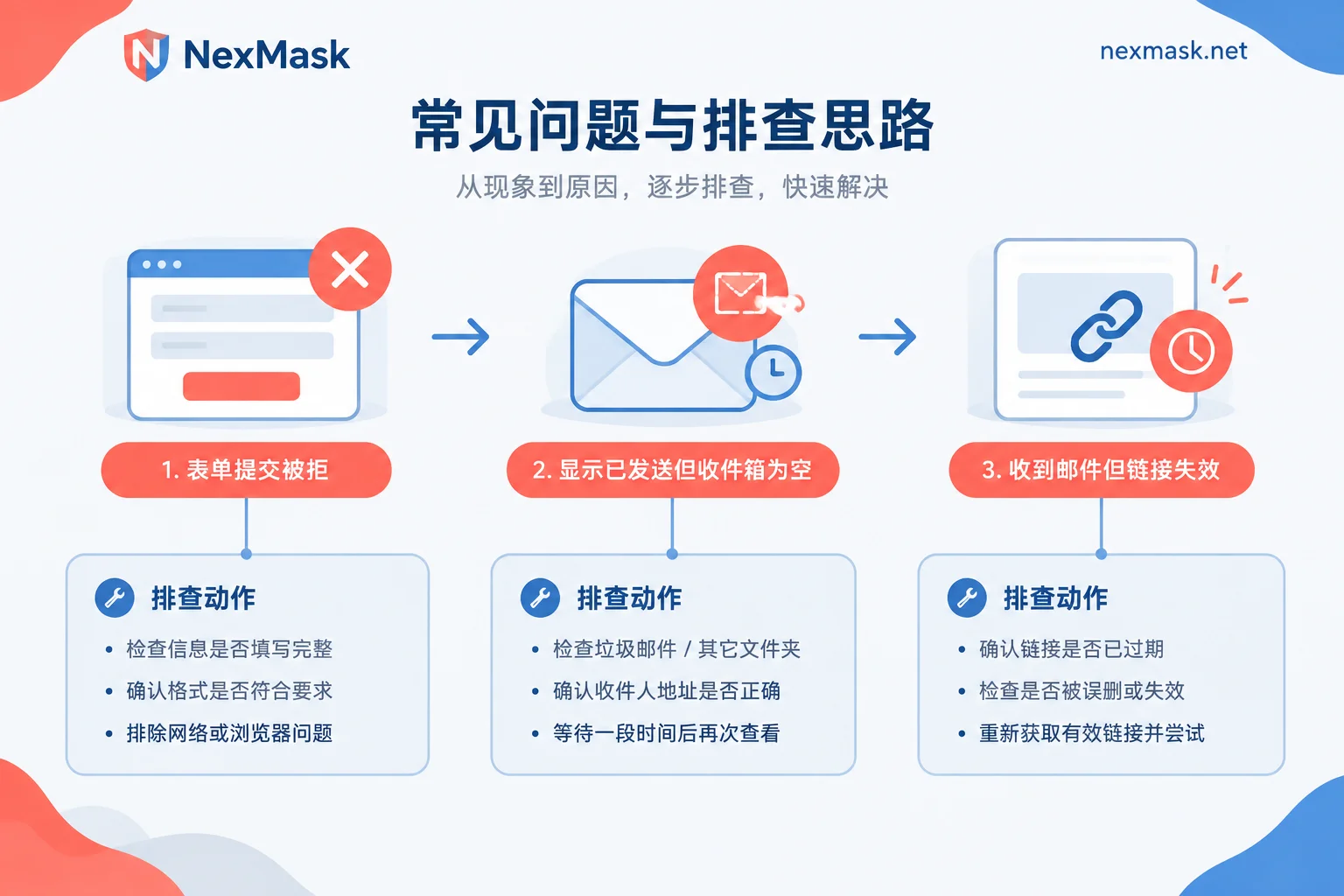
1. Blocked Before Submission: "Unsupported Email Type"
The symptoms are clear: after filling in the address and clicking next, the page immediately shows a red error saying "Please use a valid email address", "Disposable emails are not supported", or "Please use a company or personal email". No email was sent at all, so refreshing the inbox is pointless.
This is domain recognition and blocking, not a delivery failure. There's only one direction: switch to a different identity, not just a different suffix (the next section explains why).
2. "Sent" Shown but Inbox is Empty
In this case, go through the following order and you'll likely pinpoint it:
- Wait a bit and refresh. Some platforms have sending queue delays, and temporary email inboxes don't always push in real time. Clicking refresh once manually is more effective than staring.
- Verify the address is character-for-character correct. Typing manually can easily lead to errors with dots, hyphens, the number 1 and letter l. Using the copy button is more reliable than writing it down.
- Confirm the inbox is still alive. Temporary inboxes have a lifespan. After closing the page, clearing browser data, or switching devices, you might end up with a new address while the code was sent to the old one. Scenarios where you wait overnight for a reply shouldn't use short-lived temporary inboxes anyway.
- Consider silent dropping by the platform. Some sites' risk control doesn't show a front-end error but still displays "Verification code sent", while actually not delivering or delivering to a black hole. The symptom is waiting forever with nothing arriving. If two attempts both result in an empty inbox while other emails arrive at the same time, it's almost certainly this.
3. Received but the Link Says Expired
First check the time limit: verification links usually live only a few tens of minutes to a few hours. Then check whether it needs to be opened in the same browser and session. Clicking the link from a different device, or copying it from an isolated environment to another machine, increases the chance of being flagged as abnormal. Resend once and open it in the browser where you started the registration—chances are it'll work.
How Do Platforms Actually Recognize Temporary Emails?
Knowing the mechanisms helps you decide whether "trying another obscure suffix" is worth it.
1. Domain blacklist comparison. Community-maintained lists of disposable email domains are public, with hundreds of thousands of entries. Many websites plug them directly into their registration API and compare at submission—if it matches, sending is blocked.
2. MX record probing. More sophisticated risk control doesn't just look at the domain string; it checks where the domain's mail exchange records point. Even if the suffix is brand new, if the underlying receiving infrastructure is a known temporary email service, it will be recognized. This is why changing suffixes often doesn't help.
3. Risk scoring. Factors like a very recently registered domain, no website, or abnormal DNS characteristics are converted into a score. Exceeding a threshold triggers rejection or manual review.
4. Explicit platform rules. GitHub's help documentation explicitly states it does not accept disposable email verification, and registrations with such addresses will be blocked from sending. Even if you manage to register, later detection may restrict account features, requiring you to bind a non-disposable personal email to recover. These platforms don't technically fail to receive; they simply don't allow it by policy.
Also accept a reality: the update frequency and blacklist latency of various risk control libraries are not public. A domain that works on Site A today may be rejected by Site B tomorrow—it's unpredictable. So treating "find a suffix that hasn't been blacklisted yet" as a long-term solution is fundamentally unworkable.
After Rejection: Three Paths to Choose From
Switch to a long-lived alias. This is the most common choice after rejection. An alias remains usable throughout its validity period and won't expire or self-destruct. Incoming mail is forwarded as-is to your regular email. When you need to reply, you can send using the alias identity without exposing your real address. If a site starts sending spam, just disable the corresponding alias—other sites are unaffected. Having a separate alias per site also has a side benefit: when you receive harassing emails, seeing which alias it was sent to tells you which company leaked your address. You can create one first at NexMask long-lived alias with the forwarding target set to your daily email before registering.
Use your own domain. If you register a lot or want to completely bypass the issue of "domain listed on public blacklists", binding your own domain is more robust: set up MX records, enable catch-all, and any prefix can receive mail. The domain belongs to you, and you can take it with you if you migrate later. This suits people who manage many accounts long-term and is a member feature. Configure it as instructed on the custom domain page.
Just use your real email. For platforms like GitHub that explicitly prohibit disposable emails and conduct post-registration reviews, don't force it. Having to rebind after account restrictions is much more troublesome than using a proper address from the start.
Already Registered an Important Account with a Temporary Email? How to Fix It
While the inbox is still alive, log in to the account immediately, go to account settings, change the email to a long-lived alias or real email, complete verification for the new address, and also confirm that password reset channels and two-factor methods point to the new address.
If the inbox has already self-destructed—temporary email destruction is irreversible, the address isn't reserved, and there's no backend copy—you can only go through the platform's account appeal process, proving ownership with payment records, historical tickets, or other linked methods. Success depends on the platform. For more on the destruction mechanism and its knock-on effects, see How temporary email auto-destruction works.
Scenarios Where Temporary Email Is Still Worth Using
All these limitations aren't meant to discourage you. In the following scenarios, temporary anonymous email remains the most hassle-free choice:
- Obtaining one-time resources: whitepapers, templates, discount codes, preview links;
- Form and registration flow testing: QA needs to run registration pipelines repeatedly, using a fresh address each round;
- One-off inquiries, sign-ups, or price comparisons you don't want linked;
- Testing whether a site sells addresses: use it as a trial and then abandon.
The common thread: receive and discard, no need to log in again, no assets involved. If it fits, just grab one at NexMask temporary email. Copy the address on the page, come back and refresh the inbox, retrieve the code—three steps done. For first-time use, see How to use a temporary email.
A Few Habits for Long-Term Alias Use
- Name with origin: Include the site name in the alias prefix so you can quickly check the source and decide which to disable. For naming and disabling workflows, see How to manage one email alias per website.
- Set the forwarding target before registering: Don't wait until a verification code is sent to realize forwarding isn't configured.
- Disable rather than delete: Disable and observe for a few days first, confirm no important notifications go to that address, then decide what to do next.
- Separate alias for important accounts: Don't use one alias for ten sites—that brings back the old problem of "one leak, spam everywhere".
In one sentence: temporary email solves "I don't want to give my real address"; long-lived aliases solve "I don't want to give my real address but still need to receive mail long-term". When a verification code doesn't arrive, first locate which step failed, then decide whether to wait, switch addresses, or switch tools.




Comments(0)