 NexMask-官方博客
Let's start with the conclusion: temporary email "auto-destruction" is not marking emails as read or hiding them; it means that after a preset time limit, the system deletes the inbox address and all its emails from storage. Once deleted, there is no recycle bin and no "log back in to recover" option.
So the only criterion for deciding whether to use it is: will anyone ever send anything to this address again? If you receive one email and never expect another, auto-destruction is a benefit. But if future verification codes, bills, or customer service replies might arrive, it becomes a time bomb.
What exactly does auto-destruction delete?
These services use stateless inboxes with scheduled cleanup tasks (often called TTL or retention window). You click to get an address, and the system creates a mapping in storage: "this address → these emails". When the retention period expires, the cleanup task erases both the address mapping and the email content, with no account profile left for recovery.
The key lies in the phrase "no registration". Precisely because you don't create an account, set a password, or provide a phone number, the system has no profile belonging to you. That's why destruction can be thorough—the link between your real identity and this online footprint is severed. This is how it protects privacy, and it's also why recovery is impossible; two sides of the same coin.
Retention periods vary by provider, ranging from minutes to days, so you can't apply one service's rules to all tools. For NexMask temporary anonymous email, the specific retention duration and countdown rules are as displayed on the official website.
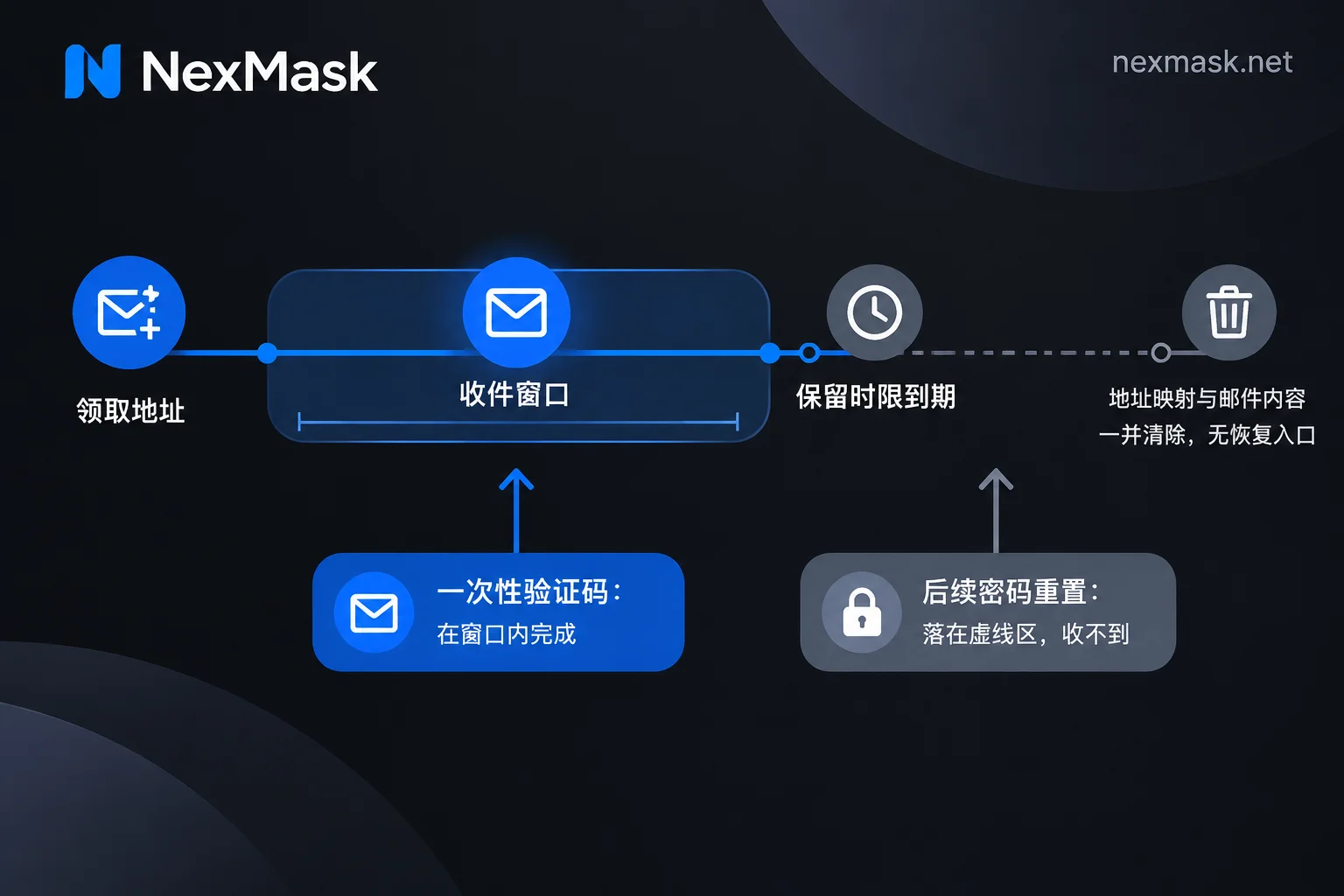
What happens after destruction?
Once the address expires, any emails sent to it will not reach anywhere, and you cannot retrieve past emails. The real problems aren't the missed welcome email, but these:
- Platform risk control triggers and needs to send a second verification code to the registered email
- You forget your password, click "forgot password", and the reset link goes to a non-existent address
- Order, billing, and renewal notices cannot be delivered
- You need to exchange emails with customer service, but their replies vanish into thin air
If any of the above occurs, the account is essentially locked. Therefore, never use an auto-destructing temporary email for banking, important personal assets, long-term social accounts, or any platform requiring long-term access maintenance.
Scenarios suitable for disposable use
These are the most comfortable uses for temporary email, all characterized by "one-time tasks":
- Getting download links for ebooks, whitepapers, or resource packs
- Trying an online tool just once without being followed by its marketing emails
- Receiving a one-time registration activation code
- Development and QA testing of registration flows, form submissions, or email deliverability
Development testing is especially suitable: you want no trace after use and don't want test data polluting your real inbox. In NexMask, bulk address generation is a member feature, but you can freely get one at a time for daily use.
Just ask yourself: once this email is received, is the address's mission over? If yes, use a temporary email; if you hesitate, read on.
When must you switch to a long-term alias?
The dividing line is whether the account needs long-term maintenance. Any business that might trigger re-verification, send bills, or require back-and-forth communication should switch to a long-term alias, rather than gambling that the destruction time is long enough.
The difference between a long-term alias and a temporary email is not "living longer" but who holds control:
- Available throughout its validity period, won't disappear on its own
- One per site; if a site leaks the email or starts spamming, you can identify the source from the alias
- Received emails are forwarded as-is to your regular inbox, so you don't need to monitor another inbox
- You can send and reply directly as the alias, and the recipient won't see your real address
- When you want to cut it off, you deactivate it manually—you decide the timing, not the system
That's the difference between deactivation and destruction: one is you flipping the switch, the other is the clock flipping the switch. For accounts that need long-term email reception, only the former works.
To get a one-time address, go to temporary anonymous email; to create an address for a website that can receive long-term and be stopped anytime, go to long-term alias and set the forwarding target to your regular email. The site has zero logs and does not record IPs.
For more on choosing between types for cross-day email reception and weighing different time limits, see What is a 7-day temporary email? Should you use it for cross-day reception or a long-term alias? and What scenarios are short-term emails suitable for? Boundaries of expiration destruction and interception mechanisms.
What to do if a one-time email is rejected during registration
Many online services have disposable email domain detection, comparing the domain you enter against public blacklists. If you see "Please use a valid email" or "This email provider is not supported", it's likely the domain is already in the feature database, unrelated to your network or spelling.
Don't repeatedly try addresses from the same batch of public domains. Instead:
- Use a long-term alias for registration; for accounts that should be maintained long-term, this is the right move anyway.
- For important platforms, use a dedicated alias bound to your own domain. Custom domains are a member feature in NexMask; add an MX record, and catch-all accepts any prefix. The domain belongs to you, so you can migrate it later if needed.
Note that no tool can promise to bypass all platform risk controls and delivery interceptions—don't believe anyone who guarantees it. For troubleshooting details on rejections, see When should you use an anonymous temporary email? Alternatives after rejection and long-term alias selection.
Already registered with a temporary email and now need it long-term?
If the destruction time hasn't arrived, immediately log into that platform and change the account email to a long-term alias or your regular email. After changing, confirm you receive the change confirmation email.
If the address is already destroyed but you remember the password, log in as soon as possible to change the email. If you've also forgotten the password, the reset link won't send, and you'll typically have to go through the platform's manual appeal—success depends on their policy. That's why selection should be done at registration, not as an afterthought.
A few boundaries not to cross
- Auto-destruction is irreversible; don't treat it as a "long-term do-not-disturb mailbox"
- Retention periods vary; re-confirm rules when switching services
- Temporary email solves inbox isolation; phone number verification is beyond its capability
- Generating addresses in real format is only for placeholder and testing purposes, assembled according to postal rules of various countries, not pointing to real residents, and cannot be used as a shipping address
Draw a clear line: "use temporary email for one-time tasks, use a deactivatable alias for long-term accounts," and most future troubles won't occur.




Comments(0)