 NexMask-官方博客
Let's put the conclusion up front. You most likely fall into one of these three situations:
- Just need to receive a few emails across days, and you'll never use this account again — a 7-day temporary email is enough; just grab one.
- You might log in, reset a password, receive bills, or set up two-factor authentication after a week — don't use a temporary email; use a long-lasting alias with forwarding directly.
- The registration page already says the email is invalid, or registration succeeded but no email arrives — trying another domain won't help; changing the tool type will.
The following explains the criteria and specific steps for each situation.
What problem does a "7-day temporary email" solve?
The earliest popular option was the 10-minute email: open a webpage, get an address, receive the verification code, and discard it. Closing the page or the countdown ending immediately invalidates the address. Its problem is that real-world emails don't always arrive instantly — platforms queue and delay verification emails, registrations may require manual overnight review, activation links might be sent the next day, and trial reminders arrive on the third day. All these emails fall outside the 10-minute window. By the time you remember to check, the address is gone and the emails are unrecoverable.
Extending the retention period from minutes to days is meant to cover this time gap. The so-called "7-day temporary email" is not a standard specification but a colloquial term for disposable email services with longer retention. Different services offer different durations — some count by hours, some by days. The exact expiry time depends on what the service you actually use states on its page; don't assume "7 days" by default.
Its only difference from a 10-minute email is the retention period; all other characteristics are the same: no registration, no phone number, ready at any time, and whole-inbox destruction upon expiry. So what you really need to think through is not "whether a few days are enough" but "will I still need this address after it expires."
Expiry means whole-inbox destruction, and it's irreversible
When a temporary email expires, it's not that "emails are cleared but the address remains" — the entire mailbox and the address disappear together with no recovery entry afterward. This mechanism is part of the privacy design, but it means several concrete things:
- Accounts registered with this address cannot reset passwords via email if forgotten later;
- If the platform sets it as a two-factor authentication receipt address or recovery email, that channel will be cut off directly;
- Renewal reminders, charge notifications, invoices, and bills from subscription services cannot be received;
- When you need to contact customer support, you cannot prove you are the account holder.
So the criterion is simple: A temporary email suits a "receive and done" relationship, not a "will keep in touch" one. Grabbing materials, downloading files, viewing one-off content, testing whether a registration flow works — these are disposable; but any account you might log into later should not have its entry point on an address that will disappear on its own.
Three questions decide which you should use
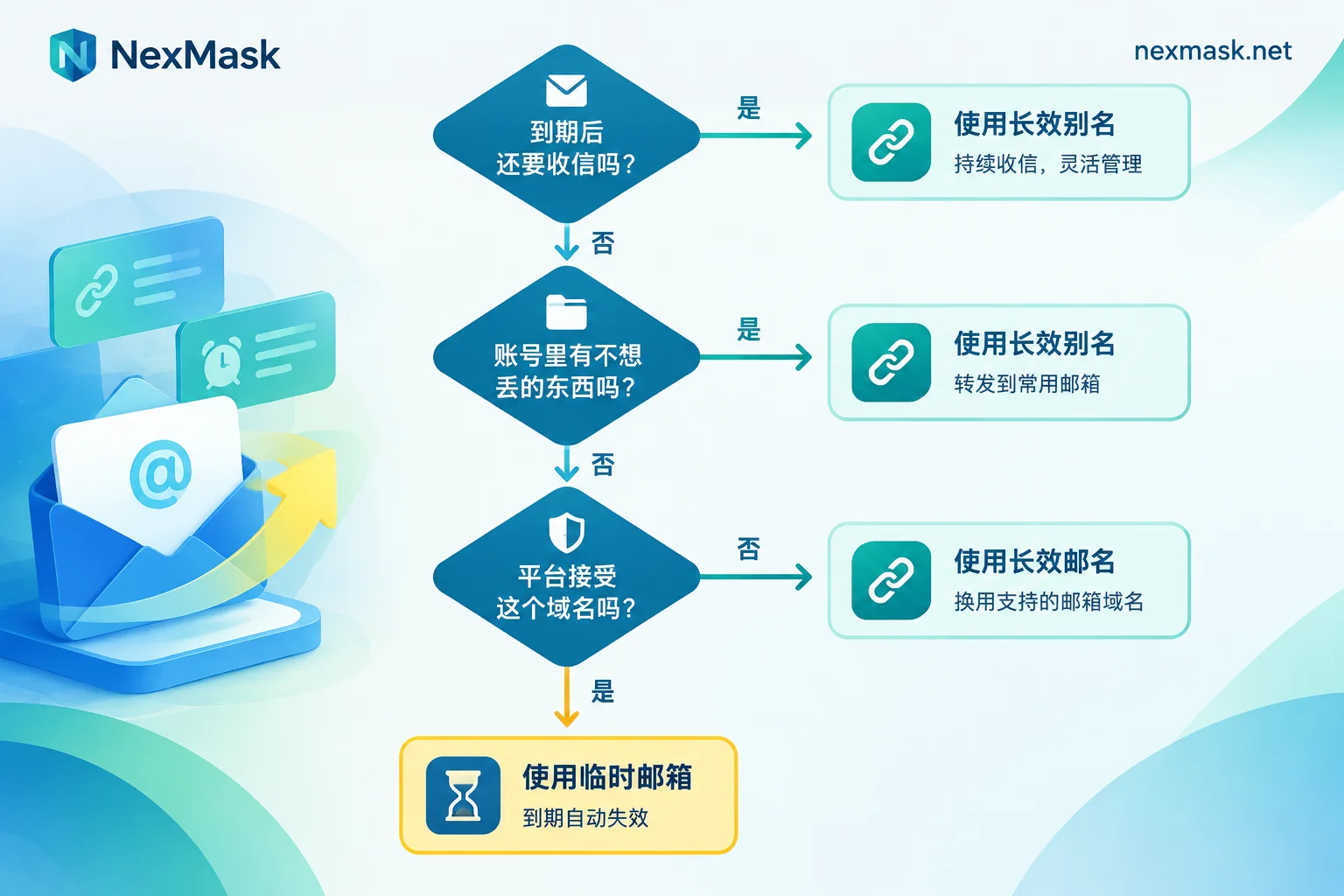
Spend ten seconds before registering to go through these:
1. Will you still need to receive emails at this address after it expires? If the answer includes "maybe," "depends," or "if I decide to keep using it," treat it as "yes" and choose a long-lasting alias. Trial services are especially prone to this — on day one you don't know if you'll want to stay on day seven.
2. Will the account hold anything you don't want to lose? Uploaded files, purchased items, linked payment methods, accumulated data. If yes, don't use a temporary email.
3. Does the platform accept this domain? Public temporary email domains are shared by many users and easily end up on disposable email blocklists. Symptoms are usually a direct "Please enter a valid email" error on registration, or registration appears successful but the verification email never arrives, or the account is created but later flagged by risk controls.
If any of the three points to "no," switch to a long-lasting alias.
When rejected, don't keep swapping domains
When facing rejection, many people's first instinct is to try another temporary email domain. That path is usually a dead end: blocklists cover entire classes of public domains, and the next one you get is likely also listed, while repeated submissions may be flagged as abnormal behavior.
The effective approach is to switch to a non-shared address:
- Long-lasting alias: The address is allocated exclusively to you, not a shared resource from a disposable domain pool. Acceptance rates are noticeably different, and the address remains usable throughout its validity period.
- Custom domain: Receive emails with your own domain, so the platform sees a normal private domain. This is a paid feature requiring an MX record added at your domain registrar. With catch-all enabled, any prefix can receive; domain ownership is in your hands, so you can migrate to another service later.
If you only occasionally encounter rejections, an alias is enough; if you need to open many accounts long-term, or worry that the provider's public domain might one day be blocked entirely, then a custom domain becomes necessary. For specific configuration steps and common troubleshooting for "alias rejected, verification code not received," see How to configure a custom domain in NexMask.
How to use a long-lasting alias specifically
The logic of a long-lasting alias differs from a temporary email: it doesn't rely on "disappearing" to protect you but on "isolation" and "closability."
One address per site — give each website you register on its own alias. Emails are forwarded as-is to your regular inbox, so notifications arrive normally without checking a separate webpage. When you need to reply, you can send and reply as the alias, and your real email won't be exposed.
The really useful part is deactivation: when an alias starts receiving spam, you don't need to change accounts, unsubscribe, or communicate with senders — just deactivate that alias, and emails from other sites are unaffected. It also helps trace sources — only site A knows this address, so any promotional mail must have leaked from A.
The free plan includes one alias — enough to move your most critical account over first. For managing one per site, naming conventions and deactivation cadence, see How to manage one email alias per website.
To get a temporary email or alias, the corresponding entries are Temporary Anonymous Email and Long-Lasting Alias. Temporary email requires no registration and no phone number — open and use. Aliases require login for allocation so they persist with your account. NexMask does not log either service.
Already registered with a temporary email? How to fix it
If you find an account you still want to use is tied to a temporary email, migrate before it expires. The order is:
- Log into the account, go to account settings, change the linked email to a new long-lasting alias;
- Many platforms send confirmation emails to both old and new addresses simultaneously, so this step must be done before the temporary email is destroyed, and both must be confirmed;
- After confirming the change is effective, go back into the account and check the two-factor authentication receipt address, recovery email, billing contact fields — they are often set independently and won't automatically update with the main email;
- Finally, run through the "forgot password" flow to confirm the reset email actually lands in the inbox forwarded by the new alias.
Don't skip step 4. A success message for changing the email doesn't mean the recovery channel actually works; only running it once does.
If the temporary email has already expired and been destroyed, and the platform requires verification via the original email to change it, then the account can basically only go through manual customer support appeal. Success depends on the platform's policy and other credentials you can provide (order numbers, payment records, etc.). This is why the judgment in section two must be done in advance.
A few easily confused boundaries
- Longer retention doesn't mean it can be your primary email. Even if retained for days, it's still a disposable mailbox; expiry means deletion, not renewal.
- An alias isn't "permanent anonymity." It protects your real address from being exposed. If you enter your real name, phone number, or payment info into the account, those are unrelated to email.
- When no email arrives, first identify which link failed. Whether the address is rejected by the platform (never sent), the email arrived but is in the spam folder of the forwarding target, or the temporary mailbox has expired — these three require completely different handling. First check whether the platform shows a "sent" confirmation before troubleshooting.
- SMS verification codes are outside the capability of email tools. Some platforms additionally require a phone number during registration; that's a separate matter. Don't expect switching emails to bypass it.
If you want to compare the applicable scenarios of different retention periods, see When to use a 24-hour temporary email and Applicable scenarios and failure boundaries of 10-minute email — the shorter the retention, the narrower the tasks it can handle; the selection logic is the same.




Comments(0)