 NexMask-官方博客
In 2026, buying a domain for a few dozen dollars a year to build a dedicated email system has evolved from a niche geek hobby into a standard practice for many ordinary users, indie developers, and cross-border operators.
The reason is straightforward: on one hand, major platforms are increasingly strict in identifying and blocking common anonymous email public suffixes; on the other hand, if all core accounts are tied to a single personal email, a data breach at any one site can instantly expose your entire digital identity—this is why more and more people are establishing a one-site-one-address defense line for receiving emails.
But when you actually have a domain in hand and are ready to configure custom domain email aliases, you often fall into new pitfalls among the overwhelming "zero-cost freebie tutorials" online.
Today we won't talk about abstract concepts. We'll directly break down the three most error-prone aspects of using your own domain aliases in practice, and see how to use NexMask custom domain to streamline receiving, sending, controlling, and multi-target routing all at once.
1. Why do many people find domain email awkward to use even after setting it up?
When trying custom domain email, many people first configure free DNS email routing (e.g., routing tools that only handle inbound forwarding), then set up Send mail as (send as other addresses) in Gmail or add a third-party sending platform. This patchwork solution seems perfect when initially testing verification codes, but quickly reveals three pain points in daily high-frequency use:
- "Can receive but cannot reply," or replies directly expose your real identity
Pure routing tools are designed as one-way "receive-only." When you need to contact customer service, confirm orders, or reply to business emails, if you casually click "Reply" in your usual mailbox, the sender field often directly becomes your private real email. - Traditional SMTP sending increasingly lands in spam
From 2024 to 2026, major email providers like Gmail and Outlook have significantly tightened verification standards for sender domains. The old tutorial method of "using personal email SMTP to force-change the sender header" is highly likely to be rejected or sent to spam by the recipient's server if it lacks matching SPF and DKIM signature alignment. For those who no longer want to bother with client-based sending, we also calculated the time cost in a previous email alias service comparison. - Enabling Catch-all turns into a spam dump for dictionary attacks
To make registration smoother, many enableCatch-all(i.e., accept all emails sent to any prefix under@你的域名). But without a matching "per-alias independent management and disabling" mechanism, once a prefix is targeted by crawlers or brute-force dictionary attacks, spam will continuously flood into your main inbox through the forwarding pipeline. You can't disable a single address, and stopping the whole domain risks missing legitimate emails.
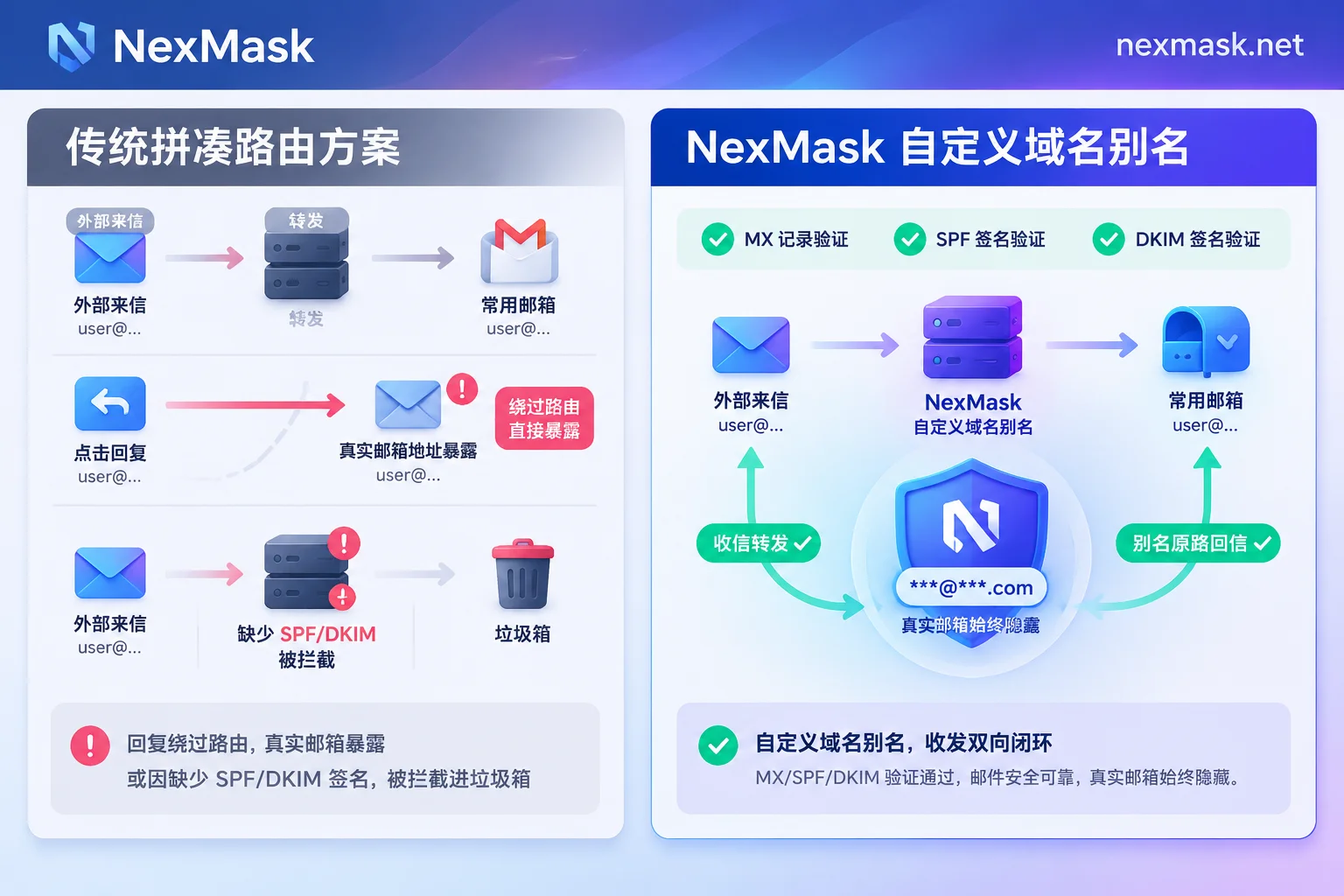
2. The right way to use custom domain email aliases: sovereignty, penetration, and two-way closed loop
Binding your domain to a tool specialized in identity isolation and alias management is primarily to save the maintenance cost of patching systems together while retaining absolute control over the domain. In NexMask's membership features, custom domain email aliases are designed around these practical pain points:
1. Say goodbye to public suffix blocking, domain assets fully owned by you
Many strict SaaS platforms, financial services, or developer services maintain a public domain blacklist. When you use your own domain, the suffix is exclusively yours and not shared with anyone else's reputation pool, naturally yielding a high registration pass rate. More importantly, the domain always belongs to you. Whenever you want to adjust your setup later, simply change the MX records back to your original provider in the domain registrar's backend for seamless migration—no risk of being locked into a platform. If you haven't bought a domain yet, the free version lets you first create a long-term anonymous email (alias) using NexMask's public domain to get started.
2. Real-time detection in the console, configure complex DNS and sending authentication all at once
Beginners configuring domain email often dread facing a bunch of DNS records and not knowing if changes took effect. When binding a domain in NexMask:
- You only need to add the corresponding MX records and verification records in your domain registrar's backend;
- The NexMask console displays the detection status of each record in real time, so you can see at a glance which one fails;
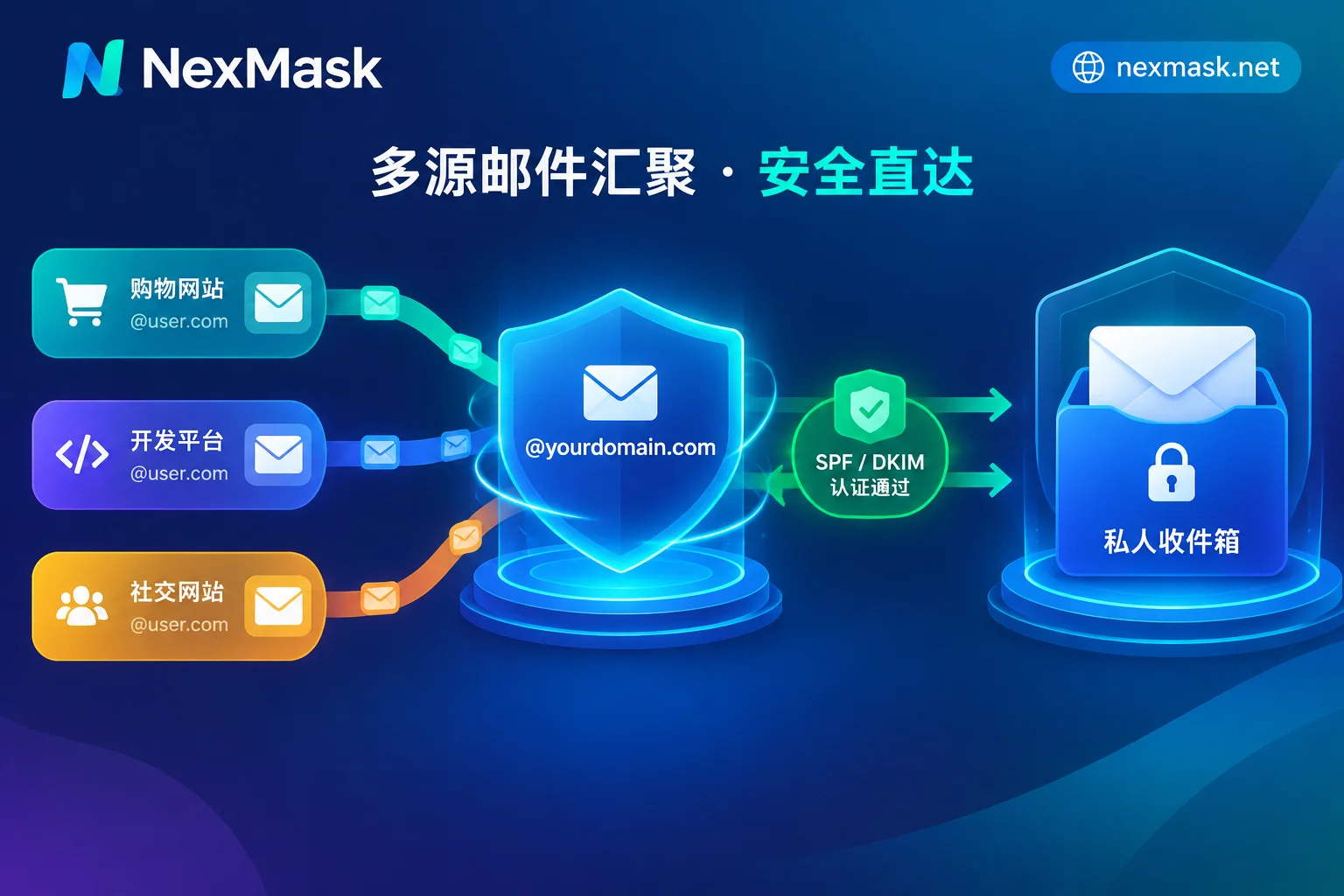
- After following the backend guidance to configure SPF and DKIM records step by step, your domain will have compliant sending signatures.
Once domain verification passes, you can not only receive emails but also proactively send emails from the console using your own domain address; when you receive forwarded emails, you can reply directly on the email, and the reply will still be sent as your domain alias identity, never exposing the real inbox behind it. For the underlying logic of reverse sending, refer to this detailed explanation of anonymous email forwarding and reply mechanisms.
3. Catch-all for on-the-fly addresses + precise per-alias circuit breaker
After enabling the Catch-all feature for your custom domain, you no longer need to manually create an alias in the backend before each website registration.
- When checking out on a shopping site, casually enter
[email protected]; - When testing an AI tool, casually enter
[email protected];
Any prefix can receive emails directly without pre-creation. And when a specific prefix (e.g., shop-2026@) later starts receiving spam due to a merchant data breach, you can immediately tell who sold your data and disable forwarding for that alias individually in the backend—cutting off the spam source without affecting the operation of dozens of other normal aliases under the domain.
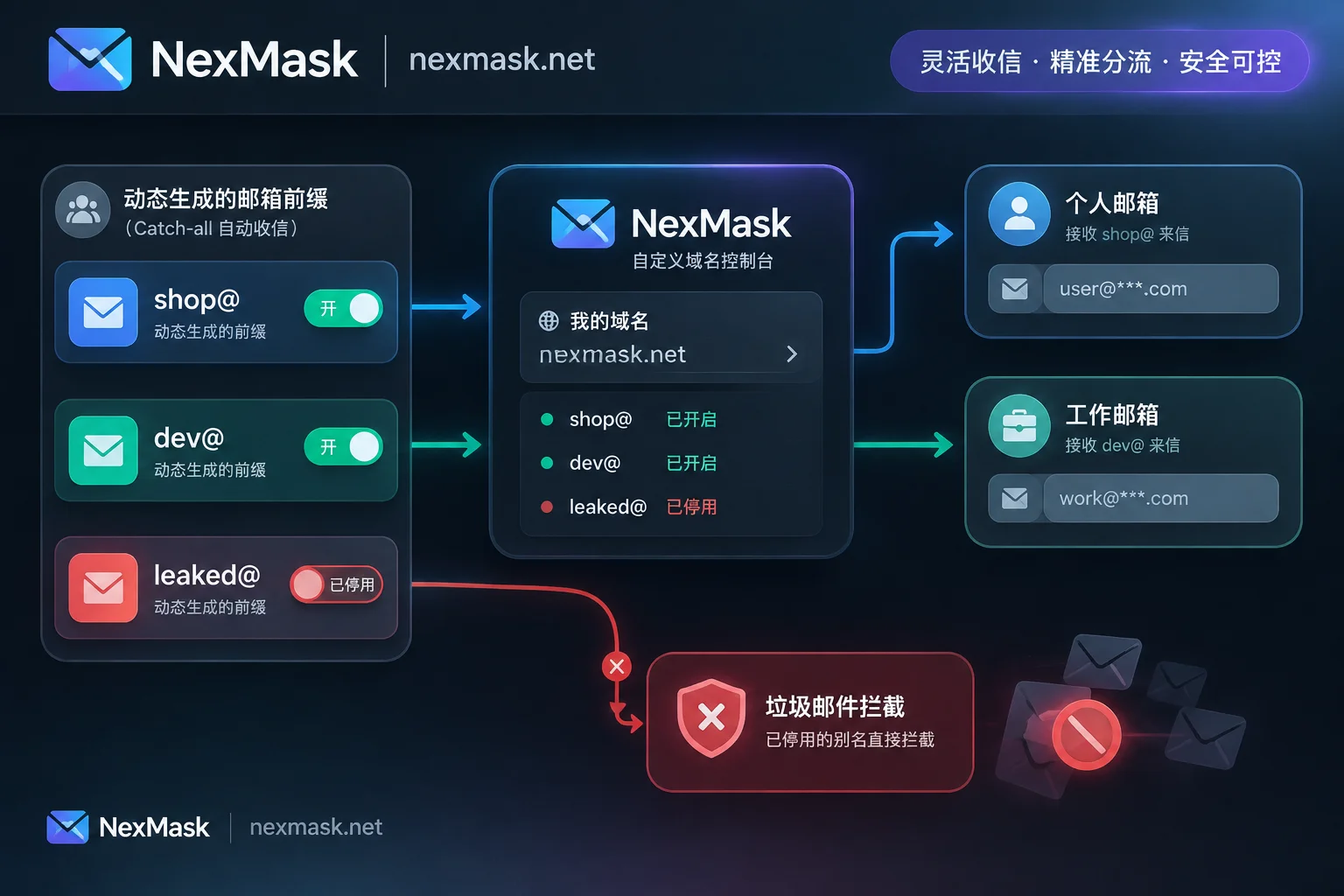
3. Advanced usage: multi-domain binding and "alias-based routing" forwarding
For users running independent stores, QA testing, or managing multiple online identities, a single domain and single inbox is often insufficient.
In NexMask, you can bind multiple custom domains and set aliases and email forwarding rules for each domain:
- Zero authorization threshold: Forwarding targets support Gmail, Outlook, QQ Mail, 163, and any email that can receive mail. Just enter the target address—no need to give up your private email's authorization code or login credentials.
- Forward as-is with no privacy retention: The email body, attachments, and sender information are forwarded as-is, with clear indication in the email of which alias it was sent to; after successful delivery to your target mailbox, NexMask servers do not retain a copy of the body, nor do they record access IP or device fingerprints.
- Multi-target and alias-based routing (membership feature): You can forward
[email protected]billing emails to both your main email and finance email simultaneously; or forward emails from the test environment to your work Outlook and personal subscriptions to your private Gmail, achieving automatic routing on the receiving end.
4. When to use your own domain alias? When to switch to other tools?
Although custom domain email aliases are very versatile, in actual business not all scenarios require your own domain. Using tools according to the "account lifecycle" is most efficient:
| Your actual scenario | Recommended NexMask tool | Why choose this |
|---|---|---|
| Long-term core accounts, indie development/business contacts, fear of public suffix blocking | Custom domain alias | Domain exclusivity avoids collisions, supports Catch-all on-the-fly entry, compliant sending and replying, and domain sovereignty remains with you. |
| Long-term ordinary website accounts, but no domain at hand | Long-term anonymous email (alias) | Usable throughout validity period and renewable, one-site-one-address anti-tracking, supports forwarding and alias replies, free version includes one alias. |
| One-time downloads, article reading, single verification code, discard after use | Temporary anonymous email | Opens without registration, visible within session, completely destroyed with emails upon expiration leaving no trace, doesn't dirty your own domain. |
| Websites strictly require mainstream provider suffixes (only Gmail / Microsoft email) and only need temporary receiving | Mainstream provider temporary email (supports @gmail.com / @outlook.com / @hotmail.com) | Register-free instant access to ready-made mainstream suffixes for verification codes, no need to bind your own phone number to create an account (Note: only for receiving during the claim period, cannot send or bind to important accounts requiring password recovery). |
| Overseas e-commerce form testing, QA validation of postal codes and address formats | Real-format address and identity generation | Browser-local generation of names, addresses, phone numbers according to postal rules of US, UK, Japan, Germany, Hong Kong, etc., with anonymous email included, easily passing form format validation (for test placeholder only, not for real verification or receiving goods). |
If you're still unsure which combination suits your business, you can directly check the scenario-based selection guide or browse the FAQ.
Conclusion
Setting up a custom domain email alias is essentially adding a "firewall" and "router" fully under your control to your digital identity. Rather than struggling back and forth between various receive-only free routing services and frequently erroring client SMTP, why not go directly to the NexMask app console, bind your domain, and follow the guidance to configure MX, SPF, and DKIM in a few minutes—experience a smooth workflow that supports both Catch-all on-the-fly entry and worry-free two-way sending and receiving.



Comments(0)